C8H10N4O2
Members
-
Joined
-
Last visited
-
Just to clarify, its a known issue with Dell PERC H710P Adapter that an array rebuild will never complete??? or just that its very slow and I just need to be really patient?
-
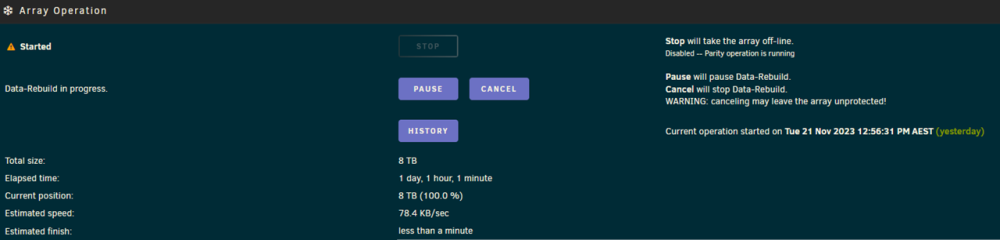
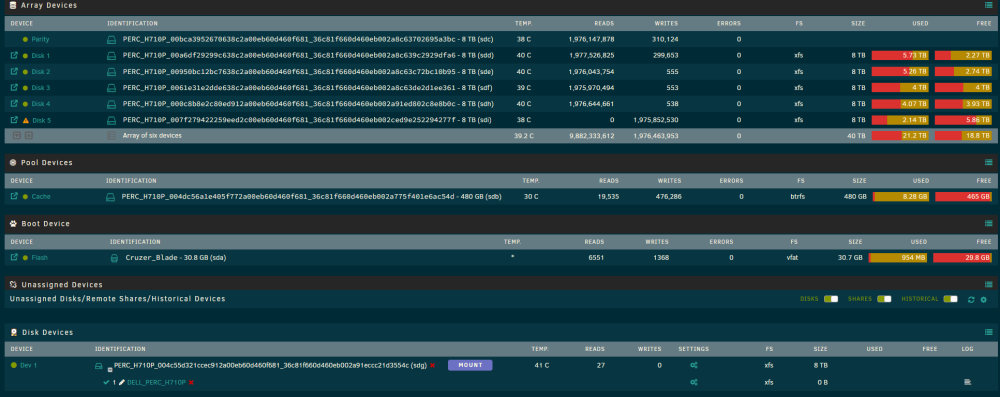
Hi, I'm now at a loss and I hope someone can assist please. Its a simple array consisting of 5x8Tb data disks, and 1x8Tb parity disk. 1 disk was starting to present SMART errors, so I replaced the disk. I've attempted to rebuild the array 3 times now. Each time the rebuild slows down from ~270MB/sec to <10KB/sec, quotes less than 1 min to complete, but never completes. If I cancel or reboot the disk remains in emulation mode and the array considers the rebuild cancelled at 100%. The first two attempts were performed with the array started normally. The third attempt was performed in maintenance mode. Each attempt has run for >12 hours, the second attempt I ran for 3 days and gave up when it slowed to under 2KB/sec. What am I missing here? Thanks in advance. Bernie serenity-diagnostics-20231205-0819.zip
-
OK please disregard my n00bness. I've found the step I missed after realising that I followed the legacy procedure for replacing a disk instead of the current procedure.
-
Hi, I'm hoping someone can assist me please. I did search around for a fix and couldn't find one, so I assume I'm doing something wrong or missing a step. One of my data disks started to give up errors a couple of days ago. Err'ing on the side of caution I replaced the drive and initiated the rebuild.... but seem to be stuck... what am I missing? (could be missing a lot as I'm no expert). Thanks in advance! Bernie