





CanadianGuy
Members
-
Joined
-
Last visited
-
No problems! Happy to hear that the details helped and I hope it helps anyone else who happen to stumble upon this post in the future. I know these details would have been great to have answered when I started going down the rabbit hole haha! Regardless, I'm happy I had the opportunity to do so as I learned a lot along the way about the hardware and hidden costs/gotchas that isn't stated as obviously AFAIK. Regarding your game plan, I think it's a solid one and sounds more appropriate and suitable for your use-case. Especially if you're trying to keep it simple and not run many boxes like I have. I encourage you to give that FX6300 a try and see if it meets your needs. I'd imagine anything is better than what you can find often on SBC as of today as they're allowed to pull more power. I can talk quickly about the older LGA 1150 and while I don't have the 4670 CPU, I have the i7-4790k and plex ran just fine on that CPU. I reckon if this is for home use and you're not pulling more than 2-3 concurrent streams on the 4790k, you'll be fine without a GPU. Of course if you have any spare GPUs ready for use, even a weak one is many times better to help with transcoding video if you turn on Hardware Acceleration on in Plex settings. Happy tinkering fellow Canadian! 🍁
-
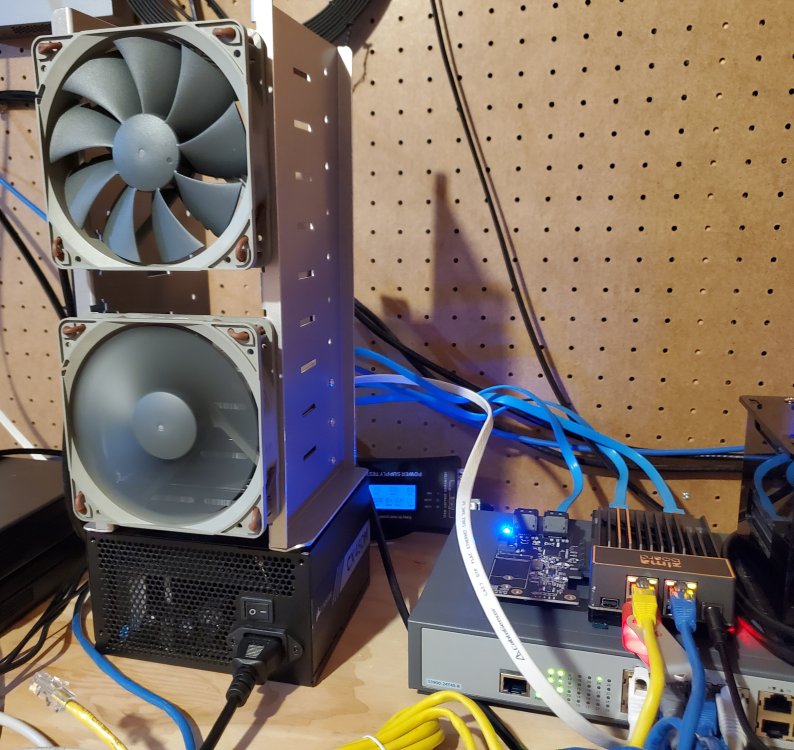
Hello Saythor! Thanks for the ping, I don't mind shedding some light and experience on how zimaboard has been with unraid. TL;DR I think the zimaboard 832 has been a brilliant SBC and a joy to use with unraid. The only thing that needs to be said is that expectations needs to be set reasonable for SBCs in general (not just the zimaboard in particular). If you can get over the few gotchas, it's a great low-power SBC that has served its purpose well. To get it out of the way, the zimaboard runs perfectly fine on unraid. I did not encounter any issues with the installation and AFAIK, everything in unraid works. It was a seamless installation. Much easier to get up and running than proxmox and other servers I've done before haha! I really appreciate that part about unraid with its easy-to-use interface. There's also plenty of guides out there if the settings don't make sense to you or need further clarification. A gotcha that wasn't obvious to me (but it was clear in unraid's docs + google searches) is that unraid can only be installed on a flash drive and not on the eMMC that is available on the zimaboard. I honestly didn't look too far into trying to install unraid on the eMMC, to see if it is possible but for anyone's heads-up if that was their original intent. Another gotcha that I did not anticipate (not unraid's fault) is that the zimaboard does not have a battery of some sort to keep the board bios settings intact after you disconnect it from the wall or the power goes out. This is a frustrating issue in some manner because if you plan on expanding your storage via PCIe, you'll be forced to set your BIOS settings again each time the power goes out. The bios settings you will need can be found in the post below where I show the tab and what my settings look like to get the PCIe card from the zimaboard website working: In addition, since casaOS is installed on the eMMC, the default boot order is always eMMC first (and not the unraid on the usb flash drive). Again, anytime the power goes out or you unplug from the wall, you'll need to remember to set the BIOS settings again to boot into unraid. If you don't, you'll just end up in casaOS. I have heard the suggestion before of flashing the eMMC to nothing but I have not attempted this partly due to being in the backlog, but also since I have the expansion card, I need to connect a monitor anyways each time the power goes out so I'm in the bios already to tell it to boot into unraid while setting up BIOS for it to recognize my PCIe. I think if you can, get an SBC with a battery on the board like the odroid-h3+ since that bios backup battery will save you headaches anytime the power goes out and you need to set the bios settings again. In the meantime ... I have been thinking about getting an UPS but fortunately power outages are a bit rarer in my area. If you can get over the gotchas, I do think this board has served its purpose very well. As a file storage server, this little board has been rock solid, with the bottleneck just being unraid and HDD. I've only seen this board struggle acting as a file storage server when I'm hitting it with high writes (from proxmox backups) while I'm trying to stream videos from Plex (CPU goes to 100%). If it is only doing high writes or streaming, it is fine. I also run syncthing docker container to help synchronize all my files across my devices. It is nice since it is an always-on device so I never run into file conflict issues. I don't run a bittorrent on my zimaboard but I'd imagine it would handle it no problems as any bittorrent in my experience is low resource to run. I have no experience with magic mirror so no thoughts on that. I think the reasonable expectations that needs to be said is Plex. Zimaboard can handle plex just fine as long as you're not transcoding. Any direct play, that is to send the video feed to the client machine as is and without transcoding it, will fly like butter. It's not hard work for it. While I haven't tested transcoding on the zimaboard, I'd imagine you'll run into the same issue as any other SBCs out there where transcoding video will be too much for it to handle. The CPU will come to a crawl as it 100% itself on all 4 cores to attempt to transcode your 1080p or greater video. I have experienced this on my odroid h2+ before and while it doesn't use the same CPU chip as the zimaboard 832, it is within the same class and I'd be surprised if it performed anything better than laggy transcoding streams. I have not ever tested transcoding video with a dedicated GPU but it sounds like your intent was to use the PCIe for storage anyways so unless you have 2 boards for different purposes, you may be out of luck here if transcoding video is a necessity for you. For myself, I have another box that has a more powerful CPU in it to help transcode video and my zimaboard acts as only an NFS share to access videos for plex. My setup looks more like an application server box with more powerful CPU + zimaboard file server as my NFS share. VMs run fine on this board if you must but again, I wouldn't try pushing it beyond non-intensive apps. I'd save all the VMs for more powerful hardware if I have a dedicated application server box with more powerful CPU. Other things worth noting that isn't obvious unless you stopped and thought about it or just run into the problem when you get there is if you're looking into powering more than 1 HDD or 2 SSD (like you're trying to expand into 5-7 HDD), you'll need a power supply and something to connect to the power supply's 24 pin that's usually connected to a motherboard to turn the power supply on. There is the paper clip trick to turn the power supply on from the 24 pin but honestly, aside from a quick test, I'd immediately replace that with something else. It is a little sketchy with what seems to be risk of hurting yourself if not careful but I confess, I don't have in-depth knowledge to judge whether the paper clip trick is safe or not. Just a forewarning that is mentioned when you're googling for the paper clip trick. I'm currently using a power supply tester as a way to connect to the 24-pin but honestly, there's cheaper options out there. I only purchased the power supply tester to see what it is about (spoiler: it's nothing exciting and not worth the cost). Attached in this post, you can see my zimaboard 832 connected to the hard drive cage + power supply (please ignore the wires haha!). You can also see the power supply tester I referred to in the picture that is required to power on the power supply. This was a long post but I hope it has shared some in-depth knowledge for those looking into getting SBCs as their server. There was a lot of learning I got from these fun little boards and I still love them. They're great if you set it out for reasonable purposes and they help keep your electricity bills low if you are in an area with more expensive electricity or just enjoy their form factor. Feel free to ask any further questions if there are any. Edit: clarified text + further info about my experiences below I also have another zimaboard 832 running opnsense right now and acting as my router. Honestly, the experience has been a little shaky since it tends to freeze itself every once in a while. Often requiring a hard reboot via pulling the plug and reconnecting. I believe this is partly due to the realtek network card. The community has agreed already that you should avoid these cards if you can before running opnsense as your main router. There are some things I have done to help mitigate this issue. 1. Download realtek drivers (os-realtek-re) from the plugins page. This is under system/firmware/plugins. This was the biggest impact in bringing in a bit of stability to the frozen issue. I went from pretty much every 24h, opnsense will freeze to every 3-4 days. 2. Under system/settings/cron, setup a cron job to restart once a day if you can. I restart my router at 5AM each day when no one is awake at this hour. The internet will be out briefly but it should be fine since no one is awake at this hour. You'll probably find better success with opnsense/pfsense if you follow some of the community recommendations but after the 2 changes I have made, it's been running just fine for me. edit 2: Add warning to paper clip trick
-
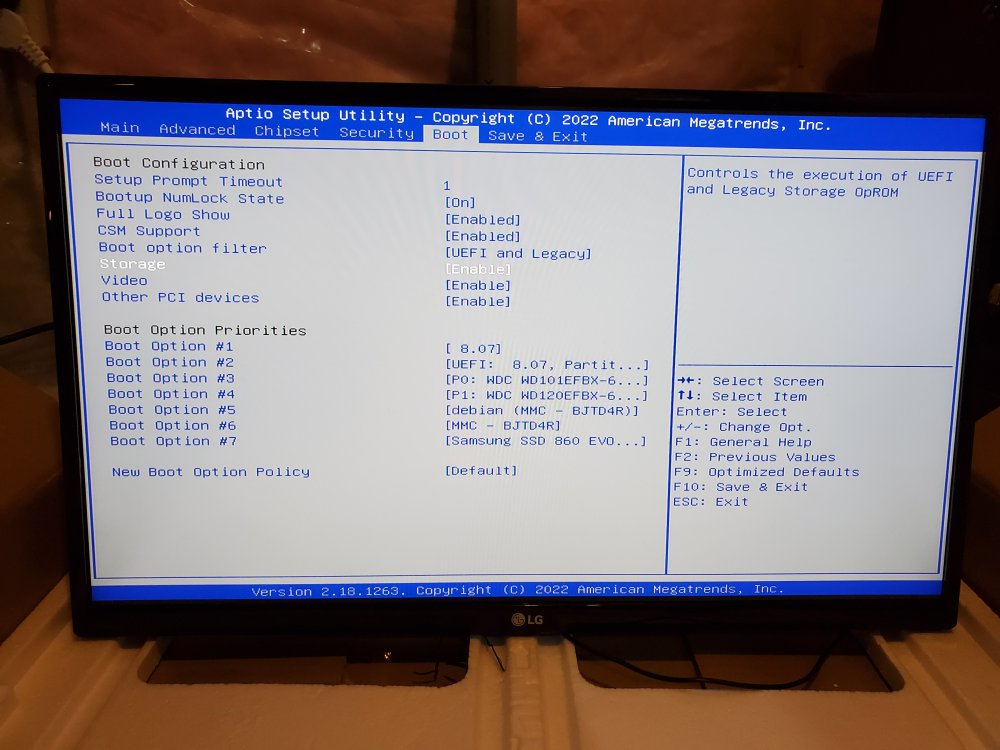
Haha! Been a long day ... that would help a lot eh? Link to PCIe to 5 sata expansion: https://shop.zimaboard.com/collections/diy-nas-media-server-bt-client/products/5-channel-sata-6g-pcie-adapter-host-card-pci-express-x1-to-x4-sata-connector-supports-ahci-fis-ncq-marvell-chipset If I found the correct model number to the PCIe, it is: G536PCE5850V10 However an update and solution to the situation in hopes that this helps someone else, especially if you have a zimaboard like me. Seems like this PCIe expansion card works just fine and I have identified the two problems 1. Seems like there's a few bios settings you might want to double check which you can find in the next few lines below. Storage: Enable (The default was UEFI) Other PCI devices: Enable (The default was UEFI) I'm also providing the rest of the settings in case they're important as reference and they're not set by default for you in the image below: The moment these settings were set, the PCIe card illuminated and the boot screen recognizes the PCIe to sata expansion card before reaching the bootloader screen. I'm not sure what these settings are to explain but the idea was inspired by the following link: https://forums.anandtech.com/threads/mobo-and-win10-not-detect-pcie-card-and-connected-sata-drive-solved.2597403/ Perhaps someone else with more technical knowledge can explain the BIOS settings that I changed. 2. Make sure you test the PCIe card first with a working HDD/SSD before you try setting up your new hard drive. It turns out that I also had a dead on arrival hard drive that I did not realize right away. This caused me to run in loops with my bios settings for hours before doing a sanity check with a known working HDD/SSD. Hope this helps!
-
Hello unraid community, I apologize if this is posted in the wrong forum, my first time posting on the unraid forums. I got a 5-port pcie sata adapter I would like to use with my zimaboard 832 that's running unraid but it doesn't seem to detect it. I have tried unplugging and replugging the expansion card, swapping it for a different expansion card (I had two identical PCIe) but to no success. Below is the full log that I found under Tools->System Devices, under pci devices [8086:5af0]00:00.0 Host bridge: Intel Corporation Celeron N3350/Pentium N4200/Atom E3900 Series Host Bridge (rev 0b) [8086:5a85]00:02.0 VGA compatible controller: Intel Corporation HD Graphics 500 (rev 0b) [8086:5a98]00:0e.0 Audio device: Intel Corporation Celeron N3350/Pentium N4200/Atom E3900 Series Audio Cluster (rev 0b) [8086:5a9a]00:0f.0 Communication controller: Intel Corporation Celeron N3350/Pentium N4200/Atom E3900 Series Trusted Execution Engine (rev 0b) [8086:5a9c]00:0f.1 Communication controller: Intel Corporation Device 5a9c (rev 0b) [8086:5a9e]00:0f.2 Communication controller: Intel Corporation Device 5a9e (rev 0b) [8086:5ae3]00:12.0 SATA controller: Intel Corporation Celeron N3350/Pentium N4200/Atom E3900 Series SATA AHCI Controller (rev 0b) [8086:5ad8]00:13.0 PCI bridge: Intel Corporation Celeron N3350/Pentium N4200/Atom E3900 Series PCI Express Port A #1 (rev fb) [8086:5ad6]00:14.0 PCI bridge: Intel Corporation Celeron N3350/Pentium N4200/Atom E3900 Series PCI Express Port B #1 (rev fb) [8086:5ad7]00:14.1 PCI bridge: Intel Corporation Celeron N3350/Pentium N4200/Atom E3900 Series PCI Express Port B #2 (rev fb) [8086:5aa8]00:15.0 USB controller: Intel Corporation Celeron N3350/Pentium N4200/Atom E3900 Series USB xHCI (rev 0b) [8086:5acc]00:1c.0 SD Host controller: Intel Corporation Celeron N3350/Pentium N4200/Atom E3900 Series eMMC Controller (rev 0b) [8086:5ae8]00:1f.0 ISA bridge: Intel Corporation Celeron N3350/Pentium N4200/Atom E3900 Series Low Pin Count Interface (rev 0b) [8086:5ad4]00:1f.1 SMBus: Intel Corporation Celeron N3350/Pentium N4200/Atom E3900 Series SMBus Controller (rev 0b) [197b:0585]01:00.0 SATA controller: JMicron Technology Corp. JMB58x AHCI SATA controller [10ec:8168]02:00.0 Ethernet controller: Realtek Semiconductor Co., Ltd. RTL8111/8168/8411 PCI Express Gigabit Ethernet Controller (rev 15) [10ec:8168]03:00.0 Ethernet controller: Realtek Semiconductor Co., Ltd. RTL8111/8168/8411 PCI Express Gigabit Ethernet Controller (rev 15) Any help to point me in the right direction is appreciated.


