





Pignuuu
Members
-
Joined
-
Last visited
-
Perhaps, I did disable all my dockers etc but maybe something else was happening
-
Thanks for replying but it for some reason works better now. I paused and resumed it then it for some reason shot up to 100mbs. I'll come back if it goes bad again.
-
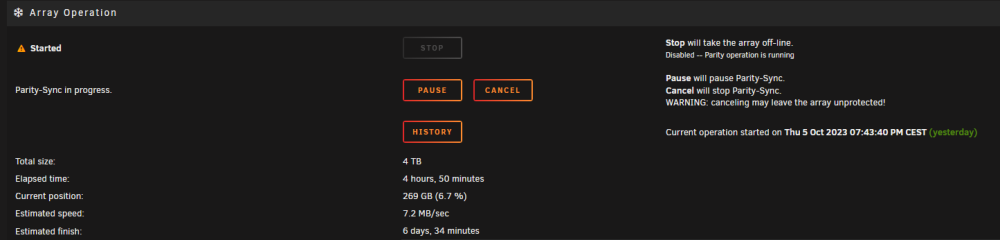
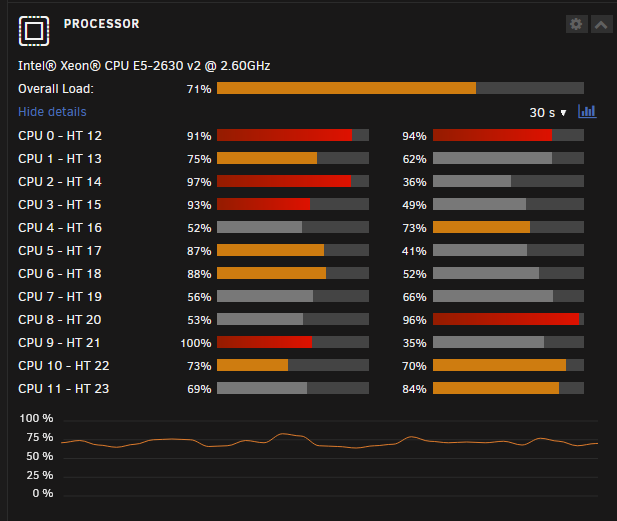
Hi, I recently upgraded the storage on my Unraid server, which meant I had to swap the parity drive with a bigger one. I am running the parity sync, but the speed is very slow, currently average speed is 7mbs. It's not unlikely I did something wrong or poorly, I am not too well versed in hardware and physical servers. Processors seems to be running at around 70% - 100% on average. If there are any logs I should upload then do ask for it.
-
Hi, I have been learning docker so that I can use it on my Unraid server, I was wondering if me developing my docker App on Windows 10 poses any issues for it running on Unraid. Should I instead be coding in a Linux environment like Ubuntu or something? What I think could pose a issue is when you have to work with files, I am unsure if processing files on Windows and the Unraid os will make a big difference. If there is a difference or something I should do then please do come with suggestions. Thanks.

