patriQ
Members
-
Joined
-
Last visited
Everything posted by patriQ
-
Reserved
-
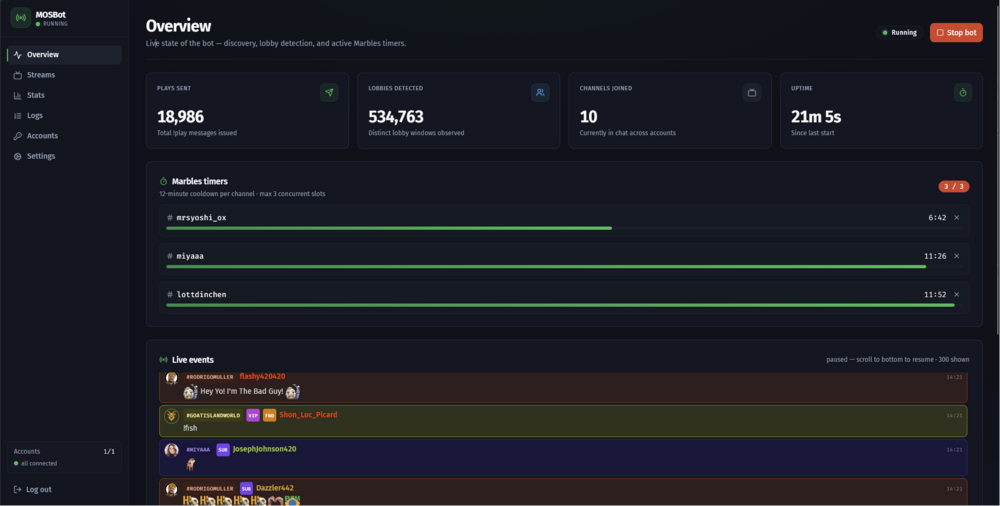
Hi everyone, this is the official Unraid community support thread for MOSBot. MOSBot is a Docker-based Twitch bot for Marbles on Stream. It automatically discovers live Marbles on Stream channels, passively watches chat activity, and sends !play once a lobby looks active. It includes a web dashboard for monitoring, account login, logs, stats, and basic control. The project is designed to run cleanly on Unraid as a single Docker container. What MOSBot doesMOSBot: discovers live Twitch streams in the Marbles on Stream category joins and parts Twitch IRC channels dynamically watches for active lobbies based on real chat activity sends exactly one !play when the configured lobby threshold is met applies per-channel cooldowns to avoid spam provides a web dashboard on port 8787 stores data in SQLite supports Prometheus metrics is designed to coexist with Twitch-Channel-Points-Miner-v2 MOSBot does not blindly spam !play. It waits until enough real users have typed !play within the configured time window, then sends one message and respects cooldowns. Important noticeThis tool automates !play in Marbles on Stream lobbies. Please use it responsibly. Some streamers may not want bot participation in their chat. MOSBot includes blacklist and whitelist options so you can respect streamer rules. You are responsible for the Twitch account you use with this container. Project linksGitHub project: https://github.com/patriqcs/mosbot Unraid template repository: https://github.com/patriqcs/unraid-templates Unraid XML template: https://raw.githubusercontent.com/patriqcs/unraid-templates/main/mosbot.xml Docker image: ghcr.io/patriqcs/mosbot Required setupBefore starting the container, you need a Twitch Developer App. Twitch Developer AppCreate a new Twitch application here: https://dev.twitch.tv/console/apps Recommended settings: Name: MOSBot Personal OAuth Redirect URL: http://localhost Category: Chat Bot Client Type: ConfidentialCopy the Client ID. You do not need a Client Secret for MOSBot’s Device Code Flow. Required environment valuesThe template expects these important values: TWITCH_CLIENT_IDYour Twitch Developer App Client ID. ENCRYPTION_KEYUsed to encrypt stored Twitch tokens. Generate one with: docker run --rm node:20-alpine node -e "console.log(require('crypto').randomBytes(32).toString('base64'))"DASHBOARD_PASSWORD_HASHMOSBot expects an Argon2 password hash for the dashboard login. Generate one with: docker run --rm -it node:20-alpine sh -c "npm i -g argon2-cli >/dev/null && argon2-cli hash -p 'your-password'"Replace your-password with your real dashboard password before running the command. Appdata pathsRecommended Unraid appdata path: /mnt/user/appdata/mosbot/Configuration file: /mnt/user/appdata/mosbot/config/config.yamlDatabase: /mnt/user/appdata/mosbot/data/mosbot.dbLogs: /mnt/user/appdata/mosbot/logs/ Web UIUploading Attachment... After the container starts, open: http://YOUR-UNRAID-IP:8787Then: Log into the dashboard Go to Accounts Start the Twitch login flow Enter the shown device code at: https://twitch.tv/activateApprove the login The bot should come online shortly after that. Basic configuration exampleCreate or edit: /mnt/user/appdata/mosbot/config/config.yamlExample: discovery: intervalMinutes: 3 maxStreams: 10 minViewers: 30 language: null sortBy: most-viewers lobby: windowSeconds: 30 minPlayers: 4 cooldownSeconds: 180 ratelimit: userChatBudgetPer30s: 16 verifiedBot: false channels: whitelist: [] blacklist: [] accounts: - name: primary enabled: true clientId: ${TWITCH_CLIENT_ID} server: port: 8787 logging: level: info rotateDays: 14 database: path: /data/mosbot.db Dashboard featuresThe dashboard includes: overview tiles live event feed discovered stream list joined channel state sent !play counters stats for 24h / 7d / 30d live logs with filtering runtime log-level changes Twitch account login using Device Code Flow health/status information Metrics and health checksMOSBot exposes: /api/healthand: /metricsThe /metrics endpoint can be used with Prometheus-compatible monitoring. Example metrics include: mosbot_plays_sent_total mosbot_lobbies_detected_total mosbot_rate_limited_total mosbot_channels_joined mosbot_discovery_duration_seconds Running together with Twitch-Channel-Points-Miner-v2MOSBot is designed to run alongside Twitch-Channel-Points-Miner-v2. It uses: a separate Twitch OAuth grant a separate Twitch Developer App Client ID separate appdata separate token storage separate SQLite database Recommended separate appdata paths: /mnt/user/appdata/twitch-miner/ /mnt/user/appdata/mosbot/Do not mount the Twitch-Channel-Points-Miner appdata folder into MOSBot. TroubleshootingDashboard does not openCheck that the container is running and that port 8787 is not already used by another container. Open: http://YOUR-UNRAID-IP:8787Twitch login failsCheck: TWITCH_CLIENT_ID is correct the Twitch Developer App exists the account completed the device login at https://twitch.tv/activate the ENCRYPTION_KEY was not changed after login If you changed the ENCRYPTION_KEY, log in again through the dashboard. Bot joins channels but does not send !playCheck your config: lobby: windowSeconds: 30 minPlayers: 4 cooldownSeconds: 180If minPlayers is too high, MOSBot may never consider a lobby active. A streamer does not allow botsAdd the channel to the blacklist: channels: blacklist: - channelnameContainer starts but config is ignoredMake sure your config file is located here: /mnt/user/appdata/mosbot/config/config.yamlAlso check container logs for YAML formatting errors. Support information to include when asking for helpIf you need help, please include: Unraid version: MOSBot image tag: Install method: Community Apps / manual template / docker compose Container log excerpt: config.yaml with tokens/secrets removed: Browser URL used for dashboard: Relevant error message:Please remove all secrets before posting logs or config files. Do not post: Twitch access tokens refresh tokens dashboard password hash if you reuse it elsewhere private cookies full database files Source code and issuesSource code: https://github.com/patriqcs/mosbot Template repository: https://github.com/patriqcs/unraid-templates Bug reports and feature requests can be posted here in this thread or opened as GitHub issues. Thanks for testing MOSBot.