





hastypixels
Members
-
Joined
-
Last visited
-
So in the end a total scrape and wipe (read: reformat and reinstall) was required to get Windows 11 recognizing the SMB shares of my Unraid server. This time I'm not going to be keeping anything critical on this machine and I'll experiment with Linux the instant I don't have to use it for school. You're kicking people out the door, Microsoft...
-
Get-SmbConnection turns up zilch. I know about the admin-mode...should have checked that. Sorry. I'm trying the Recovery with Windows Update.
-
I’ll give that a go. Thanks.
-
Here's what I get...

-
Update: So I found some more (useless to me) information in the Event Viewer logs. As follows: Under Operational: Event 1025: SMBServer One or more named pipes or shares have been marked for access by anonymous users. This increases the security risk of the computer by allowing unauthenticated users to connect to this server. Registry Key: HKLM\System\CurrentControlSet\Services\LanmanServer\Parameters Registry Values: NullSessionPipes, NullSessionShares Default Value: Empty (or not present) Current Value: Non-empty Guidance: You should expect this event when modifying the default values of NullSessionShares and NullSessionPipes. On a typical file server, these settings do not exist or do not contain values, which is the most secure configuration. By default, domain controllers populate the NullSessionShares entry with netlogon, samr, and lsarpc to allow legacy access methods. Under Security: Event 551, SMBServer SMB Session Authentication Failure Client Name: \\[fe80::a18:4ad7:b0b5:7a71] Client Address: [fe80::a18:4ad7:b0b5:7a71%6]:59916 User Name: Session ID: 0x2D00000000005 Status: The attempted logon is invalid. This is either due to a bad username or authentication information. (0xC000006D) SPN: session setup failed before the SPN could be queried SPN Validation Policy: SPN optional / no validation Guidance: You should expect this error when attempting to connect to shares using incorrect credentials. This error does not always indicate a problem with authorization, but mainly authentication. It is more common with non-Windows clients. This error can occur when using incorrect usernames and passwords with NTLM, mismatched LmCompatibility settings between client and server, an incorrect service principal name, duplicate Kerberos service principal names, incorrect Kerberos ticket-granting service tickets, or Guest accounts without Guest access enabled Still not settled on reinstalling Windows, not if I can avoid it. Noteworthy: While all of this is going on, my other machines are still happily able to access Unraid's SMB shares without a solitary hiccup. Finally, the OS install with all the problems can see, but not play, the video and audio shares available via Jellyfin since Windows has classified the server as a Media server. (The error says the authentication is wrong, but it isn't. I've double checked.)
-
Dang it. I know you're right, and I've been hoping to avoid it. It's things like this that tempt me to switch to Linux on my desktop. I appreciate everyone's help. I'll decide what I'm going to do and update this thread so anyone else who comes along knows how it turned out.
-
I've made the changes suggested, but this comes down to a problem with Windows 11 on this particular machine. As mentioned in my OP I can access the shares as normal in their entirety on two other computers that are also running Windows 11. Having made these changes I still get the same error.
-
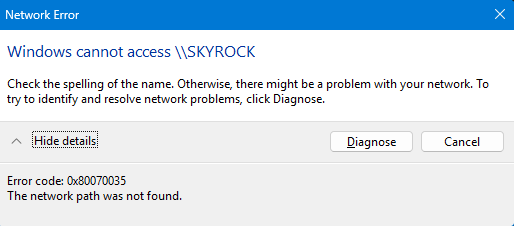
No go. This is the error I get:
-
Thanks, but that didn't work.
-
I did. Home doesn't have the Local Group Policy Editor.
-
Here's a strange one. I had to reset my server password--for some reason--so I rebooted my unRaid server the not nice way. All is well. Jellyfin is undisturbed, as are the other docker apps I've got installed. After rebooting my desktop, running Windows 11 Home, version 25H2, refused to connect to the SMB shares. Error 1208 or 0x80070035, depending on how I approached the issue. However. I can access the SMB share via my Laptop running Windows 11 Home, version 25H2. No issues. There's another machine that accesses the shares just fine as well. Clearly this is a Windows problem, but where do I start?

