



Skip to content
View in the app

A better way to browse. Learn more.

Unraid

A full-screen app on your home screen with push notifications, badges and more.

To install this app on iOS and iPadOS
  1. Tap the Share icon in Safari
  2. Scroll the menu and tap Add to Home Screen.
  3. Tap Add in the top-right corner.
To install this app on Android
  1. Tap the 3-dot menu (⋮) in the top-right corner of the browser.
  2. Tap Add to Home screen or Install app.
  3. Confirm by tapping Install.

SimonVoss

Members
  • Joined

  • Last visited

  1. Here is my diagnostics file 🙂. unraid-diagnostics-20230228-2236.zip
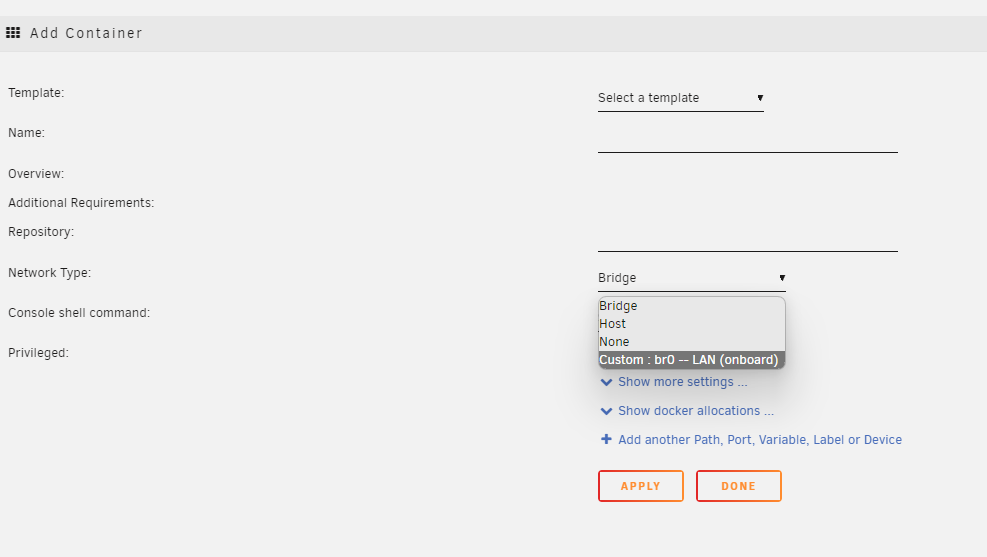
  2. Hi I have two NICs in my unraid server, both have bridging enabled. In my routing table I see br0 and br1: When creating Docker container I am only able to choose br0, since br1 is not listed in the dropdown. Can you help me figure out why br1 is not available in Docker? Thanks in advance. //Simon Voss

Account

Navigation

Search

Search

Configure browser push notifications

Chrome (Android)
  1. Tap the lock icon next to the address bar.
  2. Tap Permissions → Notifications.
  3. Adjust your preference.
Chrome (Desktop)
  1. Click the padlock icon in the address bar.
  2. Select Site settings.
  3. Find Notifications and adjust your preference.