





OlegBudeanu
Members
-
Joined
-
Last visited
-
Hello The server went down again, and I attached the syslog. Looks like I am out of memory. This happened when I started Syncthing Docker. syslog-192.168.1.3.log
-
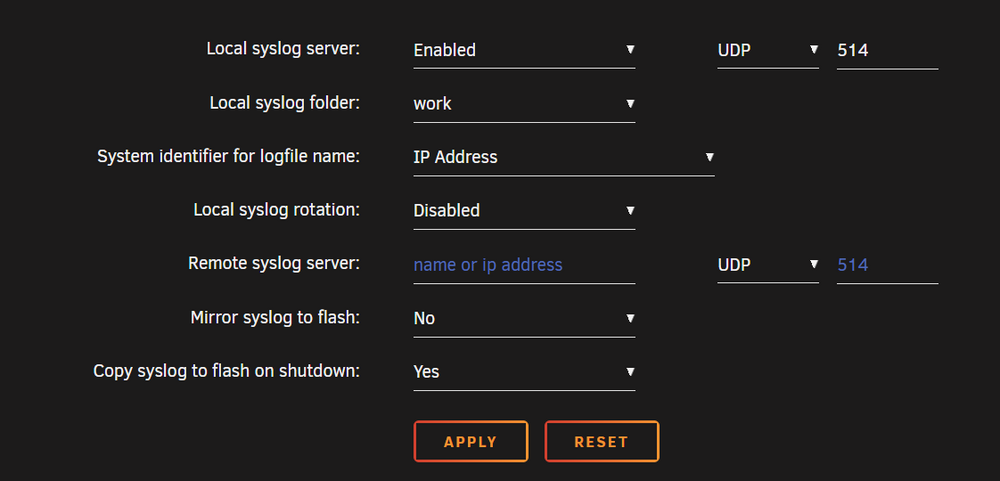
I've set it up like this but for some reason they are not saved in the "work" share. And it does not allow me to set the "custom" path, I can only choose. Is this correct way to set that up? And on the boot in the log files I don't see syslog txt file - only old archives
-
Hi Everyone For the last 2 days server became twice irresponsive - only HDD LED is constantly on - I cannot connect via SSH , GUI is not working, though I can ping the IP address. When I hook up the monitor and keyboard I see the login and I can type the login, but it never asks for password, just saying that there is a timeout after short period of time. Last thing I did was setting up Gramps docker. Can you please tell me if that's the issue? Thanks in advance! homeserver-diagnostics-20251021-1714.zip
-
Thanks for explaining As I understand, the best practice is to map any paths to array, rather than /mnt/user/appdata - that's how the data will be protected, but in case docker image gets corrupted - I will be able to restore containers with last configuration in minutes? I will be able to use appdataplugin for everything else, what is lightweight left in appdata on cache.
-
Thank you, yeah I was concerned about that also. I think I will need to check all the dockers to have proper "array" volumes. I think some of them are following bad practice having volume "inside" docker.
-
Thank you I think the last question is about protecting the cache data. For the dockers I think I got it - the best thing is to map external array volume for dockers volume.
-
here it is homeserver-diagnostics-20250511-1512.zip
-
Thanks, Done All the info on the array was older than on the cache drive.
-
Sorry, I did it and reverted and posted the diag. Sorry, my mistake, here is the new diag after all the actions. Shares are set to secondary cache and array->cache mover action. Mover invoked and finished and freed up 500gb cache drive (it was full). homeserver-diagnostics-20250511-1015.zip
-
Hello So I've done what you proposed - with disabled docker I've set the secondary storage to Array, after that made the mover to move data from array to cache. The Fix Common Problems still says that there is data on the array. But the docker is up and running with reduced image size to 50gb but all the containers are lost. I've reverted 100gb image back and everything's back. As I understand when I shrink Docker image - it gets deleted ? Diagnostics attached. homeserver-diagnostics-20250510-1506.zip
-
Here it is. Following forums I've installed the CA Appdata backup to backup the dockers on the cache. And I have the same issue with Docker again - it won't start homeserver-diagnostics-20250509-0809.zip
-
I've moved all the default shares to the cache, as well as the appdata, but still the log says the same May 8 18:16:07 HomeServer webgui: docker stats error: Cannot connect to the Docker daemon at unix:///var/run/docker.sock. Is the docker daemon running? May 8 18:16:15 HomeServer ool www[3889414]: /usr/local/emhttp/plugins/dynamix/scripts/emcmd 'cmdStatus=Apply' May 8 18:16:15 HomeServer emhttpd: Starting services... May 8 18:16:15 HomeServer emhttpd: shcmd (365): /etc/rc.d/rc.samba reload May 8 18:16:16 HomeServer emhttpd: shcmd (368): exportfs -ra May 8 18:16:16 HomeServer emhttpd: shcmd (370): /etc/rc.d/rc.avahidaemon reload May 8 18:16:16 HomeServer unassigned.devices: Updating share settings... May 8 18:16:16 HomeServer unassigned.devices: Share settings updated. May 8 18:16:18 HomeServer monitor_nchan: Stop running nchan processes May 8 18:16:21 HomeServer ool www[3891131]: /usr/local/emhttp/plugins/dynamix/scripts/emcmd 'cmdStatus=Apply' May 8 18:16:21 HomeServer emhttpd: Starting services... May 8 18:16:21 HomeServer emhttpd: shcmd (379): /etc/rc.d/rc.samba reload May 8 18:16:21 HomeServer emhttpd: shcmd (382): exportfs -ra May 8 18:16:21 HomeServer emhttpd: shcmd (384): /etc/rc.d/rc.avahidaemon reload May 8 18:16:21 HomeServer unassigned.devices: Updating share settings... May 8 18:16:21 HomeServer unassigned.devices: Share settings updated. May 8 18:16:22 HomeServer emhttpd: shcmd (394): /usr/local/sbin/mount_image '/mnt/user/system/docker/docker.img' /var/lib/docker 50 May 8 18:16:22 HomeServer root: '/mnt/user/system/docker/docker.img' is in-use, cannot mount May 8 18:16:22 HomeServer emhttpd: shcmd (394): exit status: 1 update : after reboot docker is up and running, but I got a notification from "fix common problems" that 1. these shares are unprotected 2. files exist on the array even though the location is set to "cache only". Do I understand correctly that if the drive is lost - all the docker information will be lost?
-
The Backblaze is a docker which is backing up all my array data into the cloud on Backblaze service. It mounts the array as a drive and backs it up. Using the Fix Common Problems, I set the app data to be cache only, but now it says it is unprotected. Do I understand correct that I have to set "secondary storage to none" for these shares?
-
Not really, I think it was set like that by default and I never edited that. I am not even sure what size it should be or how much the images take
-
This is the system log, maybe it will be helpful May 8 17:03:13 HomeServer ool www[3766544]: /usr/local/emhttp/plugins/dynamix/scripts/emcmd 'cmdStatus=Apply' May 8 17:03:13 HomeServer emhttpd: Starting services... May 8 17:03:13 HomeServer emhttpd: shcmd (211): /etc/rc.d/rc.samba reload May 8 17:03:13 HomeServer emhttpd: shcmd (214): exportfs -ra May 8 17:03:13 HomeServer emhttpd: shcmd (216): /etc/rc.d/rc.avahidaemon reload May 8 17:03:13 HomeServer unassigned.devices: Updating share settings... May 8 17:03:13 HomeServer unassigned.devices: Share settings updated. May 8 17:03:14 HomeServer emhttpd: shcmd (226): /usr/local/sbin/mount_image '/mnt/user/system/docker/docker.img' /var/lib/docker 120 May 8 17:03:15 HomeServer root: '/mnt/user/system/docker/docker.img' is in-use, cannot mount May 8 17:03:15 HomeServer emhttpd: shcmd (226): exit status: 1 May 8 17:03:21 HomeServer webgui: docker stats error: Cannot connect to the Docker daemon at unix:///var/run/docker.sock. Is the docker daemon running? May 8 17:07:31 HomeServer root: Fix Common Problems Version 2025.03.12 May 8 17:07:33 HomeServer root: Fix Common Problems: Error: Default docker appdata location is not a cache-only share
