PsyPsy
Members
-
Joined
-
Last visited
-
Hat sich mittlerweile erledit . CHatGPT hat meine Einstellungen gefixt. die LLösung war bonding und bridging auf eine IP-Adresse mit Einstellung active backup
-
bridging habe ich bei rj45 mal rausgenommen, dannach konnte ich meinen unraid server nicht mehr erreichten. ich musste das USB backup aufspielen
-
Ich habe folgende LAN-Konfigurateionen kann aber beide IPs nur über die RJ45 Verbindung erreichen. Wenn ich den RJ45 ziehe sind beide IP adressen nciht erreichbar. Wenn ich den SFP+ ziehe sind beide IPs weiterhin erreichbar. eth0 rj45 IPv4 DNS-Serverzuweisung: statisch IPv4 DNS-Server 1: 192.168.178.1 Netzwerkbündelung aktivieren: nein Netzwerkbrückung aktivieren: ja Teilnehmer der Netzwerkkartenbrücke br0: eth0 Netzwerkprotokoll: nur ipv4 IPv4-Adresszuweisung: statisch IPv4-Adresse: 192.168.178.10 /24 IPv4 Standard-Gateway: 192.168.178.1 9 VLANs aktivieren: nein eth2 SFP+ Netzwerkbündelung aktivieren: nein Netzwerkbrückung aktivieren: ja Teilnehmer der Netzwerkkartenbrücke br0: eth2 Netzwerkprotokoll: nur ipv4 IPv4-Adresszuweisung: statisch IPv4-Adresse: 192.168.178.12 /24 IPv4 Standard-Gateway: 192.168.178.1 1 VLANs aktivieren: nein netzaufbau: 192.168.178.10 <=> router/DSL-modem <=> SFP+ switch <=> 192.168.178.12 mein clientpc hängt auch am SFP+ switch
-
yes i did connect with a url that was not in ALLOWED_ORIGINS. with http://nas.local it works now. how can i add a url to ALLOWED_ORIGINS?
-
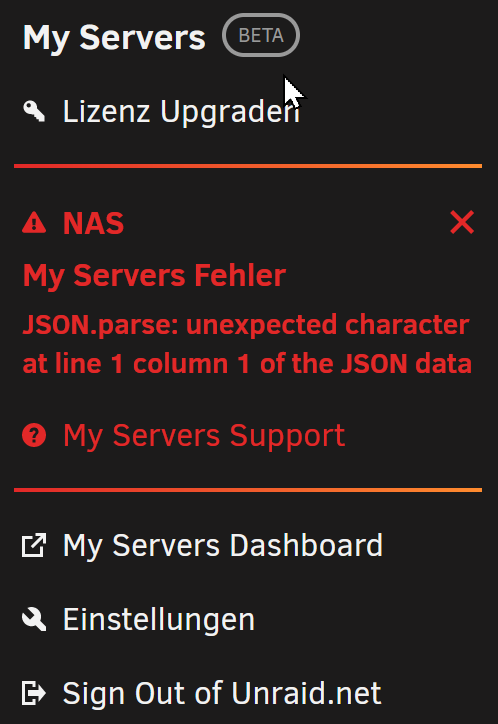
arfter changing boot stick i get now attached error in myserver menu.