-
如图所示,docker在分页面无法显示所有的容器,只能在仪表盘查看所有容器
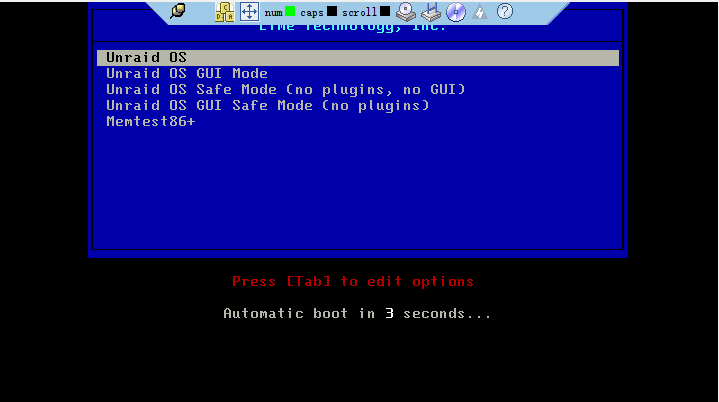
- 无法启动系统
- 无法启动系统
- 无法启动系统
- 无法进行mover操作
- 无法进行mover操作
- 无法进行mover操作
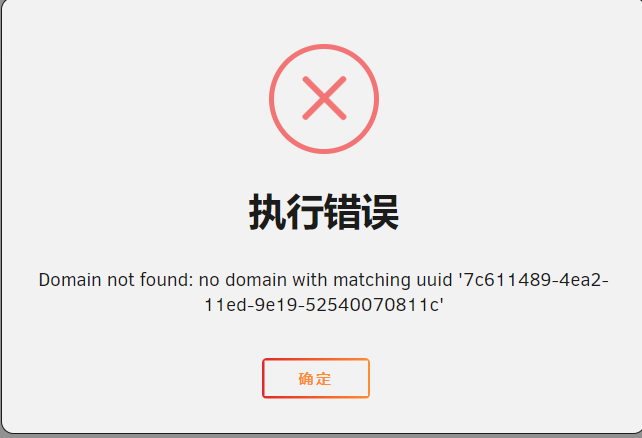
- 虚拟机无法操作
- 虚拟机无法操作
- 虚拟机无法操作
请看我主页的另一篇帖子,管理员说明了方法,在编辑模式下修改虚拟机的uuid即可- 虚拟机无法操作
- 虚拟机突发无法操作
- 虚拟机突发无法操作
Thank you for your answers. I replaced the newly installed uuid and solved it. Is there a problem with my operation? I don't know why this problem occurs🙂- 虚拟机无法操作
服务诊断-20221109-1512.zip今天在新建虚拟机时再次出现此问题,这是诊断记录,麻烦 帮忙看下,非常感谢 @SpencerJ- 虚拟机突发无法操作
冰淇淋
Members
-
Joined
-
Last visited
Account
Navigation
Search
Configure browser push notifications
Chrome (Android)
- Tap the lock icon next to the address bar.
- Tap Permissions → Notifications.
- Adjust your preference.
Chrome (Desktop)
- Click the padlock icon in the address bar.
- Select Site settings.
- Find Notifications and adjust your preference.
Safari (iOS 16.4+)
- Ensure the site is installed via Add to Home Screen.
- Open Settings App → Notifications.
- Find your app name and adjust your preference.
Safari (macOS)
- Go to Safari → Preferences.
- Click the Websites tab.
- Select Notifications in the sidebar.
- Find this website and adjust your preference.
Edge (Android)
- Tap the lock icon next to the address bar.
- Tap Permissions.
- Find Notifications and adjust your preference.
Edge (Desktop)
- Click the padlock icon in the address bar.
- Click Permissions for this site.
- Find Notifications and adjust your preference.
Firefox (Android)
- Go to Settings → Site permissions.
- Tap Notifications.
- Find this site in the list and adjust your preference.
Firefox (Desktop)
- Open Firefox Settings.
- Search for Notifications.
- Find this site in the list and adjust your preference.