





Zwen1111
Members
-
Joined
-
Last visited
-
I've a FireWire card installed in a PCI slot on my ASUS B350-PLUS. I want to passthrough this card to my Windows 11 VM, so I have to bind this to vfio. With the PCIe ACS override set to "Both" I've managed to isolate the card into a single group: But when I tick the checkbox to bind this group to vfio on boot, the server is stuck in a boot loop. When I delete the VFIO file from the USB stick the server starts normally. I already tried to swap the card with another PCI slot on my motherboard, but that didn't work. What can I do? Any help? viki-diagnostics-20230306-2233.zip

-
Can you share the XML of the VM?
-
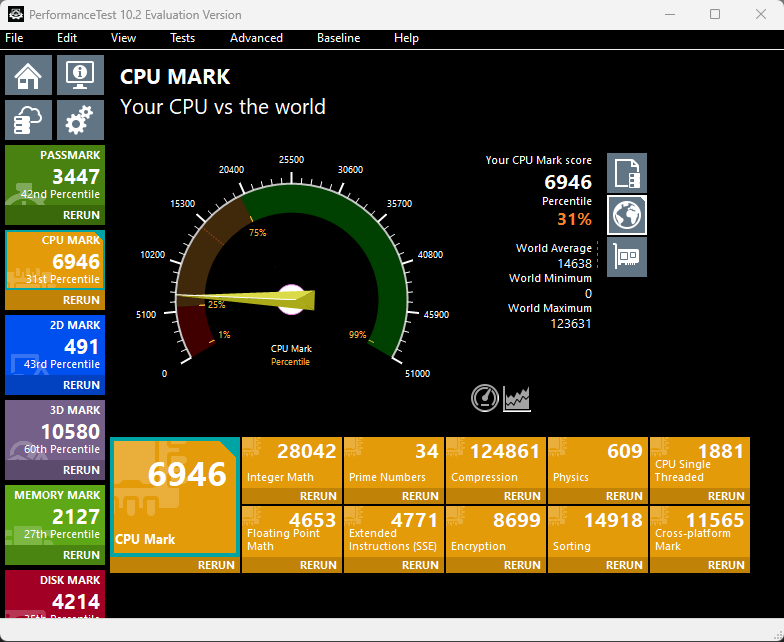
Just created a Windows 11 VM on my Unraid server and having some performance issues: Specs: CPU: Ryzen 5 1600X MOBO: ASUS B350-PLUS GPU: ASUS ROG STRIX-GTX1060-O6G-GAMING RAM: 2x8GB Crucial + 2x4Gb GSkill (I know this is not optimal. I want to upgrade to at least 32GB all same sticks) I allocated 4 of the 6 cores and isolated them and ran a test with PerformanceTest: As you can see, it's not a great score. I've already did the following things: Set the CPU Governor to Performance (with the Tips and tweaks plugin) Made sure hyperthreading is turned on Isolated the CPU cores My XML: W11.xml Any thoughts on what I can do to improve performance? Or just upgrade the CPU?
-
Somehow I got it working after re-creating the VM. I think it was messed up with drivers. The dumped vbios is working for me! After setting up the GPU for the VM and connecting via RDP the GPU didn't showed up in Device Manager, but there were two display adapters. One of them was the RedHat and the other one some Microsoft Display Adapter. While unpacking the NVIDIA driver the adapter in Device Manager changed to the GTX 1060. I think Windows Update was updating the driver on the background what made the adapter change in Device Manager.
-
Thanks for the tip. A few days ago I found out this was possible from unraid, but the dumped vbios unfortunately didn't do the trick... I'm thinking about buying an AM4 cpu with onboard graphics, just to get this working!
-
I'm trying to passthrough my single GPU to a Windows 11 VM, but my GPU doesn't get recognized because it doesn't show up in device manager and there's no video output. CPU: Ryzen 5 1600X MOBO: ASUS B350-PLUS GPU: ASUS ROG STRIX-GTX1060-O6G-GAMING I've made sure that the GPU is in its own IOMMU group and is bound to VFIO at boot Passed a vbios (grabbed the one from techpowerup) AsusGTX1060dump_2.rom Removed the NVIDIA header Bus/slot/function is correct in the VM xml <hostdev mode='subsystem' type='pci' managed='yes'> <driver name='vfio'/> <source> <address domain='0x0000' bus='0x07' slot='0x00' function='0x0'/> </source> <rom file='/mnt/user/domains/vbios/AsusGTX1060dump_2.rom'/> <address type='pci' domain='0x0000' bus='0x04' slot='0x00' function='0x0' multifunction='on'/> </hostdev> <hostdev mode='subsystem' type='pci' managed='yes'> <driver name='vfio'/> <source> <address domain='0x0000' bus='0x07' slot='0x00' function='0x1'/> </source> <address type='pci' domain='0x0000' bus='0x04' slot='0x00' function='0x1'/> </hostdev> multifunction='on' in the VM xml Legacy is set in bios CSM is enabled in bios I added video=efifb:off to syslinux.cfg: syslinux.cfg Because I don't have another windows system I can't dump my own vbios (without temporarily using my unraid server as a desktop). I would really appreciate your help! VM.xml viki-diagnostics-20221130-2008.zip


