





Bronson15
Members
-
Joined
-
Last visited
-
Would you consider never progressing past 10% a failure? It is still hung there.
-
Yeah I aborted twice because it didn't get past 10% after 415 hours on the first one. Failing meaning replace the drive? Is 40,000 hours of a drive normal? I've only had it for a year and a few months, so that number seems off to me. EDIT: Oh wait this actually was my old gaming HDD. Will do a run on the other drives
-
ST3000DM001-1CH166_Z1F448VJ-20240223-1058.txt As requested. Would you mind walking me through what you're looking for in here so I can understand as well? Thanks!
-
Welllllll, I see "SMART overall-health" as passed, but it actually looks like the SMART test never got past 10%.
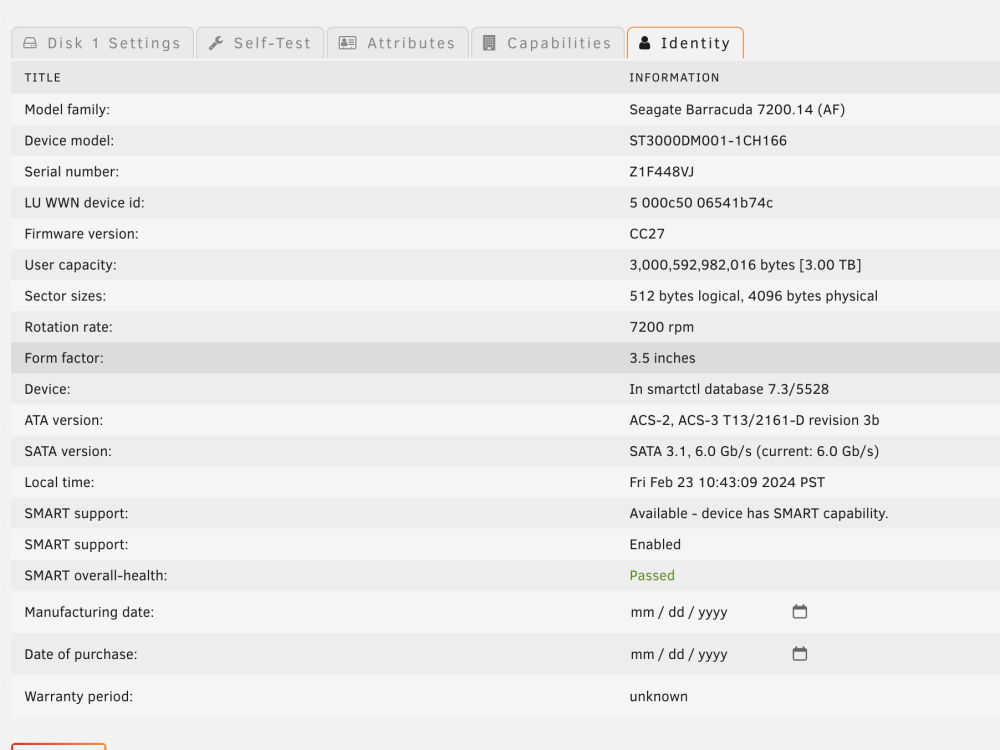
-
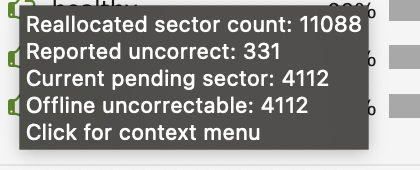
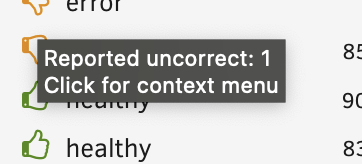
One drive says this: The other just says this:
-
The dashboard keeps showing me that two of my drives has SMART errors. I ran an extended SMART test on each of the drives and they both showing passing. Any tips? I am new to SMART reports.
-
As requested tower-diagnostics-20240208-2106.zip
-
Okay, memtest complete. It was a pass! That is good news. What's next?
-
Oh interesting. I'll run it now. FWIW I've been using this setup for over a year and it's been working perfectly fine. Just an issue with this new drive's post-read.
-
Uhhhh I can't say that I have. I'm not 100% confident on what memtest is, but a quick search shows that it might be for RAM. Is that not right?
-
Hello, Just did a pre-clear on a new 12TB HDD and it failed during the Post-Read verification step. Not sure why. Attached is the pre-clear disk log. It looks like everything in the clear worked fine, just reading failed. Is that something I can ignore? I'd hate to have to run all this again since it took 62 hours. preclear_disk_000EX7VQ_21411.txt

