BrandonHassler
Members
-
Joined
-
Last visited
Everything posted by BrandonHassler
-
Ahh yes! That was it! Didn't even realize I was behind on that! Thank you so much!
-
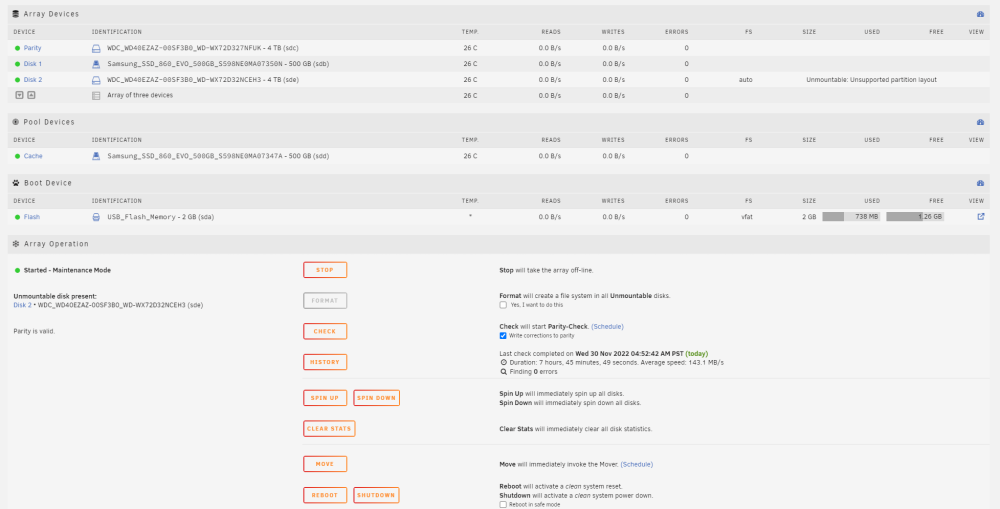
I'm a pretty tech savvy guy but when it comes to the world of home servers I'll be the first to admit I'm a complete noob. I recently bought two 4 TB HDDs to expand my Plex server which is running on Unraid. One of them successfully became my Parity drive but the other (Disk 2) can't seem to get going. As you can see in the screenshot, the 2nd HDD is giving me a "Unmountable: Unsupported partition layout" error and I can't figure it out. Here is what I have tried: Checking the format box at the bottom and formatting (several attempts) Changing out the SATA cable with another SATA cable. Shutting the system down and trying again (several attempts) Stopping the array, then starting in "Maintenance Mode" to format the drive. Since it is a new drive I don't have any data to "recover" from it so I'm open to doing whatevr is needed to get it connected to the system. I've also attached a troubleshooting log! hasslerunraid-diagnostics-20221130-0803.zip