





pabron
Members
-
Joined
-
Last visited
Everything posted by pabron
-
I have a Windows 11 vm (on an ssd cache pool) that I am moving services to from an old server. I was about to import a subversion repository over, by placing it on the vm and have it dump periodically to the parity protected array. Then it occured to me I could potentially just place the repository directly onto the array in the first place... which should mean I wouldn't lose any commits in the event that the ssd dies and I hadn't run the dump command in a while. Is there a reason not to do this?
-
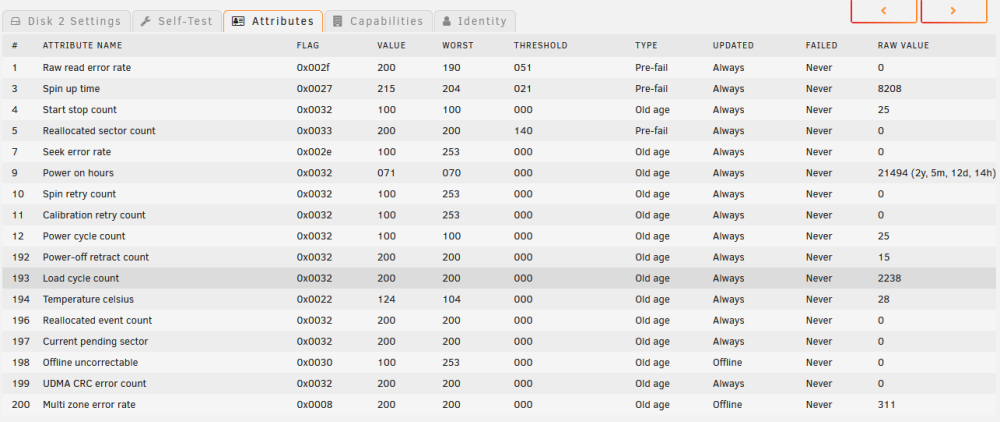
So I ran the Extended SMART test and receieved the below results. The only attribute that updated was Multi zone error rate with a value of 311 but if I'm reading it correctly the test stopped after just 20% completion? The drive is out of warranty. Any advice on whether it's still safe to use in an unraid array or how to test it further?

-
Thanks Jorge. Updated then rebooted and the error was cleared.

-
Installed unraid for the first time and as per the manual waited for the array to complete its initial parity check (19hours). After it completed the array reported errors on one of the disks. The SMART however seems to be ok (pic attached). Using the forum search, the advice generally seems to be check the power and sata connections, which I now have. Should I now re-run the parity check before formatting the drives and adding data? Should I be more concerned about these errors? pabraid-diagnostics-20221114-1223.zip



