it-guy92
Members
-
Joined
-
Last visited
-
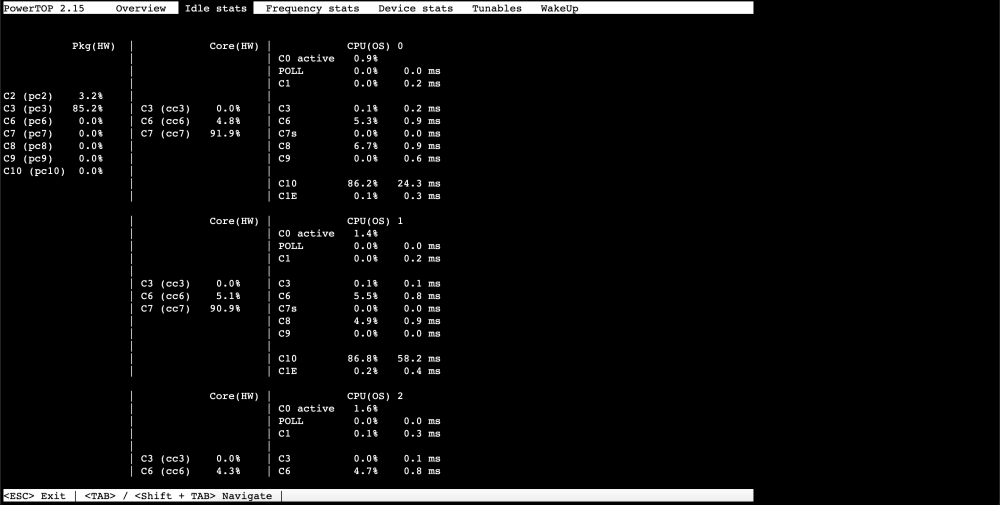
Hello guys, i bought an HP Prodesk 400 G5 with Intel® Core™ i5-9500T CPU. My goal is to setup a NAS with two SSDs and consume less energy than a Raspberry Pi 4. I want to use Home Assistant and some Servers like Plex, Samba, Adguard, Paperless, Zigbee2MQTT, MariaDB, Nextcloud and so on. Now i have made the following observation: With Proxmox and /etc/rc.d/rc.cpufreq powersave powertop --auto-tune and no VMs running i consume 1-2W Idle (Whole system measured with an Smart Plug). I can see in Powertop, the CPU goes to C10 state. Same setup, but with Unraid i consume 5-6W. No VMs, no shares, just Idle. Powertop show my CPU only on C3 state. I already installed the Intel-GPU-TOP plugin. But no difference. Can someone explain why Unraid consumes 3-6 times more Idle Power than proxmox? I live in Germany, Energy is very expensive and this is a deal breaker for me The screenshot shows Unraid.