




Skip to content
View in the app

A better way to browse. Learn more.

Unraid

A full-screen app on your home screen with push notifications, badges and more.

To install this app on iOS and iPadOS
  1. Tap the Share icon in Safari
  2. Scroll the menu and tap Add to Home Screen.
  3. Tap Add in the top-right corner.
To install this app on Android
  1. Tap the 3-dot menu (⋮) in the top-right corner of the browser.
  2. Tap Add to Home screen or Install app.
  3. Confirm by tapping Install.

Jose Magalhaes

Members
  • Joined

  • Last visited

Everything posted by Jose Magalhaes

  1. What about windows?
  2. I’ve tried to unzip the backup.zip file to get the config but none of the usual tools for Mac seems to work. any advice?
  3. the only folder on the flash drive after the creation of a new boot drive with the Unraid USB creator and the backup file is the syslinux? is this normal shouldn’t there be other files namely a boot config?
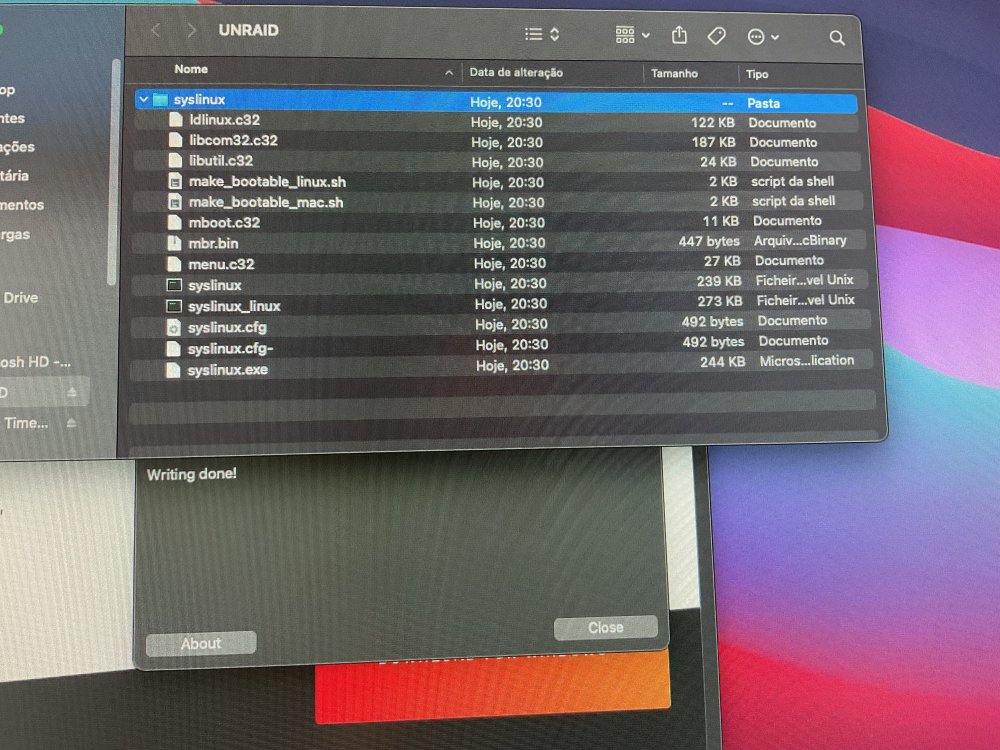
  4. My system crashed and will not boot again. I thought It to be a problem with the USB drive so got another drive, flashed the backup and still wont boot. The blue screen with the options of Unraid OS, safe mode, GUI, memtest,…, shows up but the Unraid OS goes into a Automatic boot loop and the other options are unresponsive. I made a new boot disk and the boot halts at the same blue screen. Any help please?

Account

Navigation

Search

Search

Configure browser push notifications

Chrome (Android)
  1. Tap the lock icon next to the address bar.
  2. Tap Permissions → Notifications.
  3. Adjust your preference.
Chrome (Desktop)
  1. Click the padlock icon in the address bar.
  2. Select Site settings.
  3. Find Notifications and adjust your preference.