





FarSide792
Members
-
Joined
-
Last visited
-
I just created a new VM with the same settings as before (except increasing memory) and pointed the vDisk to the old qcow2 file.

-
And with all that being said - I recreated the VM and pointed the new VM to the existing disk which magically resolved the issue *phew*
-
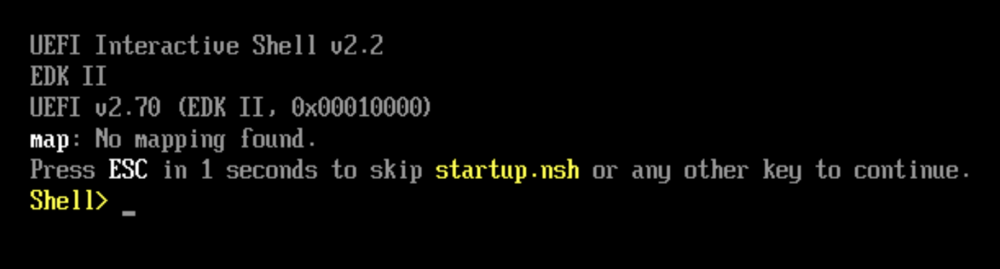
Long-time user of Home Assistant running as a VM. Recently started seeing Z-wave connectivity issues and noticed the HA VM console showing lots of "out of memory" errors, so I decided to increase the RAM on this VM from the default 1 GB to 4 GB. The next boot of the HA VM promptly reached the shell prompt, indicating, I assume, that it can't find the bootable disk: "map: No mapping found." I stumbled across another post where folks were having similar issues (https://forums.unraid.net/topic/102345-tried-to-back-up-my-vm-image-now-it-wont-boot-uefi-shell/), but everything seems to be set fine within my XML for this VM (the disk is labeled as qcow2): Not really sure where to turn now - the disk file still exists in the unraid file structure. Really hoping there is some simple fix that I'm overlooking! Any help is appreciated.

-
As a quick update to this - I finally got around to testing further. In an effort to ensure I had a backup of the original flash drive, I booted the Unraid box from it, and everything worked as it should. I rebooted a couple of times, and everything continued to work. Not really sure what caused things to work again, but I'm going to leave it alone for now, haha. Thanks for the suggestions, @JorgeB - I'll refer back to this thread and update it if the problem returns.
-
Finally got around to testing as suggested above @JorgeB . Interestingly enough, networking works as expected. I set up the new flash drive with 192.168.20.250, and I can connect to it from anywhere, and the Unraid box can ping the gateway. I grabbed a support bundle in case anything was comparable to the original one (attached). That said, what's the best way to migrate all previous shares/settings/etc to this new install? Thanks in advance! arsbackuptest-diagnostics-20251028-2002.zip
-
Running into a weird issue with an Unraid box - and I've exhausted my Google/forum searching capabilities, so looking to the forum for additional support. Issue: The Unraid box in question (192.168.20.240) cannot ping the gateway IP (192.168.20.1), but it can ping all other devices on the same subnet. This is a flat /24 subnet, and you can connect to the Unraid box via its IP when you are on a device connected to the same subnet (oddly, I cannot connect to it when VPN'd to this network - assuming a routing issue related to not being able to ping the gateway). This network is managed by a Unifi Dream Machine Pro (UDMP) , and it does not even show that the Unraid box is physically connected (it's greyed out). Troubleshooting so far: I've changed the IP address of the Unraid box to 192.168.20.250. This caused the UDMP to recognize it was physically connected for a short period, and to update the IP address on that physical connection, but it then returned to the same greyed-out status. The result of the IP change was the same as the original situation - you cannot ping the gateway, but you can connect to it and manage it from a device on the same network. The UDMP has also been rebooted to clear any ARP cache-related issues, but nothing changed there. I've attached a log bundle that was pulled during all of this testing a few weeks back for review and additional eyes. Any suggestions would be greatly appreciated! arsbackup-diagnostics-20251016-1147.zip
-
Thanks for the reply - the shares are still including the respective pool(s). Assuming new docker and livbert images were created, is there a way to just import the settings from my previously installed containers/vms? Edit: Ended up adding the containers back via templates from the previous installs and creating new VMs just pointing manually to the "old" vdisks. Sorry for my ignorance here!
-
I have multiple m.2 drives installed on my current Unraid setup and accidentally changed the filetype from btrfs to xfs and started the array back up - after noticing the issue I changed it back to btrfs however, all of the Docker containers and VMs that lived on this cache pool no longer show up in the inventory (they still exist and I can browse to them when the array is up). 🤦♂️ Any simple fix to restore these items to the docker/VM inventories?


