





OnlyDads
Members
-
Joined
-
Last visited
-
Wow I just wanted to thank you for alerting me about the bug - I will go through the update process. I've gotta get a few minutes to go over your post with a fine tooth comb but I need to figure out why is nginx running at all - so I will work my way through the outline provided. I never considered motherboard/ram/platform bug, but I suppose this could be the case as well - although it's all brand new and ran fine for a few years (i know things break) - but once I eliminate this nginx gremlin I will wait and see if it happens again, and then if needed swap memory/cpu/mobo in that order (cost and likelyhood of failure - although I probably should do motherboard before the chip but IDK) Sometimes I think I woudl prefer it to be one of those problems I can just throw money at and it goes away - but I actually kind of look forward to this - definitely causes some more gray hairs! If you have a paypal/venmo/etc you can DM me and I would like to buy you a beer or a 12 pack of pop or something. I really am very grateful for your time and willingness to look into this for me. I was extremely anxious about this process because I thought I was going to get literally murdered in the forums like I'm dialing into AOL Chat rooms lol. Thank you!
-
Hello folks, I am desperate for your help and expertise. I'm on a 7.0,1 build, approx. 12 drives, have had no real problems other than having to force my boot to usb every time it boots (I know that's not an unraid problem.) Server is doing it's thing, nothing going on, it's primarily a media server, and a place that I can test things out or try to improve my families digital encroachment in life. Randomly, we cannot access the server - typically this is alerted in plex or trying to access sonarr and radarr. I am unable to get the server to respond with the keyboard hooked to it - no error messages at all on the attached lcd. I do just see the login prompt at the bottom of my screen, yet unraid is unreachable by name or ip, unpingable. I believe I have the right logs setup - it truncated the prior log right at the error, and then started this new one. If it's not right, let me know and I'll try to correct that so the next time it happens I can post. syslog-previous is what i believe is the log prior to the crash, the culprit is in here - but idk. syslog is the newest one since i restarted the server, maybe that will help. You also will see some containers that are shut off - nginxproxymananger and things related to a reverse proxy I had setup but I broke something with it so I just disabled it all. I am sincerely grateful for any assistance or ideas. syslog-previous syslog
-
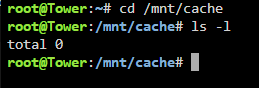
Sorry about that, i'm dense. nothing here.
-
I'm sorry, which folder would you like to see the contents for?
-
Yes, it persists even after disabling docker as well as restarts. If it's nothing to worry about I can ignore it from the plugin but I just thought I'd try to track this down to prevent a bigger issue in the future
-
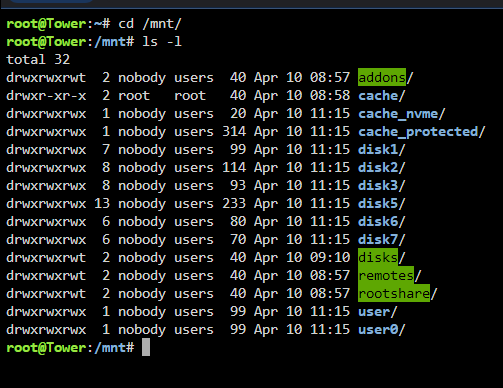
Here is a screenshot of the folder contents
-
Hello, I've had this error for quite some time but finally decided I should get it figured out. I'm a relative noob when it comes to linux/command line/ and unraid TBH but I'm learning all the time. Anyways, I get this error from the common problems plugin and I just can't track it down. I have attached my diagnostics - If someone can point me either where to look because I've went through a bunch and can't find what I see in other posts like this. Thanks in advance, I appreciate your time and energy. Daniel tower-diagnostics-20240410-1102.zip
