TwoWheelUnion
Members
-
Joined
-
Last visited
Everything posted by TwoWheelUnion
-
I just went to the APP section and it said I needed to update, so I did.
-
I did and it is functional again, but does doing that fix the problem?
-
Hey everyone. I just updated the Unraid on my server and I got this message after I log in headless and my actual server immediately afterwards. Fatal error: Uncaught Error: Call to undefined function var() in /usr/local/emhttp/plugins/dynamix.my.servers/include/state.php:144 Stack trace: #0 /usr/local/emhttp/plugins/dynamix.my.servers/include/state.php(130): ServerState->getWebguiGlobal('notify', 'unraidos') #1 /usr/local/emhttp/plugins/dynamix.my.servers/include/myservers2.php(15): ServerState->_construct() #2 /usr/local/emhttp/plugins/dynamix/include/DefaultPageLayout.php(605): include('/usr/local/emht...') #3 /usr/local/emhttp/plugins/dynamix/template.php(82): require_once('/usr/local/emht...') #4 {main} thrown in /usr/local/emhttp/plugins/dynamix.my.servers/include/state.php on line 144 Has this happened to anyone else, and does anyone have a fix? If there is no fix, how can I downgrade my Unraid to the previous version without being able to use the browser inerface?

-
I'm posting because I was wondering the same thing and I was hoping someone know how to set this up.
-
Thanks I made the changes. I'll leave it for a couple hours and see if that fixed the problem. I appreciate you taking the time. What I did was change the path to the place where the media is located and changed the transcode path to /dev/shm. Let's see what happens!
-
Thank you for the help. I have a question. When you say "Your first path should be changed from /mnt/user to /mnt/user/plexmedia (or whatever you call it)" Do you mean the NAME of the server or the location of the content? Dumb question I just want to be super clear so I can help others when they have this issue.
-
If it helps when I go into "logs" it says this. 2024-10-29 18:41:50,096 DEBG fd 8 closed, stopped monitoring <POutputDispatcher at 22418751581952 for <Subprocess at 22418748570848 with name plexmediaserver in state STARTING> (stdout)> 2024-10-29 18:41:50,096 DEBG fd 10 closed, stopped monitoring <POutputDispatcher at 22418745763616 for <Subprocess at 22418748570848 with name plexmediaserver in state STARTING> (stderr)> 2024-10-29 18:41:50,096 WARN exited: plexmediaserver (exit status 255; not expected) 2024-10-29 18:41:50,097 DEBG received SIGCHLD indicating a child quit 2024-10-29 18:41:52,100 INFO spawned: 'plexmediaserver' with pid 439 2024-10-29 18:41:52,848 DEBG 'plexmediaserver' stdout output: Error: Unable to set up server: sqlite3_statement_backend::loadOne: database disk image is malformed (N4soci10soci_errorE)
-
Thanks for the reassurance. I just wonder why jellyfin worked right away.
-
I asked Chat GPT about the error and it said this. The error code you're seeing indicates that your Plex Media Server is performing database migrations, which can happen after an update or when there are significant changes to the library. Here’s how you can address this issue: Wait it Out: Sometimes, the best approach is to simply wait. Database migrations can take some time, depending on the size of your library and the changes being made. I just wonder if it's trying to connect to an new IP or something.
-
So I tried this. I deleted the docker file then reinstalled previously installed apps now plex is doing this. Please help, any suggestions would be good. Jellyfin and tautulli are working perfectly after the docker delete and re-install.

-
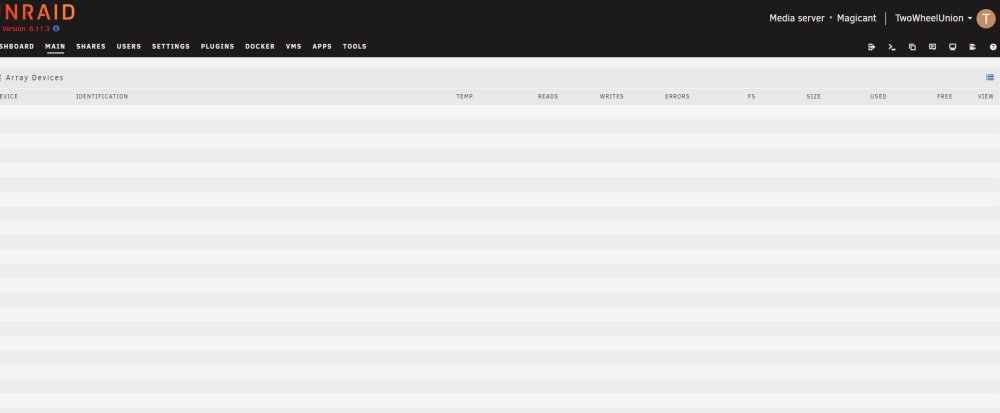
Thanks for this link. I am going to try doing this and I will get back to you.Where would I find my Plex docker template? Sorry I am new.Hey there. I have encountered a problem and I think it may have something to do with my server. I run a Plex server with my rig and currently it's not adding new content when I add it, however I can see that it SCANS the new files, just not add them. Up until recently I had the settings set to that new content goes to the cache driver first and I could use the MOVER to move the files to the array. I had that set up for about 2 years. Recently, when I move files from my PC to the server, they will show up on the server but when I scan they will not be added to Plex. I installed Jellyfin just to troubleshoot and Jellyfin picked up the files that Plex missed. Has anyone else had this problem? I've already done all the Plex clearing metadata and saving room troubleshooting that I have read online and it still doesn't work. Could I delete the Docker Image and just rescan the libraries? I honestly don't know how to proceed.Hello all, I came home from work and found that when I logged into my dashboard my CPU load was at 0% and none of the bars that show CPU usage are working. I went over to the MAIN tab and none of the array devices are listed. Here's what's weird, I can still access the server thru windows, I moved files and scanned it with Plex and it added the show. It is still playing shows and movies just fine and I am able to move files but nothing is registering on the dashboard. Does anyone know how to fix this? The picture was taken when I was transcoding a video file on Plex.