fredopato
Members
-
Joined
-
Last visited
-
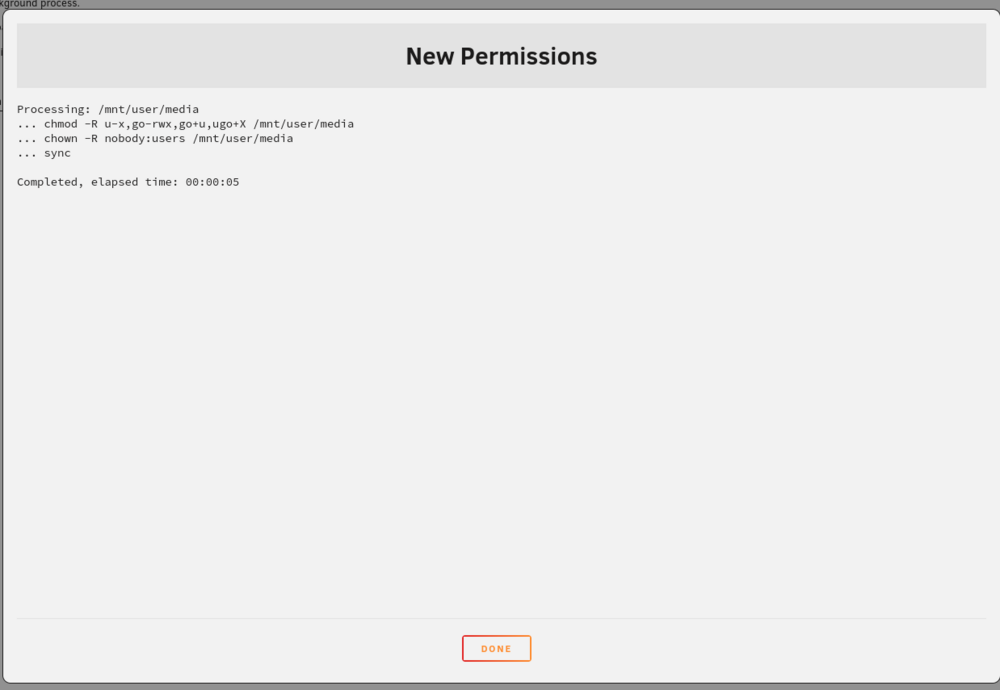
Thank you for this tip, unfortunatly it still says "No medium found". Also tried multiple reboots with no luck. root@EVOLI:/mnt/user0# ls -la total 36 drwxrwxrwx 1 nobody users 287 Jul 10 09:51 ./ drwxr-xr-x 13 root root 260 Jul 10 09:27 ../ <more shares> drwxrwxrwx 1 nobody users 72 Mar 24 12:35 media/ <more shares> root@EVOLI:/mnt/user0# cd media root@EVOLI:/mnt/user0/media# ls -la total 20 drwxrwxrwx 1 nobody users 25 Mar 23 14:26 $RECYCLE.BIN/ drwxrwxrwx 1 nobody users 72 Mar 24 12:35 ./ drwxrwxrwx 1 nobody users 287 Jul 10 09:51 ../ drwxrwxrwx 1 nobody users 65 Mar 23 14:26 System\ Volume\ Information/ drwxrwxrwx 1 nobody users 278 Sep 5 2023 anime_movies/ drwxrwxrwx 1 nobody users 4096 Apr 26 07:52 anime_series/ drwxrwxrwx 1 nobody users 4096 Jul 3 2023 kids_movies/ drwxrwxrwx 1 nobody users 4096 May 21 18:09 kids_tvseries/ drwxrwxrwx 1 nobody users 4096 May 21 18:08 movies/ drwxrwxrwx 1 nobody users 214 Mar 23 20:37 music/ drwxrwxrwx 1 nobody users 6 Dec 13 2022 musicvideos/ -rw-rw-rw- 1 nobody users 809 Apr 15 16:26 skript.sh drwxrwxrwx 1 nobody users 157 Mar 25 10:59 tvshows/ drwxrwxrwx 1 nobody users 27 Mar 23 20:37 vorlage/ root@EVOLI:/mnt/user0/media# touch test touch: cannot touch 'test': No medium found
-
Yeah sure, here is my diagnostics-zip evoli-diagnostics-20240710-1149.zip
-
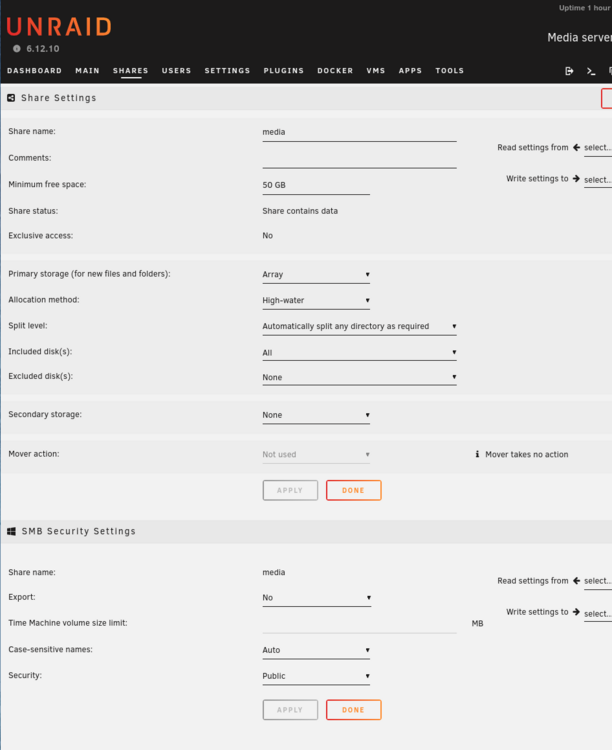
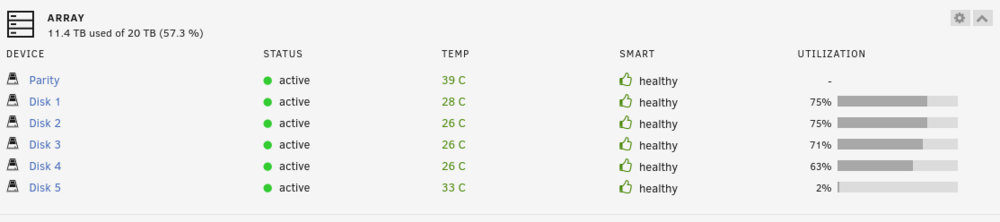
Hello together, I have a problem with a share, and I unfortunately don't know since when I had the problem. I cannot create files or folders in one share. Basically, I have multiple shares and the share "media" (I removed some of the shares in this snipped because they all look alike): /mnt/user0# ls -la total 36 drwxrwxrwx 1 nobody users 287 Jul 10 09:51 ./ drwxr-xr-x 13 root root 260 Jul 10 09:27 ../ <more shares> drwxrwxrwx 1 nobody users 46 Jul 8 19:57 isos/ drwxrwxrwx 1 nobody users 72 Mar 24 12:35 media/ drwxr-xr-x 1 nobody users 31 Feb 28 14:42 supersecretshare/ drwxrwxrwx 1 nobody users 8192 Jul 8 18:40 ultrasecretshare/ <more shares, even more secret> In the share "isos" I am able to create folders and files: mnt/user0# cd isos/ /mnt/user0/isos# mkdir test /mnt/user0/isos# touch testt /mnt/user0/isos# ls -la total 13294644 drwxrwxrwx 1 nobody users 46 Jul 10 10:29 ./ drwxrwxrwx 1 nobody users 287 Jul 10 09:51 ../ -rw-rw-rw- 1 root root 8596357120 Jul 2 06:37 ChuckNorris\ Linux.iso drwxrwxrwx 1 root root 6 Jul 10 10:28 test/ -rw-rw-rw- 1 root root 0 Jul 10 10:29 testt -rw-r--r-- 1 root users 5017356288 Apr 2 12:44 ubuntu-22.04.4-desktop-amd64.iso So far, so good. My Problem is in the share "media": /mnt/user0# cd media/ /mnt/user0/media# mkdir testt mkdir: cannot create directory ‘testt’: No medium found /mnt/user0/media# touch test touch: cannot touch 'test': No medium found mnt/user0/media# ls -la total 20 drwxrwxrwx 1 nobody users 25 Mar 23 14:26 $RECYCLE.BIN/ drwxrwxrwx 1 nobody users 72 Mar 24 12:35 ./ drwxrwxrwx 1 nobody users 287 Jul 10 09:51 ../ drwxrwxrwx 1 nobody users 65 Mar 23 14:26 System\ Volume\ Information/ drwxrwxrwx 1 nobody users 278 Sep 5 2023 anime_movies/ drwxrwxrwx 1 nobody users 4096 Apr 26 07:52 anime_series/ drwxrwxrwx 1 nobody users 4096 Jul 3 2023 kids_movies/ drwxrwxrwx 1 nobody users 4096 May 21 18:09 kids_tvseries/ drwxrwxrwx 1 nobody users 4096 May 21 18:08 movies/ drwxrwxrwx 1 nobody users 214 Mar 23 20:37 music/ drwxrwxrwx 1 nobody users 6 Dec 13 2022 musicvideos/ -rw-rw-rw- 1 nobody users 809 Apr 15 16:26 skript.sh drwxrwxrwx 1 nobody users 157 Mar 25 10:59 tvshows/ drwxrwxrwx 1 nobody users 27 Mar 23 20:37 vorlage/ I get the error "No medium found". This is my share config: I have enough free space: Has anyone any idea what's going on? Jellyfin can use the files inside and its a little while since I last copied something in there.
-
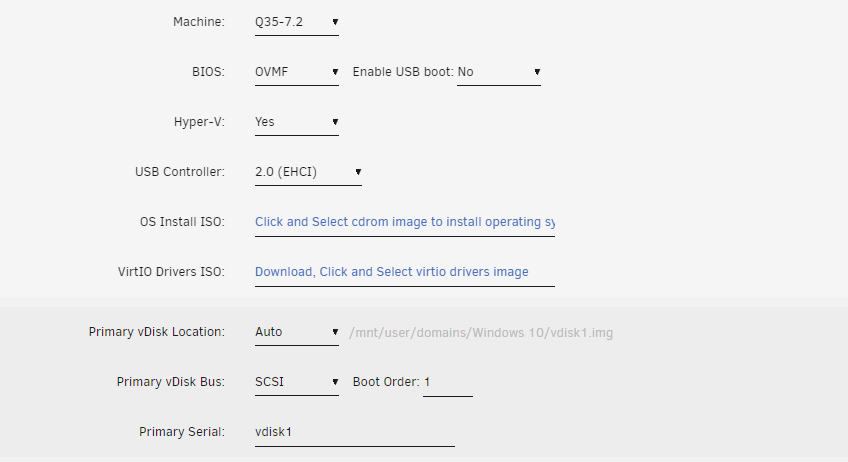
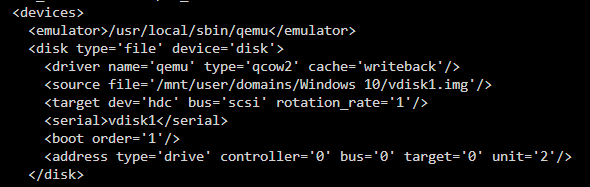
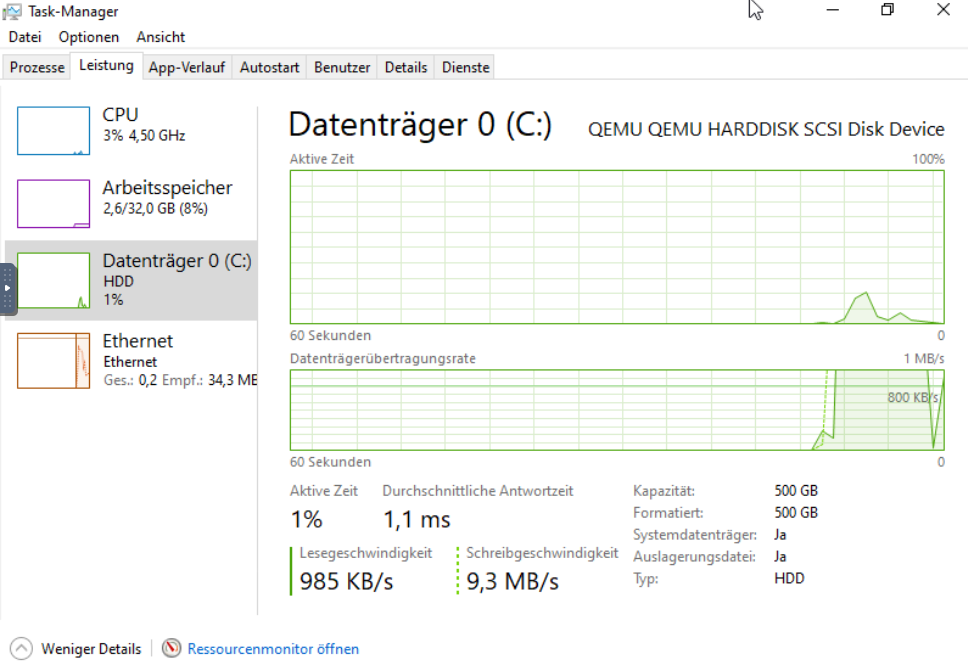
Hello, I created a Windows 10 VM in Unraid 6.12.6 with a vdisk as qcow2 and SCSI as adapter on a real SSD. Unfortunately, Windows shows the disk as HDD in Task manger. I followed the advice mentioned in the FAQ to add rotation_rate='1' with virsh edit "Windows 10" Task manager still shows the disk as HDD and defrag is still active. Is there a new method to mark a vdisk as SSD (like in Proxmox "SSD Emulation" checkbox)?
-
Thank you very much, I must have overlooked that 👍
-
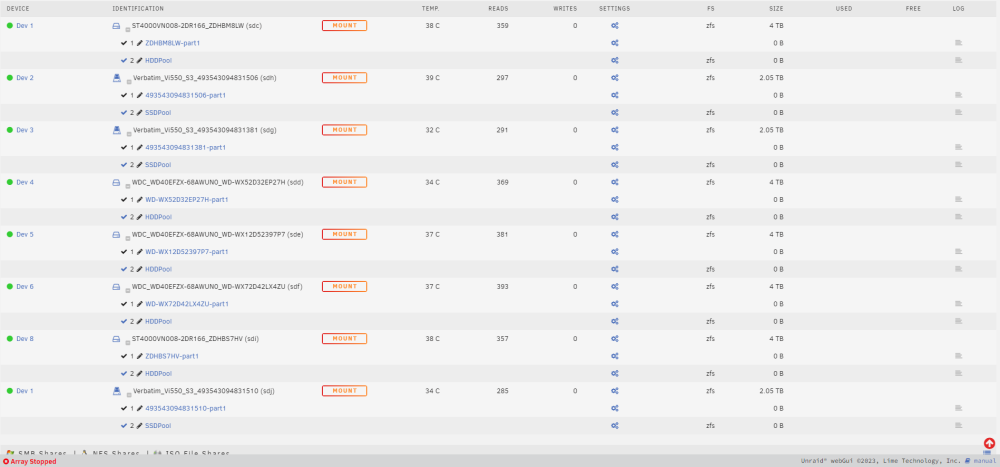
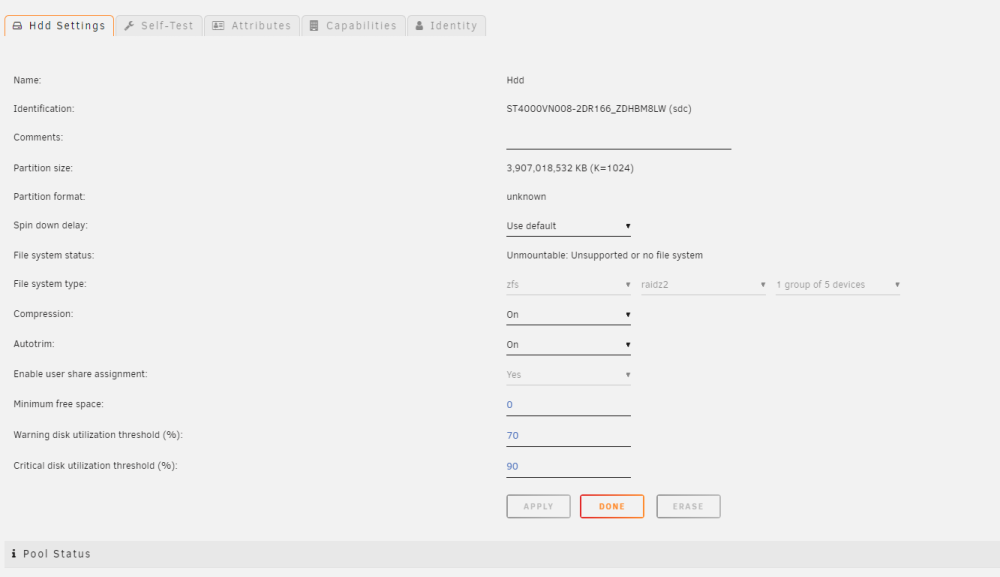
Hello, today I updated to unraid 6.12.2. After I exported my ZFS Pool "HDDPool" from truenas I tried to import it into unraid by creating a new pool and assigning all 5 drives. I did this also to a second pool called "SSDPool", but it has the same symptoms. After starting the Array, it says "UNMOUNTABLE: UNSUPPORTED OR NO FILE SYSTEM". At the moment I can't test if the pools are still functioning in truenas, but maybe you have some tips for me or point me to something I did wrong Here are some screenshots. nachtara-syslog-20230708-1450.zip


-
Thank you very much, that does the trick for me!
-
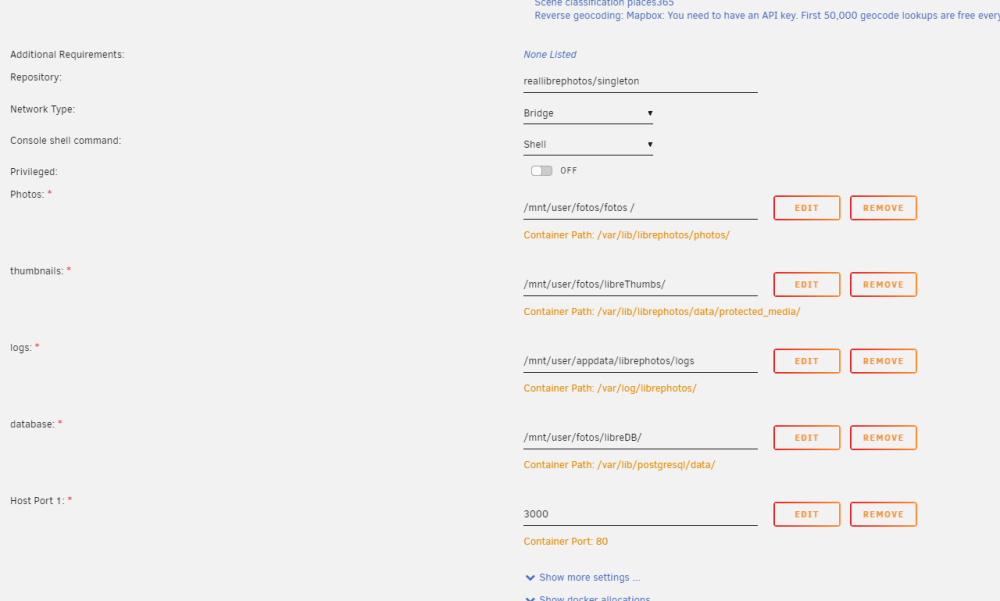
Hello I tried to install librephotos, but while installation I get the error With the notification that the Docker disk utilization reached 100%. The problem is with the IMAGE ID [a1462053d071] (6GB). My USB-Stick is 64GB and mostly empty. The share "fotos" has 7.77TB free with minimum free space of 50mb. Can someone help me how I can make the docker image disk larger? Or do you have any other tips? This is my configuration: Photos: /mnt/user/fotos/fotos/ thumbnails: /mnt/user/fotos/libreTumbs/ logs: /mnt/user/appdata/librephotos/logs database: /mnt/user/fotos/libreDB/