2Crazy4Nick
Members
-
Joined
-
Last visited
-
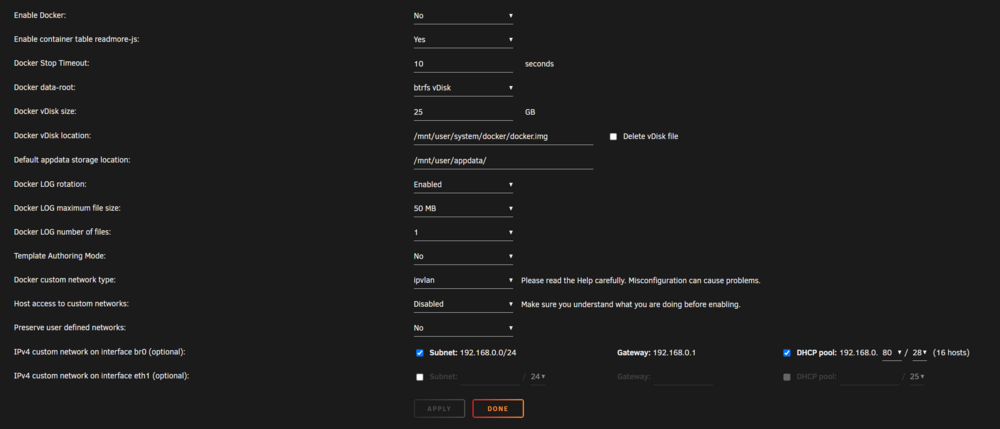
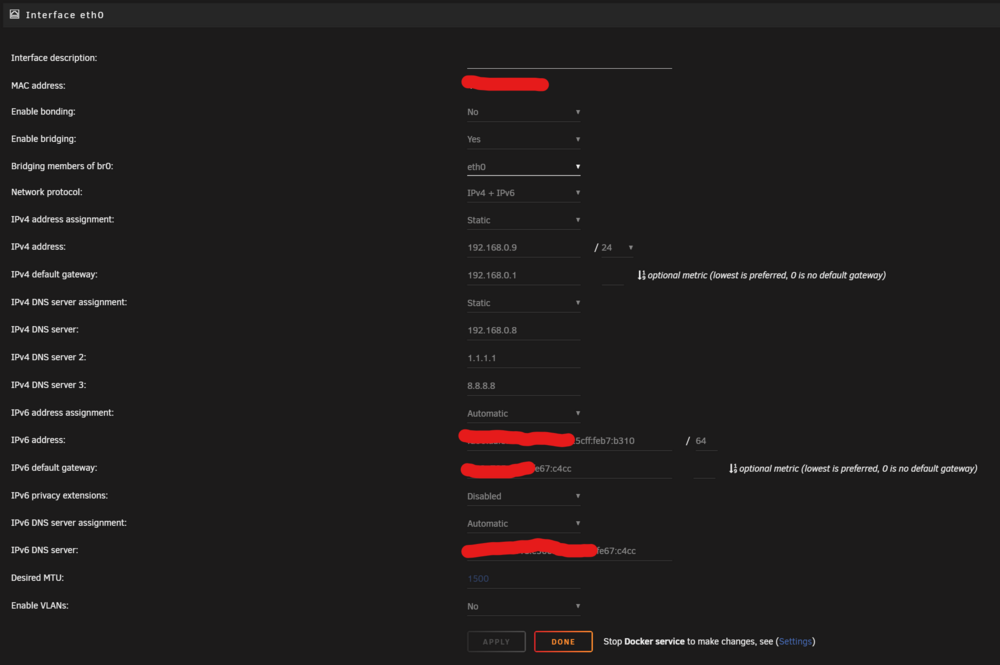
I have setup my HomeAssistant Container with br0 to be reachable via ipv6 through duckdns from the internet (DS-Lite, so IPv4 doesn't work) After coming home after a few days of being away I notice my HomeAssistant not being reachable through the app so I check through the Unraid GUI and find the container not having an IP. I tried restarting the container, docker itself, restarting the server when suddenly IPv6 itself vanishes from the docker setting for br0: Great, now there's two problems I don't know the reason for and how to solve them.. I'm by no means an expert but got everything to work a while back with the help of this post: Looking at the eth0 network config it does seem to get an IPv6 but br0 suddenly doesn't show the option anymore and my containers get no public ipv6 anymore. The no ipv4 problem only exists with HomeAssistant by the way, I have other containers running on br0 but those get an IPv4 assigned just fine. I'm thankful for any help at this point.. //Update: It appears the whole Unraid Server doesn't get a public IPv6 anymore. Other devices in my network do not have that problem but the server suddenly only has a local IPv6. I'm at a loss with my limited knowledge, but since the unraid server is the only device suddenly only getting a local IPv6 I would assume the root of the problem to be on the Unraid side of things? 2c4nas-diagnostics-20240530-1849.zip