retrorecall
Members
-
Joined
-
Last visited
-
🤣😅 ohhhh well this is embarassing haha thank you! cheers
-
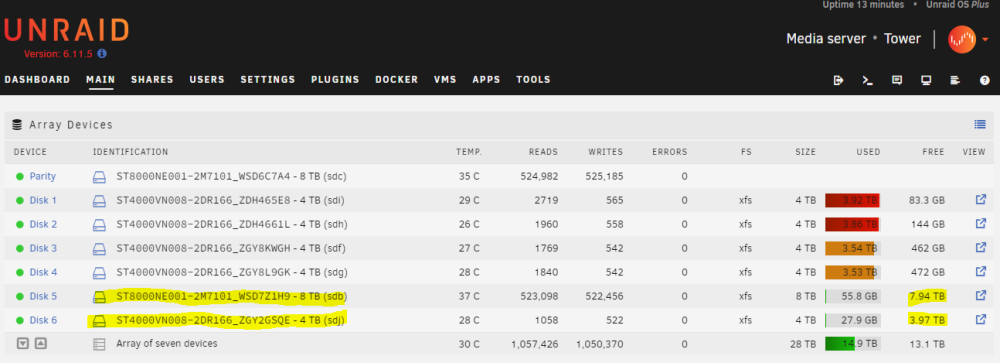
hmm I see.. maybe I am? I am pretty unsophisticated about all of this I am surprised I have been using this for awhile but not too knowledable! I just figure the disk 5 and 6 bar graph would read similar to disk 1-4, showing used at very little since they are new? Or perhaps it is showing the correct 'used' and I am reading them wrong (history of total data that was written in to the empty systems from preclear) and the bar should be read separate as the total available disk space now? sorry if that is confusing and doesn't make sense
-
Hello, I installed 2 new drives today (disk 5 and 6) one 8 TB and another 4TB. And for some reason they are showing up on the GUI bar as having more space than the actual drives (see below). Although the text shows the correct remaining space. my 8tB disk 5 is plugged in to my mobo directly and I believe the 4tb disk 6 is in to a controller card. Any help would be appreciated thank you. Attached diagnostics tower-diagnostics-20221220-1116.zip