





Kivaj
Members
-
Joined
-
Last visited
Everything posted by Kivaj
-
Okay, but then i can't just ignore it, right? i could do that with the backup drive, but im afraid that i stop the array for some reason from outside home and i cannot physically remove it. Upgrade it's steep with the new pricing just to have an extra drive tbh
-
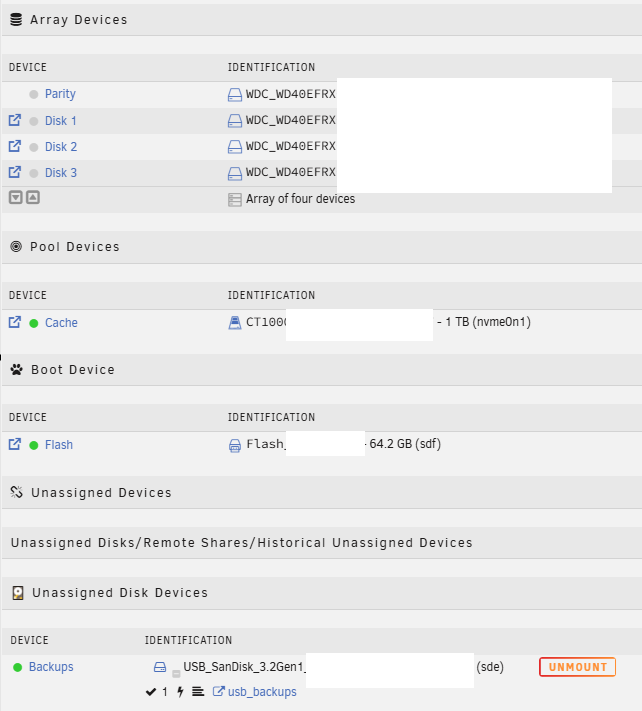
Hello! This is probably old news, but i must be missing something. I have a legacy Basic license, and i have the following setup: Array: 3 HDD + 1 HDD parity Cache: 1 SSD Unraid USB 1 extra USB, inside Unassigned Disk Devices, for Backups My main computer broke and i installed a cheap SSD in a free M2 slot since i needed a Windows machine for work (I know, VM's, but i still needed a physical one, so it seemed easier). I installed it, use Windows, and when i fixed my PC i thought: Was a cheap SSD, let's leave it there just in case When i turn on Unraid, it told me that i had too many devices and i wasn't able to run my array with my current license. My question is.. Why? I mean, AFAIK the USB with Unassigned Disk Devices is not part of the array, so i should have 4 HDD + Cache SSD, still a free slot right? How can i have this SSD here without using it? And if i want to use it, i should be able to, right? I was thinking to use it for the Minecraft server so my HDDs can sleep while the server is on if the rest is not in use, but my main concert is just to have it connected, since it's easier to just not loose it, and a Windows backup that doesn't touch Unraid could be useful. Thanks!
-
I mean, now it's working, yes, but its never after the first reboot, but after a few, that's what i'm trying to fix
-
I did, probably is not what it broke it, but its also not helping. Thanks! Still clueless, but every little thing is a thing that could be causing problems and its not there anymore
-
Inside the Ethernet adapter is where only i can see 4 items related to networks, not sure if you mean that: Edit: Yup, for some reason i have bound active in my NIC, a nonsense because i only have one physical controller, and when i plug another one is an USB for debugging. Removed. Could this be related? I was just supposed to have some virtual networks for the *ARR services

-
Yeah, i only get the diagnostic file when it boots, not sure if you can get it otherwise. It only should be one NIC yes, how can i check that? @JorgeB
-
Im trying to check the syslog.txt, but im not sure about what i should be looking for
-
It happened again. i buy some more fans to lower the temperature and i shutdown the server (I was missing a cable, so i will do it again when i have it). Last time i needed to restore a backup, and i modified the network from fixed ip to DHCP and did the IP reservation at router level (like before), but not fixing the IP in Unraid, so i can discard if its the server, the network or what. The USB now is one of the reccomended ones, and it's new littlekraken-diagnostics-20241016-1257.zipAny idea?
-
Now it worked on the 4th reboot, after plugging and unplugging the Ethernet cable, but that was probably just a coincidence. Router (OpenWRT) says 100mb until it really boots, and then it says 1GB. Parity check started, so i'm guessing that it had SO booted but no IP. Could it be something about the reserved IP for the device?
-
Sorry, i was swamped with the job and i totally forgot about this. Router shouldn't be the issue (More devices there), changing port is the same issue and the same cable with my phone and an type-c Ethernet adapter works, so it's weird. Today i rebooted after a week to switch one bad fan, and same issue. I'll switch cables just in case
-
Hello there! I've noticed a slow transference speed, and not being sure about what can it be, i restarted my Unraid machine. After the reboot, i wasn't able to make the server get an IP. This is not the first time that it happens. I replaced my flashdrive for one with a better quality, but it seems that it wasn't doing well. I tried to reboot, not connecting to the second router but directly to the main one, putting an HDMI to see the output and .. nothing. No HDMI output, no IP, not even lights in the ethernet port. I removed the assigned IP for the server, and it booted, but when i went to my PC to see how was everything i didn't have an IP anymore. I tried to restore a month-old backup, and same problem. I tried the USB in my main PC and it doesn't boot. New USB, same backup copied... it works! So i thought: The USB was not a good one, let's replace it. I moved the new USB to the Unraid machine and no boot. Same for the old one. After a few reboots, i noticed that my MSI MoBo has turned on the "No OS" light, so i keep trying until i don't see the light anymore, and it booted again, but when i moved the server back in place, no ip again I opened the server, removed and put the RAM again and, after a few tries, it booted again, and now it has been 15 minutes and i still have my IP What could go wrong? I'm gonna order one of the USB reccomeneded in the SpaceInvaderOne video, because i used a new one that i had laying around, but i'm not sure if that is the issue (And it seems that i can't move my key anymore, should i ask support?) I'm not sure about how to debug this, i will need to open the case again to add more fans now that i've found a splitter for the old connector, but any thoughts or ideas will be appreciated. Thanks! I've ran the diagnostics file just in case, but i'm guessing that the old boots won't be there littlekraken-diagnostics-20240924-1737.zip
