AshleyS
Members
-
Joined
-
Last visited
-
Alright, will do! Just one more thing, is this a btrfs, nvme or me being silly issue? From what I've seen it seems that people with similar issues have swapped to xfs as a "solution". Thank you for your help, I checked your profile and the amount of people you help is crazy! Thanks again 😄
-
It was not a correcting scrub. I checked "Repair corrupted blocks" and this was the result 😬

-
Thank you so much for the reply! I have just ran a scrub (before swapping the slots) and this is the result. Doesn't look good. Is it still safe to swap the slots over?

-
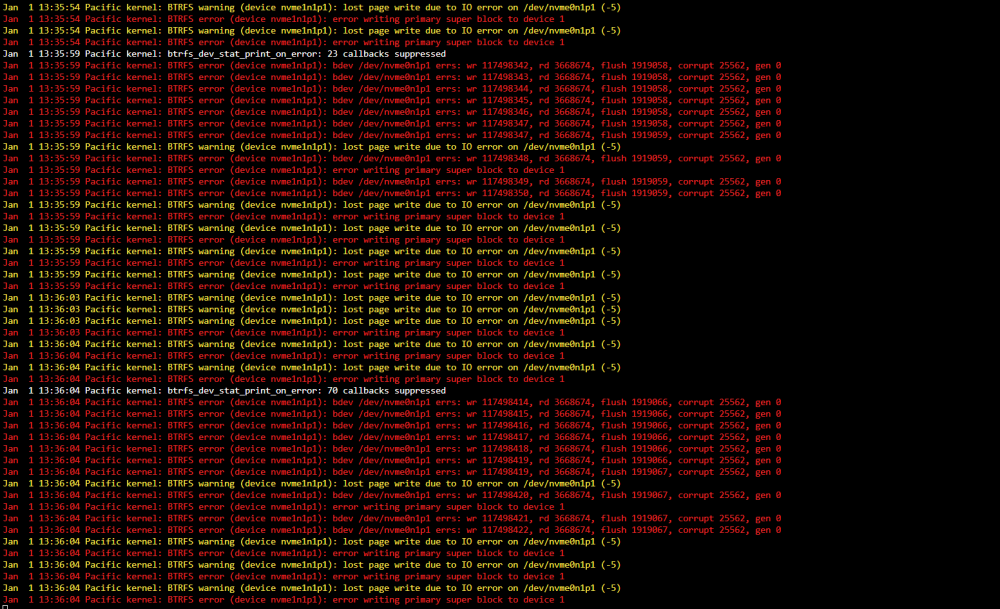
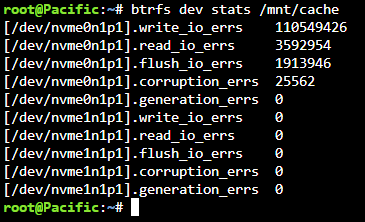
Happy new year! I have tried looking up these errors and am not sure exactly what steps to take so I have turned to the forums. Setup I am running - Unraid Version: 6.11.5 I am using - Community Applications, Dynamix File Manager, My Servers and User Scripts. Docker - Cloudflare-DDNS, mariadb, nextcloud, plex, swag and vaultwarden. I've got two Sabrent Rocket 4.0 1TB's running in raid 1 as cache. X3 18TB Seagate Exos HDD'S - in dual parity (plan to add more in the future). The Problem Last month I was listening to music on plexamp and it suddenly stopped. I checked the server and it said cache drive nvme0n1 was missing. Thoughtlessly I decided to reboot the system (Through the Unraid option). Once it had booted back up the drive appeared again and that's when I decided to get a second nvme and run them in raid 1. After rebooting again the drive showed up as missing, after a few more reboots (I realise this probably isn't too smart) The drive shows up again. This is still the case on reboots now. When the server starts back up, sometimes the nvme is missing sometimes its not. I checked my syslog and it keeps showing errors on my cache drive (See image) I searched this error and found a post saying to run this command (btrfs dev stats /mnt/cache) so I did (See image) The post said all of the above is meant to show 0. Plan From my understanding this is a problem with the cache drive itself and I am planning on replacing the nvme. Is this the correct thing to do or is there something I can to do in software? Thank you for your time - Ashley pacific-diagnostics-20230101-1312.zip