





obesepanda
Members
-
Joined
-
Last visited
Everything posted by obesepanda
-
I ran the first line once then ran both the commands at once, it's prolly why it says '/x' exists. root@UNRAID:~# mkdir /x mount -v /dev/sdag1 /x mkdir: cannot create directory ‘/x’: File exists mount: /x: can't read superblock on /dev/sdag1. dmesg(1) may have more information after failed mount system call.
-
It looks like it's still showing the same thing Label: none uuid: d5aaad24-9cef-4355-873e-2785ad43db0d Total devices 4 FS bytes used 3.84TiB devid 1 size 1.82TiB used 1.82TiB path /dev/sde1 devid 2 size 1.82TiB used 1.82TiB path /dev/sdc1 devid 3 size 232.88GiB used 232.88GiB path /dev/nvme1n1p1 devid 4 size 232.88GiB used 232.88GiB path /dev/nvme2n1p1 Label: none uuid: d452fc5f-ee99-46fa-9bbe-682ab68e56c2 Total devices 2 FS bytes used 120.68GiB devid 1 size 447.13GiB used 146.01GiB path /dev/sdd1 devid 2 size 447.13GiB used 146.01GiB path /dev/sdf1 Label: none uuid: f55cb54a-2452-494e-9340-9780bde56654 Total devices 1 FS bytes used 10.10GiB devid 1 size 447.13GiB used 15.02GiB path /dev/sdj1 Label: none uuid: 851912fa-e718-4fdd-8c29-7d58c7cfb7bf Total devices 2 FS bytes used 332.00KiB devid 1 size 223.57GiB used 2.03GiB path /dev/sdl1 devid 2 size 223.57GiB used 2.03GiB path /dev/sdk1 Label: none uuid: f67d589a-9d63-4c57-866d-b0508a799559 Total devices 1 FS bytes used 163.14GiB devid 1 size 232.88GiB used 231.02GiB path /dev/nvme0n1p1 Label: none uuid: 89cf4528-ee9b-4964-8291-4bc0331a689b Total devices 1 FS bytes used 17.75GiB devid 1 size 60.00GiB used 35.02GiB path /dev/loop2 Label: none uuid: 63882d78-2006-4da2-85af-93eb4cbb5910 Total devices 1 FS bytes used 2.76MiB devid 1 size 1.00GiB used 238.38MiB path /dev/loop3 warning, device 1 is missing Label: none uuid: 20662da0-afcb-4ae1-bc89-cd6d2cf8e959 Total devices 4 FS bytes used 20.00TiB devid 2 size 2.73TiB used 2.73TiB path /dev/sdx1 devid 3 size 2.73TiB used 2.73TiB path /dev/sdah1 devid 4 size 12.73TiB used 12.67TiB path /dev/sdg1 *** Some devices missing
-
root@UNRAID:~# btrfs-select-super -s 1 /dev/sdag1 using SB copy 1, bytenr 67108864
-
I let it run for about five mins and got the following root@UNRAID:~# wipefs /dev/sdag1 DEVICE OFFSET TYPE UUID LABEL sdag1 0x0 xfs d0b9fbf1-53f0-4560-9002-3cef4869bdde sdag1 0x10040 btrfs 20662da0-afcb-4ae1-bc89-cd6d2cf8e959 root@UNRAID:~# dd if=/dev/sdag bs=16M status=progress 2>/dev/null | hexdump -C | grep '_BHRfS_M' 00018040 5f 42 48 52 66 53 5f 4d 9f 3f 01 00 00 00 00 00 |_BHRfS_M.?......| 04008040 5f 42 48 52 66 53 5f 4d 9f 3f 01 00 00 00 00 00 |_BHRfS_M.?......|
-
root@UNRAID:~# fdisk -l /dev/sdag Disk /dev/sdag: 2.73 TiB, 3000592982016 bytes, 5860533168 sectors Disk model: TOSHIBA HDWD130 Units: sectors of 1 * 512 = 512 bytes Sector size (logical/physical): 512 bytes / 4096 bytes I/O size (minimum/optimal): 4096 bytes / 16773120 bytes Disklabel type: gpt Disk identifier: 31A4A078-D172-40EE-B09B-649E600FEB4E Device Start End Sectors Size Type /dev/sdag1 64 5860533134 5860533071 2.7T Linux filesystemI get the following when running it.
-
I'm a bit confused. That pool only has 4 drives and are they not all present? UNRAID shows green on them. I'm also not seeing any failed SMART reports for any of the drives.
-
I believe it was set as RAID 0. I didn't really care about the data. Is it possible to recover it without losing everything?
-
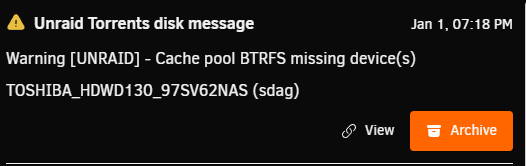
So one of my drives was acting up, so I stopped the array and then pulled out one of the drives for my other pools by accident. It appears doing so, caused it to get an error message. When running btrfs fi show I get the following Label: none uuid: 20662da0-afcb-4ae1-bc89-cd6d2cf8e959 Total devices 4 FS bytes used 20.00TiB devid 2 size 2.73TiB used 2.73TiB path /dev/sdx1 devid 3 size 2.73TiB used 2.73TiB path /dev/sdah1 devid 4 size 12.73TiB used 12.68TiB path /dev/sdg1 *** Some devices missing I've tried to reboot the server and the issue is still there. Any ideas on how I can recover it without losing any data? unraid-diagnostics-20260101-1913.zip

-
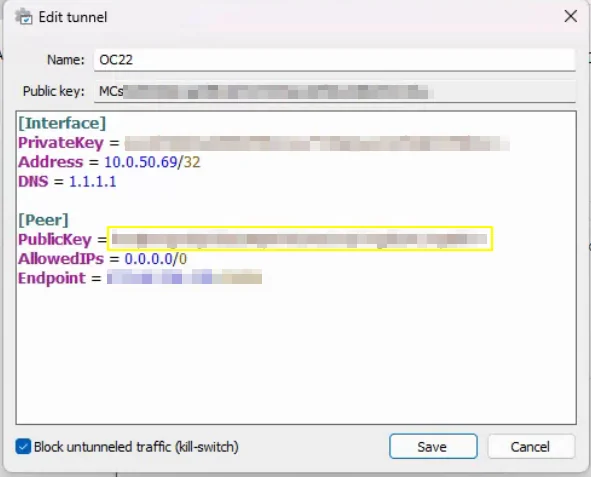
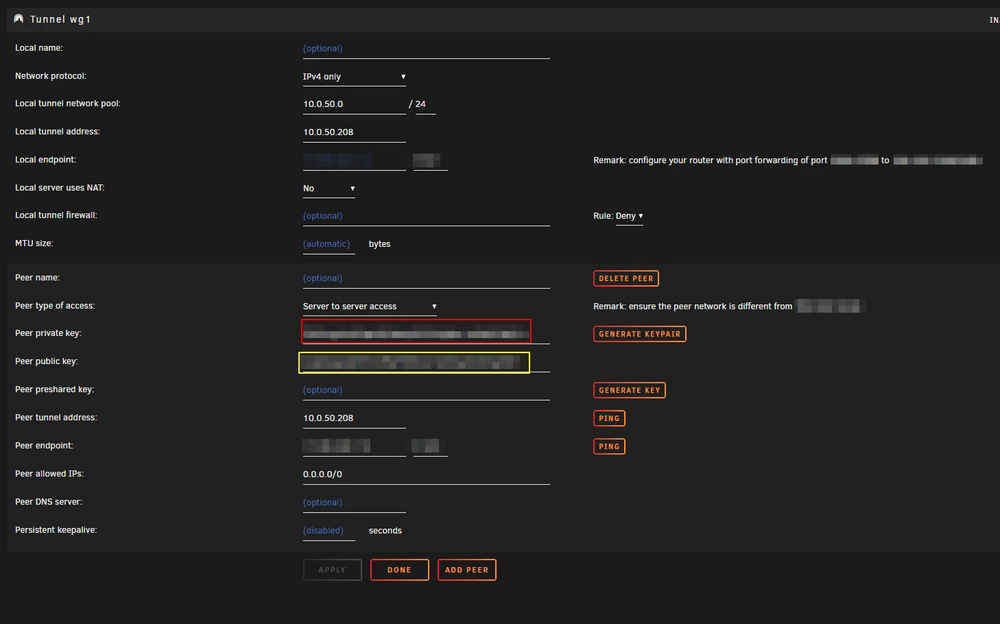
So I'm trying to get my Unraid Server to join a Wireguard connection that my Omada ER605 is hosting at a remote location. I am able to connect to it with another Windows laptop, so I know the connection is set up correctly. I'm having issues connecting with Unraid. I tried to export the config from the working machine over to Unraid, but that didn't work. I'm able to get Data Sent, but no Data received. I did notice that on the Windows laptop, the Public Key at the top is supposed to placed under Omada's Peer (see third screenshot Public Key). How do I get that Public Key for Unraid? I think if I can find that key I should be all set. Windows Wireguard Settings Omada Settings Unraid Setting


-
Is it possible to change the profile to "default" or non RAID without losing any data? If so, how?
-
One of my pools seems to have glitched up and it's saying there's no free space even though the total size is 9TB. It says only 6.69TB is used and I tried to add in another 1TB drive to see if that helps, but it did not. I tried to rebalance it, but that didn't work and deleting the files via Windows "appears" to delete it, but when I confirm with console the file is still there. I also cannot delete or create a folder in console as it gives me a Read-Only file system error. The drive I added doesn't even register as the total size should be 10 TB Overall: Device size: 8.19TiB Device allocated: 6.15TiB Device unallocated: 2.03TiB Device missing: 0.00B Device slack: 10.50KiB Used: 6.08TiB Free (estimated): 2.11TiB (min: 1.09TiB) Free (statfs, df): 0.00B Data ratio: 1.00 Metadata ratio: 2.00 Global reserve: 512.00MiB (used: 0.00B) Multiple profiles: no Data Metadata System Id Path RAID0 RAID1 RAID1 Unallocated Total Slack -- ---------- --------- -------- --------- ----------- ------- -------- 1 /dev/sdr1 2.72TiB 7.00GiB 32.00MiB 1.04MiB 2.73TiB 3.50KiB 2 /dev/sdab1 2.72TiB 7.00GiB 32.00MiB 1.04MiB 2.73TiB 3.50KiB 3 /dev/sdaa1 711.49GiB - - 2.03TiB 2.73TiB 3.50KiB -- ---------- --------- -------- --------- ----------- ------- -------- Total 6.14TiB 7.00GiB 32.00MiB 2.03TiB 8.19TiB 10.50KiB unraid-diagnostics-20240103-1444.zip

-
I ended up hitting shutdown on the GUI and after 5-10 mins the server finally shutdown. I was able to start the array without any issues.
-
I'm not sure what is happening, but UNRAID cannot stop my array. It looks looping back with this error message. Jun 1 10:15:40 UNRAID emhttpd: Unmounting disks... Jun 1 10:15:40 UNRAID emhttpd: shcmd (1731): umount /mnt/docker Jun 1 10:15:40 UNRAID root: umount: /mnt/docker: target is busy. Jun 1 10:15:40 UNRAID emhttpd: shcmd (1731): exit status: 32 Jun 1 10:15:40 UNRAID emhttpd: Retry unmounting disk share(s)... Jun 1 10:15:45 UNRAID emhttpd: Unmounting disks... Jun 1 10:15:45 UNRAID emhttpd: shcmd (1732): umount /mnt/docker Jun 1 10:15:45 UNRAID root: umount: /mnt/docker: target is busy. Jun 1 10:15:45 UNRAID emhttpd: shcmd (1732): exit status: 32 Jun 1 10:15:45 UNRAID emhttpd: Retry unmounting disk share(s)... unraid-diagnostics-20230601-1018.zip
-
That was it. I should've turned off my dockers one by one to troubleshoot. Thanks for the help!
-
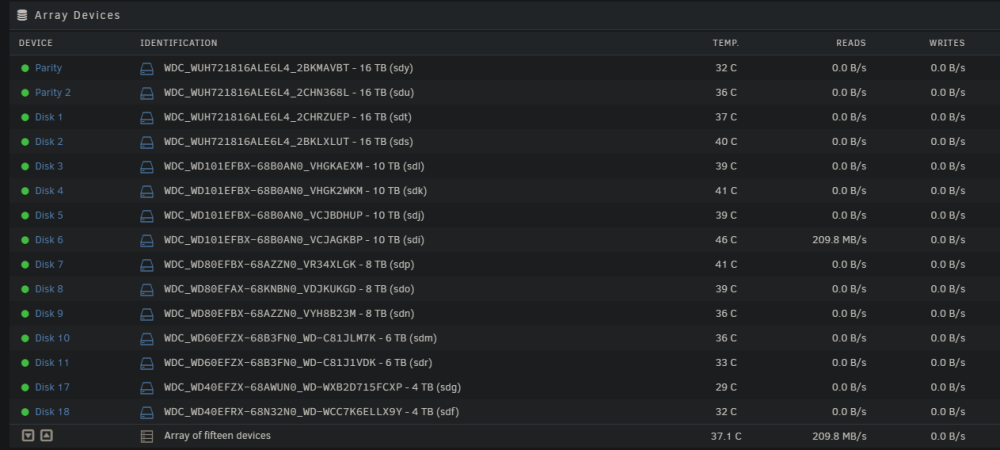
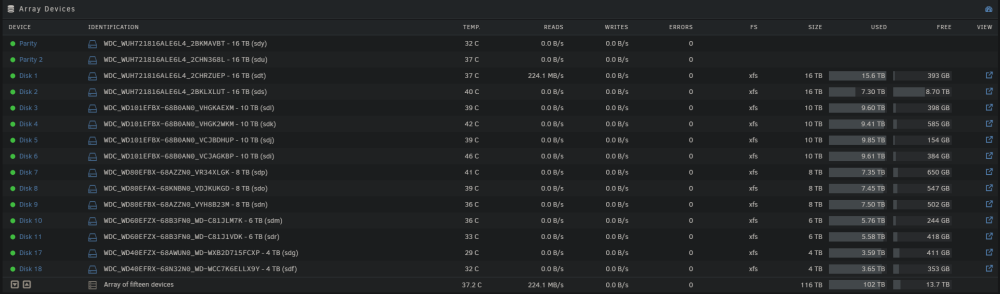
I'm not sure what is causing it, but I've noticed that a drive will randomly read itself at full speed, then it will switch off to another drive. It will rinse and repeat between diff drives and I haven't been able to figure out why. I checked the contents in those drives and no apps/users are using it. I've tried to restart the server, and it will be fine then after 5 mins or so, it will start back up. Any ideas? (When I first started to write this) (5 mins later) unraid-diagnostics-20230522-1146.zip
-
Ahh got it. Thank you so much for all the help!
-
It looks like adding another 2TB SSD got me back in. I took a look at the usage and it appears that there's still of space that's unallocated. I assume the best approach here is to downsize/separate these drives into diff pools. How would I go about that without breaking anything? Data Metadata System Id Path RAID0 RAID1 RAID1 Unallocated Total Slack -- -------------- --------- -------- --------- ----------- --------- ----- 1 /dev/nvme0n1p1 199.55GiB - - 33.33GiB 232.88GiB - 2 /dev/nvme1n1p1 199.52GiB - - 33.36GiB 232.88GiB - 3 /dev/nvme2n1p1 199.55GiB - - 33.33GiB 232.88GiB - 4 /dev/sdb1 192.24GiB - - 31.33GiB 223.57GiB - 5 /dev/sdc1 104.24GiB - - 15.00GiB 119.24GiB - 6 /dev/sde1 104.24GiB - - 15.00GiB 119.24GiB - 7 /dev/sdd1 451.55GiB 4.00GiB 32.00MiB 1.37TiB 1.82TiB - 8 /dev/sdh1 451.55GiB 4.00GiB 32.00MiB 1.37TiB 1.82TiB - -- -------------- --------- -------- --------- ----------- --------- ----- Total 1.86TiB 4.00GiB 32.00MiB 2.91TiB 4.77TiB 0.00B Used 1.85TiB 3.09GiB 128.00KiB
-
Got it. Just to improve my understanding of how my cache is supposed to function. Why would it say that I have 1.79TB max space on my cache when the GUI is reporting 3.2TB? What am I doing wrong that's preventing it from using all the space?
-
Awesome. I just have a few quick questions here. When I add another 2TB SSD will the data "recover" itself? Right now it looks like anything that was on my cache has been wiped out. When installing the secondary 2TB SSD, will I need to do anything special? I want to be sure that I'm using all the allocated space for it. Is there a way to reclaim the unallocated space on the current 2TB SSD once I add on the new one?
-
Sorry for my confusion here, but how is that my 2TB still has 1.16TB of unallocated space? Shouldn't it be in use? Would I be able to allocate the space over? Or will I have to get another drive with at least 1TB?
-
I'm not sure what is happening. It started yesterday and I pretty much just wiped/formatted my cache drives when it first occurred. Today the same thing happened. I looked at the logs and I think it may be a issue with one of my drives, but I'm not sure. I did recently install a 2TB SSD last week, but I don't think that could be the cause. What happens is that my cache drive will read as full, and all contents in them will be wiped out. All docker containers will freeze and I can't access them. They will still appear on the list, but I can't access them. Any chance I can still recover any data? May 11 08:24:27 UNRAID kernel: ------------[ cut here ]------------ May 11 08:24:27 UNRAID kernel: BTRFS: Transaction aborted (error -28) May 11 08:24:27 UNRAID kernel: WARNING: CPU: 0 PID: 13355 at fs/btrfs/inode.c:3329 btrfs_finish_ordered_io.isra.0+0x67e/0x69b May 11 08:24:27 UNRAID kernel: Modules linked in: xt_CHECKSUM ipt_REJECT nf_reject_ipv4 ip6table_mangle ip6table_nat vhost_net tun vhost vhost_iotlb tap xt_connmark xt_mark iptable_mangle xt_comment iptable_raw xt_nat xt_tcpudp veth xt_conntrack nf_conntrack_netlink nfnetlink xfrm_user xfrm_algo xt_addrtype br_netfilter xfs md_mod tcp_diag inet_diag efivarfs iptable_nat xt_MASQUERADE nf_nat nf_conntrack nf_defrag_ipv6 nf_defrag_ipv4 wireguard curve25519_x86_64 libcurve25519_generic libchacha20poly1305 chacha_x86_64 poly1305_x86_64 ip6_udp_tunnel udp_tunnel libchacha ip6table_filter ip6_tables iptable_filter ip_tables x_tables bridge stp llc bonding tls wmi_bmof x86_pkg_temp_thermal intel_powerclamp coretemp kvm_intel kvm crct10dif_pclmul crc32_pclmul crc32c_intel ghash_clmulni_intel aesni_intel crypto_simd cryptd rapl intel_cstate intel_uncore i915 mpt3sas iosf_mbi drm_buddy i2c_algo_bit ttm i2c_i801 raid_class nvme i2c_smbus May 11 08:24:27 UNRAID kernel: BTRFS: error (device nvme0n1p1: state A) in btrfs_finish_ordered_io:3329: errno=-28 No space left May 11 08:24:27 UNRAID kernel: scsi_transport_sas igc drm_display_helper nvme_core btusb May 11 08:24:27 UNRAID kernel: BTRFS info (device nvme0n1p1: state EA): forced readonly May 11 08:24:27 UNRAID kernel: btrtl btbcm drm_kms_helper btintel ahci libahci input_leds bluetooth drm joydev led_class ecdh_generic ecc intel_gtt agpgart i2c_core vmd syscopyarea sysfillrect sysimgblt fb_sys_fops fan thermal wmi video backlight tpm_crb tpm_tis tpm_tis_core tpm acpi_tad acpi_pad button unix [last unloaded: md_mod] May 11 08:24:27 UNRAID kernel: CPU: 0 PID: 13355 Comm: kworker/u40:4 Not tainted 5.19.17-Unraid #2 May 11 08:24:27 UNRAID kernel: Hardware name: ASUS System Product Name/TUF GAMING Z690-PLUS WIFI, BIOS 1601 07/07/2022 May 11 08:24:27 UNRAID kernel: Workqueue: btrfs-endio-write btrfs_work_helper May 11 08:24:27 UNRAID kernel: RIP: 0010:btrfs_finish_ordered_io.isra.0+0x67e/0x69b May 11 08:24:27 UNRAID kernel: Code: e8 20 b1 4f 00 0f 0b 89 e9 ba 13 0d 00 00 e9 e6 fd ff ff 83 fd e2 0f 84 d6 fd ff ff 89 ee 48 c7 c7 dc 1b 0f 82 e8 fb b0 4f 00 <0f> 0b e9 c1 fd ff ff 48 81 c4 98 00 00 00 5b 5d 41 5c 41 5d 41 5e May 11 08:24:27 UNRAID kernel: RSP: 0018:ffffc90003347d78 EFLAGS: 00010286 May 11 08:24:27 UNRAID kernel: RAX: 0000000000000000 RBX: ffff888035af12e8 RCX: 0000000000000027 May 11 08:24:27 UNRAID kernel: RDX: 0000000000000001 RSI: ffffffff820d7be1 RDI: 00000000ffffffff May 11 08:24:27 UNRAID kernel: RBP: 00000000ffffffe4 R08: 0000000000000000 R09: ffffffff828653f0 May 11 08:24:27 UNRAID kernel: R10: 00003fffffffffff R11: ffff88887f7c880f R12: ffff88817a41d888 May 11 08:24:27 UNRAID kernel: R13: 0000000000000020 R14: ffff88872502b480 R15: 0000000000003000 May 11 08:24:27 UNRAID kernel: FS: 0000000000000000(0000) GS:ffff88885f200000(0000) knlGS:0000000000000000 May 11 08:24:27 UNRAID kernel: CS: 0010 DS: 0000 ES: 0000 CR0: 0000000080050033 May 11 08:24:27 UNRAID kernel: CR2: 0000150e71062000 CR3: 00000001d28a4004 CR4: 0000000000770ef0 May 11 08:24:27 UNRAID kernel: PKRU: 55555554 May 11 08:24:27 UNRAID kernel: Call Trace: May 11 08:24:27 UNRAID kernel: <TASK> May 11 08:24:27 UNRAID kernel: ? newidle_balance+0x289/0x30a May 11 08:24:27 UNRAID kernel: btrfs_work_helper+0x111/0x2a5 May 11 08:24:27 UNRAID kernel: process_one_work+0x1a8/0x295 May 11 08:24:27 UNRAID kernel: worker_thread+0x18b/0x244 May 11 08:24:27 UNRAID kernel: ? rescuer_thread+0x281/0x281 May 11 08:24:27 UNRAID kernel: kthread+0xe4/0xef May 11 08:24:27 UNRAID kernel: ? kthread_complete_and_exit+0x1b/0x1b May 11 08:24:27 UNRAID kernel: ret_from_fork+0x1f/0x30 May 11 08:24:27 UNRAID kernel: </TASK> May 11 08:24:27 UNRAID kernel: ---[ end trace 0000000000000000 ]--- May 11 08:24:27 UNRAID kernel: BTRFS: error (device nvme0n1p1: state EA) in btrfs_finish_ordered_io:3329: errno=-28 No space left May 11 08:24:27 UNRAID kernel: BTRFS warning (device nvme0n1p1: state EA): Skipping commit of aborted transaction. May 11 08:24:28 UNRAID kernel: BTRFS error (device nvme0n1p1: state EA): parent transid verify failed on 569036668928 wanted 2264 found 2212 May 11 08:24:28 UNRAID kernel: BTRFS error (device nvme0n1p1: state EA): parent transid verify failed on 569036668928 wanted 2264 found 2212 May 11 08:24:28 UNRAID kernel: BTRFS error (device nvme0n1p1: state EA): parent transid verify failed on 569036668928 wanted 2264 found 2212 May 11 08:24:28 UNRAID kernel: BTRFS error (device nvme0n1p1: state EA): parent transid verify failed on 569036668928 wanted 2264 found 2212 May 11 08:24:28 UNRAID kernel: BTRFS error (device nvme0n1p1: state EA): parent transid verify failed on 569036668928 wanted 2264 found 2212 May 11 08:24:28 UNRAID kernel: BTRFS error (device nvme0n1p1: state EA): parent transid verify failed on 569036668928 wanted 2264 found 2212 May 11 08:24:28 UNRAID kernel: BTRFS error (device nvme0n1p1: state EA): parent transid verify failed on 569036668928 wanted 2264 found 2212 May 11 08:24:28 UNRAID kernel: BTRFS error (device nvme0n1p1: state EA): parent transid verify failed on 569036668928 wanted 2264 found 2212 May 11 08:24:28 UNRAID kernel: BTRFS error (device nvme0n1p1: state EA): parent transid verify failed on 569036668928 wanted 2264 found 2212 May 11 08:24:28 UNRAID kernel: BTRFS error (device nvme0n1p1: state EA): parent transid verify failed on 569036668928 wanted 2264 found 2212 May 11 08:24:31 UNRAID kernel: PMS Logger[11073]: segfault at 1464653ba61c ip 0000146482ccc4b3 sp 000014647dffb940 error 4 in ld-musl-x86_64.so.1[146482c91000+53000] May 11 08:24:31 UNRAID kernel: Code: e9 37 ff ff ff 55 41 57 41 56 41 55 41 54 53 50 49 89 cc 49 89 d7 49 89 f6 49 89 fd 48 89 d3 48 0f af de 48 85 f6 4c 0f 44 fe <83> b9 8c 00 00 00 00 78 29 4c 89 e7 e8 c5 de ff ff 89 c5 4c 89 ef May 11 08:24:45 UNRAID kernel: verify_parent_transid: 13523 callbacks suppressed May 11 08:24:45 UNRAID kernel: BTRFS error (device nvme0n1p1: state EA): parent transid verify failed on 568932679680 wanted 2264 found 1516 May 11 08:24:45 UNRAID kernel: BTRFS error (device nvme0n1p1: state EA): parent transid verify failed on 568932679680 wanted 2264 found 1516 unraid-diagnostics-20230511-0835.zip






