





thewolf56
Members
-
Joined
-
I followed the advice from the other thread with this issue. One of the updates deleted glances.conf, so I downloaded it from github and uploaded it to appdata/glances. after restarting the container, it worked.
-
Thanks. That fixed it for me.
-
I'm having the exact same issue. I've tried uninstalling it, using appdata cleanup, reinstalling, and nothing works. It was working fine begfore and my 1st unRAID system (still running 6.12.4) glances still works.
-
I am having an issue with 2 containers on my new unRAID build (this is my 2nd machine with unRAID). I had Glances working, but now it stopped working. I can start it and it stays started, but the WebUI pops up as blank and if I try to open the container log, the window immediately closes. unRAID 7.1.4
-
Did you get this working? I had some issues with getting my RTX 5070 to pass through to my Windows 11 VM and actually display on the output. Now that it actually works, it works quite well but it took some added XML lines for it to work (assuming it is bound correctly for passthrough).
-
Okay, I'm not sure why, but I figured out the issue. For some reason, enabling Vsync in the Romm browser window was the cause of the stuttering (not just video, but audio) and it was constant. It almost seemed like the old-school method of using slow motion with the certain NES controllers that would rapid press the start button to pause. I'm still not sure why that caused an issue with the VM with a passthrough RTX 5070 when it didn't cause an issue with the PC with an iGPU.
-
Here is my XML of the VM <?xml version='1.0' encoding='UTF-8'?> <domain type='kvm'> <name>Windows 11 Gaming</name> <uuid>e2b19b82-6a2b-94cb-8922-9eac8e7a1c51</uuid> <metadata> <vmtemplate xmlns="unraid" name="Windows 11" iconold="windows11.png" icon="windows11.png" os="windowstpm" webui="" storage="default"/> </metadata> <memory unit='KiB'>25165824</memory> <currentMemory unit='KiB'>25165824</currentMemory> <memoryBacking> <nosharepages/> </memoryBacking> <vcpu placement='static'>10</vcpu> <iothreads>2</iothreads> <cputune> <vcpupin vcpu='0' cpuset='1'/> <vcpupin vcpu='1' cpuset='2'/> <vcpupin vcpu='2' cpuset='3'/> <vcpupin vcpu='3' cpuset='4'/> <vcpupin vcpu='4' cpuset='5'/> <vcpupin vcpu='5' cpuset='6'/> <vcpupin vcpu='6' cpuset='7'/> <vcpupin vcpu='7' cpuset='8'/> <vcpupin vcpu='8' cpuset='9'/> <vcpupin vcpu='9' cpuset='10'/> <emulatorpin cpuset='0,11-12'/> <iothreadpin iothread='1' cpuset='0,11-12'/> <iothreadpin iothread='2' cpuset='0,11-12'/> </cputune> <sysinfo type='smbios'> <bios> <entry name='vendor'>American Megatrends Inc.</entry> <entry name='version'>4010</entry> <entry name='date'>07/21/2021</entry> </bios> <system> <entry name='manufacturer'>ASUSTeK COMPUTER INC.</entry> <entry name='product'>PRIME Z890-P WIFI</entry> <entry name='version'>x.0x</entry> <entry name='serial'>xxxxxxxxxx</entry> <entry name='uuid'>e2b19b82-6a2b-94cb-8922-9eac8e7a1c51</entry> <entry name='sku'>SKU</entry> <entry name='family'>Z890 MB</entry> </system> </sysinfo> <os> <type arch='x86_64' machine='pc-q35-9.2'>hvm</type> <loader readonly='yes' type='pflash' format='raw'>/usr/share/qemu/ovmf-x64/OVMF_CODE-pure-efi-tpm.fd</loader> <nvram format='raw'>/etc/libvirt/qemu/nvram/e2b19b82-6a2b-94cb-8922-9eac8e7a1c51_VARS-pure-efi-tpm.fd</nvram> <boot dev='hd'/> <smbios mode='sysinfo'/> </os> <features> <acpi/> <apic/> <kvm> <hidden state='on'/> </kvm> </features> <cpu mode='custom' match='exact' check='partial'> <model fallback='allow'>Skylake-Client</model> <topology sockets='1' dies='1' clusters='1' cores='10' threads='1'/> <maxphysaddr mode='passthrough' limit='39'/> </cpu> <clock offset='localtime'> <timer name='hpet' present='no'/> <timer name='hypervclock' present='yes'/> </clock> <on_poweroff>destroy</on_poweroff> <on_reboot>restart</on_reboot> <on_crash>restart</on_crash> <devices> <emulator>/usr/local/sbin/qemu</emulator> <controller type='pci' index='0' model='pcie-root'/> <controller type='pci' index='1' model='pcie-root-port'> <model name='pcie-root-port'/> <target chassis='1' port='0x8'/> <address type='pci' domain='0x0000' bus='0x00' slot='0x01' function='0x0' multifunction='on'/> </controller> <controller type='pci' index='2' model='pcie-root-port'> <model name='pcie-root-port'/> <target chassis='2' port='0x9'/> <address type='pci' domain='0x0000' bus='0x00' slot='0x01' function='0x1'/> </controller> <controller type='pci' index='3' model='pcie-root-port'> <model name='pcie-root-port'/> <target chassis='3' port='0xa'/> <address type='pci' domain='0x0000' bus='0x00' slot='0x01' function='0x2'/> </controller> <controller type='pci' index='4' model='pcie-root-port'> <model name='pcie-root-port'/> <target chassis='4' port='0xb'/> <address type='pci' domain='0x0000' bus='0x00' slot='0x01' function='0x3'/> </controller> <controller type='pci' index='5' model='pcie-root-port'> <model name='pcie-root-port'/> <target chassis='5' port='0xc'/> <address type='pci' domain='0x0000' bus='0x00' slot='0x01' function='0x4'/> </controller> <controller type='pci' index='6' model='pcie-to-pci-bridge'> <model name='pcie-pci-bridge'/> <address type='pci' domain='0x0000' bus='0x01' slot='0x00' function='0x0'/> </controller> <controller type='pci' index='7' model='pcie-root-port'> <model name='pcie-root-port'/> <target chassis='7' port='0xd'/> <address type='pci' domain='0x0000' bus='0x00' slot='0x01' function='0x5'/> </controller> <controller type='virtio-serial' index='0'> <address type='pci' domain='0x0000' bus='0x02' slot='0x00' function='0x0'/> </controller> <controller type='sata' index='0'> <address type='pci' domain='0x0000' bus='0x00' slot='0x1f' function='0x2'/> </controller> <controller type='usb' index='0' model='qemu-xhci' ports='15'> <address type='pci' domain='0x0000' bus='0x00' slot='0x07' function='0x0'/> </controller> <interface type='bridge'> <mac address='52:54:00:12:00:00'/> <source bridge='br0'/> <model type='e1000'/> <address type='pci' domain='0x0000' bus='0x06' slot='0x01' function='0x0'/> </interface> <serial type='pty'> <target type='isa-serial' port='0'> <model name='isa-serial'/> </target> </serial> <console type='pty'> <target type='serial' port='0'/> </console> <channel type='unix'> <target type='virtio' name='org.qemu.guest_agent.0'/> <address type='virtio-serial' controller='0' bus='0' port='1'/> </channel> <input type='mouse' bus='ps2'/> <input type='keyboard' bus='ps2'/> <tpm model='tpm-tis'> <backend type='emulator' version='2.0' persistent_state='yes'/> </tpm> <audio id='1' type='none'/> <hostdev mode='subsystem' type='pci' managed='yes'> <driver name='vfio'/> <source> <address domain='0x0000' bus='0x02' slot='0x00' function='0x0'/> </source> <rom file='/mnt/user/isos/vbios/Zotac_RTX5070OC_Solid/Zotac_RTX5070_OC_Solid_modified.rom'/> <address type='pci' domain='0x0000' bus='0x03' slot='0x00' function='0x0'/> </hostdev> <hostdev mode='subsystem' type='pci' managed='yes'> <driver name='vfio'/> <source> <address domain='0x0000' bus='0x02' slot='0x00' function='0x1'/> </source> <address type='pci' domain='0x0000' bus='0x04' slot='0x00' function='0x0'/> </hostdev> <hostdev mode='subsystem' type='pci' managed='yes'> <driver name='vfio'/> <source> <address domain='0x0000' bus='0x01' slot='0x00' function='0x0'/> </source> <address type='pci' domain='0x0000' bus='0x05' slot='0x00' function='0x0'/> </hostdev> <hostdev mode='subsystem' type='usb' managed='no'> <source startupPolicy='optional'> <vendor id='0x2357'/> <product id='0x0604'/> </source> <address type='usb' bus='0' port='1'/> </hostdev> <hostdev mode='subsystem' type='usb' managed='no'> <source startupPolicy='optional'> <vendor id='0x258a'/> <product id='0x010c'/> </source> <address type='usb' bus='0' port='2'/> </hostdev> <hostdev mode='subsystem' type='usb' managed='no'> <source startupPolicy='optional'> <vendor id='0x3554'/> <product id='0xf55d'/> </source> <address type='usb' bus='0' port='3'/> </hostdev> <hostdev mode='subsystem' type='usb' managed='no'> <source startupPolicy='optional'> <vendor id='0x3554'/> <product id='0xfa09'/> </source> <address type='usb' bus='0' port='4'/> </hostdev> <hostdev mode='subsystem' type='usb' managed='no'> <source startupPolicy='optional'> <vendor id='0x3554'/> <product id='0xf55e'/> </source> <address type='usb' bus='0' port='5'/> </hostdev> <watchdog model='itco' action='reset'/> <memballoon model='none'/> </devices> </domain>
-
This is my 2nd unRAID build. My 1st was based on a mini PC and used it mainly for hosting Docker containers and Home Assistant and freePBX VMs. It worked pretty well and was low power, but recently the only SATA died, so I had to throw the SSD into a USB enclosure in order to get the array started (array is a USB flash drive with absolutely nothing loaded on it and has an SSD data_cache pool and an NVME fast_cache pool), so I decided to build a new unRAID server. The new unRAID server has a Intel Core 7 Ultra 265k and an RTX 5070, 64 GB DDR5 RAM, with array so far of 20 TB Exos x20 parity, 20 TB shucked WD, 18 TB Exos x 18, and an 18 TB shucked. 4 TB Samsung 990 Evo for cache pool 1 and 500 GB Samsung 870 Evo for cache pool 2, and a 2TB Samsung 9100 Pro passed through to a Windows 11 VM. This is my first attempt at using a Windows 11 VM on unRAID (I've used virtualbox and VMware in the past) and I wanted to have a gaming VM. The OS installed on the passthrough NVME and the RTX 5070 is passed through to the VM. I had to make some XML fixes for Roblox to run on it for my kid, but was able to get Xbox games (Minecraft), Skyrim from Steam, and Fallout 3 and BioShock Remastered from gog working on it with very good results. There were some issues in the beginning with getting the GPU passthrough to actually display, but I was able to resolve that. I decided to install Romm as a docker container and it worked well when I used the web browser on a separate PC to play my ROMs. However, when I tried to do this on the VM on the unRAID box, the ROMs would run like they were severely glitchy (very slow response from the gamepad and audio sounded like it was with a robotic sound effect). I have been moving my PLEX media files to this new server from my current Windows 11 Plex server (found unRAID a couple of years after setting Plex up), so I thought the glitching could be from me transferring the media files from the unassigned devices HDD (transferring the HDDs physically before moving the files is faster than going through the network). Even with the file transfer in progress, Room still worked perfectly fine on the Plex server PC, but glitchy on the VM. If anyone has any troubleshooting advice, I would appreciate it as it seems to be a VM issue. I already had to troubleshoot the GPU passthrough, an NVME passthrough issue, Roblox crashing, and Fallout 3 crashing on this VM
-
Thanks for sharing your solution. This has reinforced my decision to justify the extra expense of a PCIe Gen 5 riser cable to use the vertical GPU slots on my case instead of using a GPU support (would have needed to purchase a longer support for my fractal Design Define 7 XL anyway).
-
So, I never figured out why the 4 TB Samsung 990 Evo NVME would not show up as a passthrough for installing Windows 11 VM, but I was able to get Windows 11 installed through a 2 TB Samsung 9100 Pro NVME as passthrough (and was very impressed with the Passmark scores on that drive in a VM) After doing that, I stopped binding the 4 TB Samsung 990 Evo NVME and added it as a separate cache pool and moved my domains, appdata, and docker.img to it. For the NVIDIA RTX 5700 VM passthrough issue, I was able to solve that by adding the line <maxphysaddr mode='passthrough' limit='39'/> to the XML by following the suggestions in this thread. https://forums.unraid.net/topic/186349-error-in-vm-with-nvidia-gpu-passthrough-qemu-system-x86_64-vfio_map_dma-failed-invalid-argument/#comment-1522992 After that I was able to boot up the VM, with the sound and display working through the HDMI port and my USB mouse and keyboard worked as passthrough USB devices on the VM.
-
I tried the hugepages attempt to fix this issue, but it did not work for me in unRAID 7.1.4. i fixed the errors (and my black screen through the passthrough GPU) by following the suggestions and adding the line <maxphysaddr mode='passthrough' limit='39'/> as suggested in https://forums.unraid.net/topic/186349-error-in-vm-with-nvidia-gpu-passthrough-qemu-system-x86_64-vfio_map_dma-failed-invalid-argument/#comment-1522992
-
Hello, I just started building my 2nd unraid server and I am having issues with a Windows VM with GPU and NVME passthrough. My 1st unraid server had 4 VMs (2 of them running 24/7), but none of them were windows VM. I used a micro PC with unraid mainly for the ease of use with the VMs for home assistant and freePBX and the mostly easy Docker setup. I currently also use a windows PC as my Plex server (with a LSI 9211-8i for all of the drives) and plan to migrate Plex to the new computer. For my new Unraid server (specs in the signature), I have figured out how to passthrough the Intel iGPU to a Plex container and have already tested with using HW transcoding to transcode 4 active 4k HDR streams to 1080p SDR (looked like the GPU stats had plenty of room for a few more streams). I also have the plex container to use /dev/shm for the transcode directory. My issue right now is that I cannot get my Windows VM working correctly. I have figured out how to passthrough the RTX 5070 to the Windows VM so that it is viewable in the windows VM using RDP or moonlight/sunshine, but It does not actually output to the display using the HDMI port. Also, I cannot passthrough the NVME as I would like to have it actually boot from the NVME and not use a vdisk. It is passed through in the System Devices, but it is not available in the Windows VM as a drive. Checking control panel shows an error for the Standard NVM Express controller with device status "This Device cannot start (Code 10) An I/O adapter hardware error has occurred". The strange thing is, before creating the unraid flash disk for this server, I had installed windows onto that NVME drive and had everything working well (to test the installation of everything and to run Passmark benchmarking software). I also tried setting up a separate keyboard and mouse with USB passthrough in the VM and could not get the display to work). Any help is appreciated to figure this out.
-
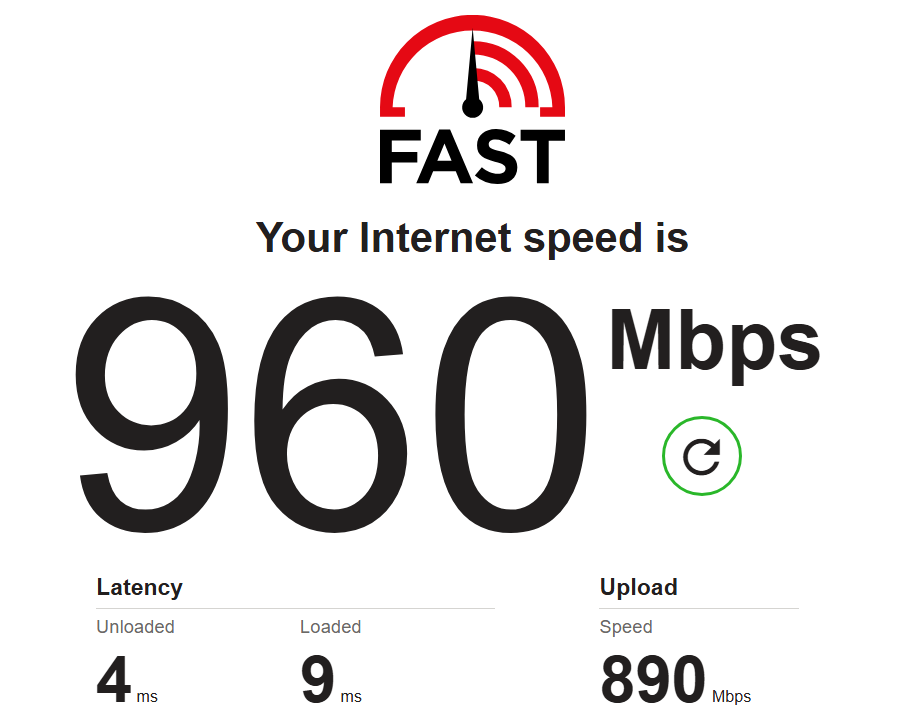
I just wanted to say thank you for this information. I just built a new Unraid server (my 2nd one) and it is my first time using a windows VM in unraid (first server had ubuntu, home assistant, and freePBX VMs). I went from 60 Mbps download using fast.com with frequent timeouts while browsing or logging into apps through MS Edge to 960 Mbps down/ 890 Mbps Up (940 Mbps fiber service). Now I just need to find an updated guide to passthrough my nvme drive to the Windows VM as a boot device and my VM setup will be complete.
-
I'm having some issues starting up NPMO. I currently run nginx on my firewall, but it has not been updating the Let's Encrypt certs automatically (I cannot figure out why). After an issue with Google flagging my apps as dangerous (got that resolved) and restarting my current nginx service, now 2 of my apps are not working... I decided to switch to NPMO in unRAID as all but one app that needs nginx is on the unRAID server anyway. When I try to start it up after selecting my docker custom network, I receive an error in my logs and this is what the mapping looks like in the Docker tab. This is the error in the creation log. docker: Error response from daemon: driver failed programming external connectivity on endpoint Nginx-Proxy-Manager-Official (ea336f70b9060a33facb1c1604d88956cacd513ac79bc324b838e9220addbb0a): Error starting userland proxy: listen tcp4 0.0.0.0:443: bind: address already in use. I did have pihole installed in unRAID, but it was not running when I created the NPMO docker container. After uninstalling pihole, I still receive this error and I do not see port 443 allocated in docker anywhere.

-
@casperse How are you liking the performance of that GPU? I'm looking to build a new server in the near future (currently have unriad on a mini PC) and finally move my PLEX server from a Windows PC to unRAID and I'm debating which platform I use for it, so seeing how the intel ARC GPUs do in unraid with docker containers for stuff like Plex and TDARR would be helpful. I know current intel iGPUs are pretty good on that front.

