Pandasoft
Members
-
Joined
-
Last visited
Everything posted by Pandasoft
-
Ah - good point. That will save some time. Thank you.
-
Hi All, I want to move my entire Unraid setup from it's existing server to some older kit so I can reuse the newer server. My existing server supports 8 drives but my old one only supports 4. Luckily I can drop the existing array down to four drives as I have quite a lot of spare space. So, I have a plan but I wanted to check it will work with people who know better... Move all my data off each drive in turn, removing drive and rebuilding parity - one drive at a time until I'm down to four drives. Pull my existing USB and all the drives from my current server and install into the older one. Power on and hope for the best. I think this will work, but I'm wondering if I need to rebuild the config after I move everything across or whether it will just use the existing config OK. Any thoughts please? Thanks in advance
-
Thanks for that info. I will do a little more investigation first (i'd like to try and only update the samba package to prove that's the issue), but it will have to wait until next week as my monthly parity check has started and I don't want to start/stop the array while that's running.
-
Well, I have it working now, but it's weird. Today I decided in desperation to turn off SMB on the shares, turn off SMB in settings and reboot. Then turn on SMB in settings again and re-enable SMB on the shares - and it all started working again. Curious, I then decided to upgrade to 6.12.5 again, which again broke my shares. Downgraded back to 6.12.4 - still broken. Repeated fix from above - now working. So, I think the problem may be in 6.12.5.
-
Hi, Thanks for replying. That is the correct IP for the Unraid server - my whole network is 192.168.0.0/24 so everything is in that subnet. Also yes, I have bonding on my NICs and my switch is configured the same. I can access the Unraid GUI and it seems to be working fine. I can also SSH to Unraid from other Linux boxes. Everything was working up until this morning, before I updated AND messed about with my gateway.
-
Downgraded to 6.12.4 and the problem remains 😪 At least it looks like it wasn't the update then.
-
Just remembered, I DID make a change to Unraid this morning. I updated to version 6.12.5. I'll start looking to see if I can go back a version and see if that fixes it.
-
Hi all, I have an Unraid server which I use to hold backups of my VMs and Windows machines in my home network/lab. Everything was working fine until I decided to make some network changes today and now, even though I have reversed all the changes, none of my Windows machines can see the Unraid shares. I was trying to put a firewall between my cable modem and my network switch which involved giving my new firewall the modem gateway IP and changing the modem IP to a new one. Multiple modem and firewall reboots and IP changes later, I gave up and put everything back as it was before I started. No changes were made to Unraid at all. Now, whenever I try to view my shares from a Windows device, I get this... <IP> is not accessible. You might not have permission to use this network resource. Contact the administrator of this server to find out if you have access permissions. We can't sign you in with this credential because your domain isn't available. Make sure your device is connected to your organisations network and try again. If you previously signed in on this device with another credential, you can sign in with that credential. Things I've tried... Removing the Unraid server from the domain, making sure it's computer account was removed and adding it back to the domain. Rebooting domain controllers Rebooting Unraid Ensuring my account (Domain Admin) is not locked out Mapping to other Windows shares which seems to prove the domain is OK. I've attached my diagnostics here. unraid-diagnostics-20231129-1415.zip Would appreciate any help you can give as I'm out of ideas now. Many Thanks Paul
-
Just in case anyone else discovers this thread - recreating the USB worked fine, but what I didn't realise was that my Unraid server had not connected to my domain after the USB change as the domain account password doesn't seem to be saved. So, just a heads up that you need to reenter the domain user password to rejoin the domain.
-
USB replaced and server rebooted fine so far. Hopefully that's it all sorted now.
-
Thank you - that's what I was hoping. I'll build a new one and if it solves the problem, I will come back and mark the solution. Thanks again
-
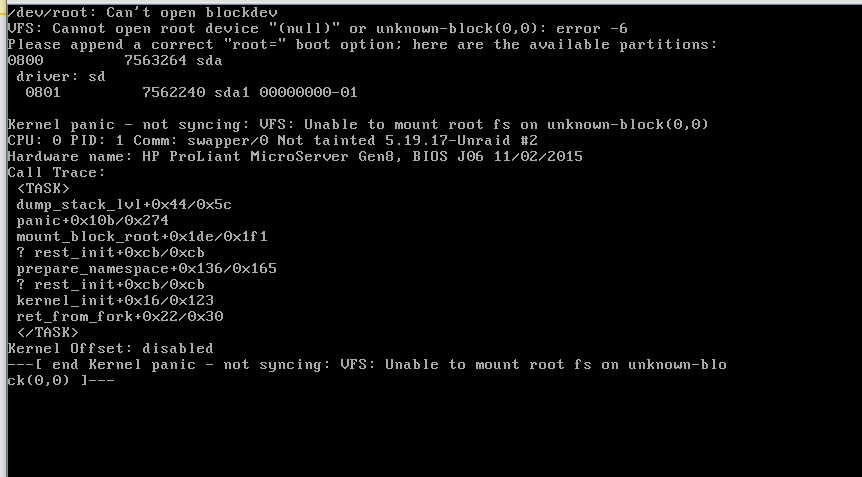
Hi All, My first time posting so I'd like to start by saying thanks for the software - it's exactly what I've been looking for and I've learnt so much getting it up and running using numerous articles from here. I now have my unraid server performing automatic backups for my hybrid windows and linux environment plus many other things. This morning however I woke to find all my backups had failed. Further investigation showed my server was totally unresponsive. I rebooted and it failed to come up - it sat at the unraid boot options, appeared to try and boot but seemed to fail at loading /bzroot and then quickly returned to the boot options screen. Eventually I rebooted again and selected safe mode with gui from the boot screen and this time it came up no problem. I was able to start the raid successfully and the dockers also started. So I shut everything down properly and rebooted once more and this time it booted properly again in normal mode. Since then, I have rebooted again and it has again failed to boot, but I managed to capture the error as shown in screenshot but summarised to cannot open root device - please append a correct root = boot option I am hoping someone can confirm that this is simply a failing USB boot drive and I can just replace it and restore my latest backup, but before I try that, I thought I would ask. Any help would be great - Thanks in advance Paul