





Fenixsu
Members
-
Joined
-
Last visited
-
It was quite a simple solution. Thank you so much! There were some other strange changes in my setup, for example, the cache pool was set to RAID0 instead of RAID1. But it doesn’t matter anyway, everything is working fine now. Thanks again!
-
I was far from home when my server became inaccessible. When I arrived home, I couldn't access it via WebUI or SSH. I forced a shutdown by pressing the power button. Upon rebooting, everything seemed to be in order, but it wasn't. Some of my Docker containers were not functioning correctly, especially Cloudflare-DDNS, Duckdns, and PMS. The 'Apps' tab also doesn’t work; it shows the message 'Download of appfeed failed.' My first suspect was the USB flash drive. I powered down the server and connected the USB drive to my Windows machine, then I used chkdsk => no issues. Should I replace the flash drive? (just in case..?) and... What’s next? I was thinking about deleting all my containers and starting from scratch (I have backups), but the error in the Apps tab made me realize that the problem was deeper than I thought. I hope someone can help me. Thank you very much in advance! Unraid 6.12.10 SS App Tab: https://prnt.sc/S5XTPMUpvddD EDIT: The problems were caused because the server couldn’t access the internet. I haven’t made any changes to the network configuration, so I still don’t understand what happened. The server can reach the router with a ping, but it can’t reach the IP 8.8.8.8, 'unreachable.' I have a second NIC (FE), so I connected a cable to it, and now I have internet access. bluetower-diagnostics-20241020-2140.zip
-
Hello everyone! I have a little issue :(. I have a "Cache pool" with two devices, SSD 250GB + SSD 240GB, in a mirror configuration. The 250GB disk had given me some trouble before; UNRAID asked me to format it. There was no issue since it was in "mirror mode" anyway. Days ago, after a restart, my cache appeared as Unmountable. I assumed the 250GB disk was causing issues again, so I left it as "unassigned." Everything returned to normal. So, my server has been running with only one SSD as cache... (yeah, my bad) Well, I bought a new hard drive because I was running out of space (12tb HDD). (Before installing it, I made a backup of my flash drive, just in case) I turned off the server, installed the 12TB disk, then turned the server back on, and the cache appeared as "Unmountable." I tried the following: "Stop array and unassign both pool devices Start array (click checkbox "I want to do this") Stop array Reassign both pool devices" Well, I'm not sure if I did it correctly. My pool consisted of two SSDs, but only one was working (240GB). I assumed that the "unassigned" option was the same as "no device." IMG1: https://prnt.sc/vwwzfUpTaVSg Anyway, it didn't work, It still appears as "Unmountable." IMG2: https://prnt.sc/vj1PZmX15Zkz Next, I tried this: btrfs rescue zero-log /dev/sdb1 IMG3: https://prnt.sc/cGXiDngxxIGP Then I restarted the array. It didn't work. I was running Unraid version 6.12.1, and I read that updating might fix it. I did update to version 6.12.6. It didn't work either. I also tried this: "btrfs check --readonly /dev/sdX1" IMG4: https://prnt.sc/YWPELW3pbrA7 But I don't exactly understand what it means. I hope you can help me; it would be a shame to lose all my configurations and dockers. English is not my native language, so I hope you understand what I wrote! Greetings. PD: Okay, the 250GB SSD works when I add it by itself. (Maybe an issue with the cable?) I was able to recover my dockers and configurations, but they are from several days ago. Well, better than nothing. If it were possible to recover anything from the other SSD, it would be wonderful. PD2: Forget it, I managed to solve it with the working SSD. It was probably the cable. Issue resolved. bluetower-diagnostics-20240116-1834.zip
-
Rebuild was successful, everythings is working normally. I really appreciate your help, I thought I was going to lose all my data, you are amazing, thank you very much! 😁 bluetower-diagnostics-20230223-1330.zip
-
Considering the backup, I would say that I managed to recover 85% of my data. (Lost Found + Backup). Pretty good, I didn't lose anything important. I can recover the lost data with a little patience. Disk1 is being emulated, should I add the new hard drive to the array now? Is it necessary to pre-clear the new drive?
-
Apparently everything is in "lost+found", but file structure is messed up.
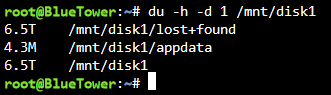
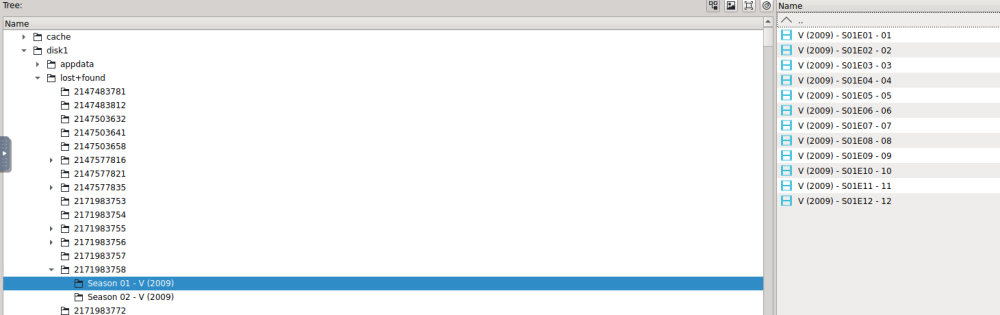
-
bluetower-diagnostics-20230221-0013.zip
-
Done CheckBlueTower.zip
-
This?
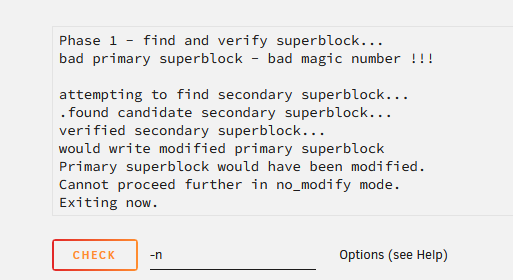
-
Diagnostics 2bluetower-diagnostics-20230220-2336.zip
-
bluetower-diagnostics-20230220-1740.zip Diagnostics
-
bluetower-diagnostics-20230220-1722.zip 🫡
-
I already got a new hard drive. What's Next?
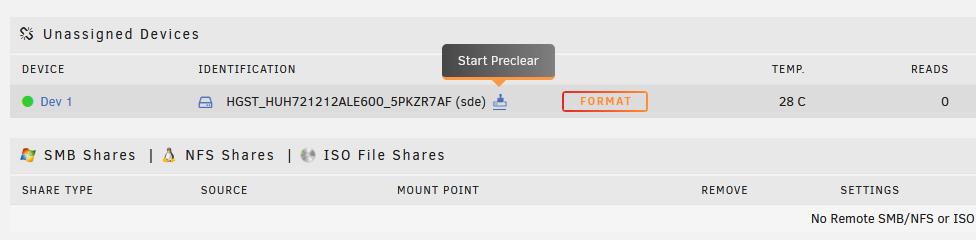
-
I have backup of maybe 40% of the files. They were mostly movies, but there were a couple of movies that were hard to find and would be a pain to lose. I'm going to wait until I have a new 12TB hard drive. That would make things easier, right?
-
Yes, I have other hard drives, but not with the same storage capacity. It could work?


