Naji
Members
-
Joined
-
Last visited
-
I tried to do it from the UI, but I didn't start the array after doing the changes because I was afraid it might be added to the existing vdev, and thus reducing its capacity. It wasn't clear to be which actions were going to be done. Thank you, that was perfect!
-
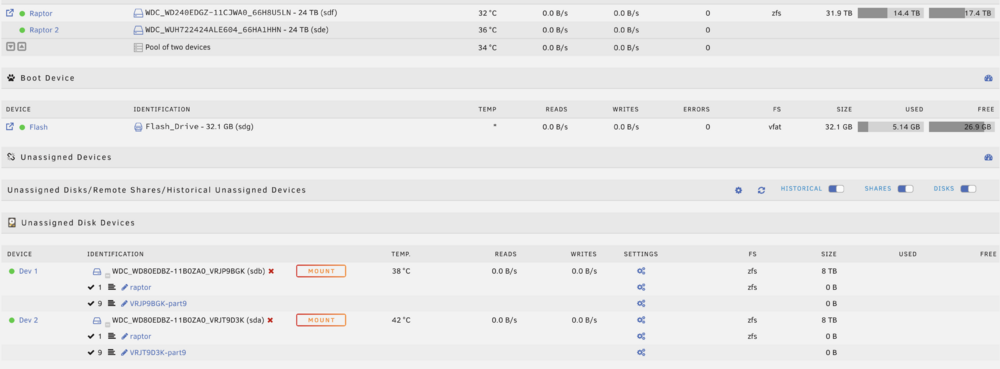
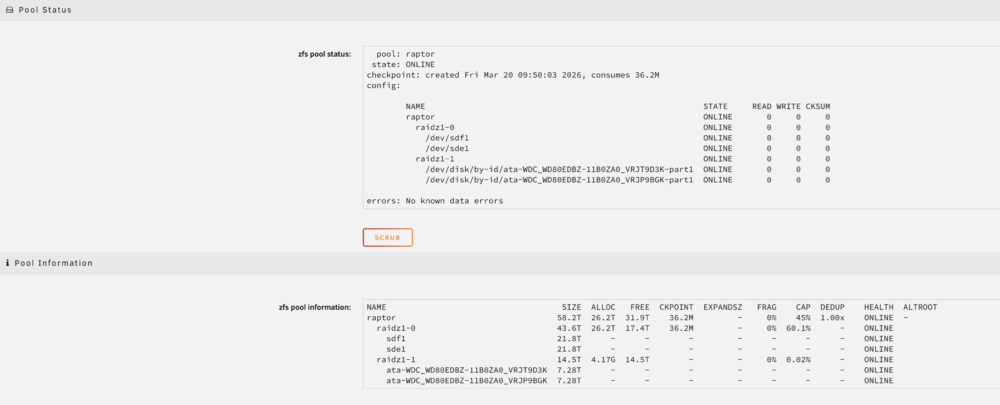
Hi, I currently have a ZFS pool with 2 vdevs, but the UI only shows one. The disks on the second vdev are even shown as unassigned. Curiously, the pool total size is correct, even though the disks aren't listed. When running zpool import, it's listed correctly pool: raptor id: 8349364709607528910 state: ONLINE action: The pool can be imported using its name or numeric identifier. config: raptor ONLINE raidz1-0 ONLINE sdf1 ONLINE sde1 ONLINE raidz1-1 ONLINE ata-WDC_WD80EDBZ-11B0ZA0_VRJT9D3K ONLINE ata-WDC_WD80EDBZ-11B0ZA0_VRJP9BGK ONLINE I actually added the second vdev manually, because the disks have different sizes. Any idea on how to fix the UI? It's not a critical issue, since my pool is working correctly. diagnostics-20260320-1217.zip Thank you!