





brendon362
Members
-
Joined
-
Last visited
-
This is okay to disregard now. I should have been more observant before posting. If any admin/mod wants to remove this post, feel free, but I will leave it here for now just in case anyone runs into a similar issue. The issue was that I just had a Dynamix fan control NCT6687 plugin that was not compatible with the most recent Unraid OS version. I uninstalled the plugin, rebooted, and we are good to go.
-
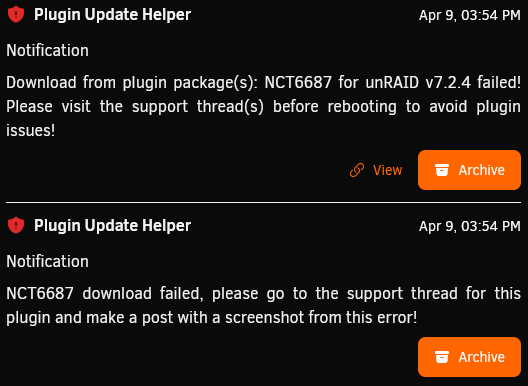
Is anyone able to tell what happened here? I attempted to update my server from version 7.1.4 to version 7.2.4 and I just got a generic failure notification. I have attached the screenshot as well as my diagnostic zip file. unraidtower-diagnostics-20260409-1556.zip
-
On a regular (almost daily) basis I have to reboot my entire Unraid server in order to regain access to my VMs tab. Currently, it just loads a blank grayunraidtower-diagnostics-20250717-2043.zip screen, and so does the VM manager settings within the settings tab. Is there any command I can enter to reboot the VM services? Can anyone tell what is incorrect with my setup from my diag zip?
-
unraidtower-diagnostics-20231104-1025.zip Attached! Thank you
-
I have this exact issue right now, I know it is 3 years later but is there any way we can reopen this post? I logged in locally via booting to unraid GUI, I then disabled VMs from the settings page and when I boot, all is fine. I can run a continuous ping and the moment I go to settings and try to enable VM Manager again, the whole server loses network connectivity. Cannot ping server, cannot ping out from server.
-
Hello! Hoping someone can point me in the right direction or let me know if they are having similar issues. Last night I upgraded to the latest RC version of unraid, and since then, I cannot even use my server due to extreme slowness. I'm talking, it takes about 10 minutes for the webGUI to load, and when it does, if I click on anything I'm waiting another multiple minutes for it to load. It drops about 50% of pings, and the ones it does reply to have anywhere from 100ms to 1000ms of latency. CPU usage is pinned at 100% even with all VMs off, even if I click the terminal icon just to issue a "top" command, the terminal window just says "502 bad gateway". Nothing seems to be functioning appropriately. Any advice? I don't even know if Ill be able to provide logs of any sort because it is nearly impossible to access anything on the server.
