





indy177
Members
-
Joined
-
Last visited
Everything posted by indy177
-
hi quick update As I was going to format the drive and clean install, I thought I would woudl risk for biscuit and delete the folder and any file with "WireGuard Watchdog" . folder and .plg file in the config folder, plugged the USB back into the server, and rebooted it. It is all working fine Not sure what is wrong with that wg-watchdog folder, but it should be removed from the app store Thank you very much for all your help good night indy
-
just to confirm that i can copy each file onto the newly installed OS to overwrite the excisting file on the USB this will overrate and revert my old setting thanks
-
thank you i will try these and update you indy
-
hi, Yes, I can connect to the server, and it sees the USB on both Windows and Mac. i have not tried on the other server. I am confused as to why both my Unraid have the same problem. Do I need to edit the old USB, or wipe and install it and start from scratch? thank you indy
-
hi, Are you suggesting I export the exciting flash drive first, then do a clean install on the old drive? I created a new Unraid OS on a new USB. Can I use this instead, just in case I make a mess of the old USB? thanks indy
-
hi Jorge Thank you for all your help, but can I ask a question? If I were to install a new OS, would I not need to recreate all the shared drives with usernames and passwords, or do you just want me to check whether I can access the USB drive after bootup? before crating any mounting and creating shared drive i hope this makes sense thanks again indy
-
hi Jorge I don't understand. I am not a very technical person. If I were to use another flash drive, will that not wipe the setup I have? I forgot to mention I have another unraid server that has the exact same problem
-
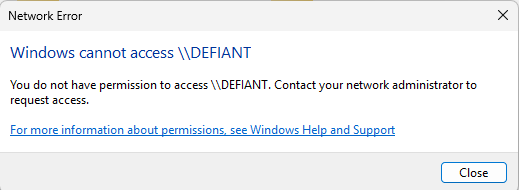
hi I have tried this, I can't access the network, I know the password is correct/ thanks indy
-
hi I'm not sure if this is just a coincidence, but ever since I installed the WireGuard watchdog, I have been unable to access any of my shared drives on both Windows and Mac. I have tried disabling and uninstalling it, but I'm still getting an "access denied" message. I know I am connecting to the server because when I enter the wrong password, it says "incorrect password." However, when I enter the correct password, it still shows "access denied." i can connect to the server through webUI Any advice is much appreciated thanks indy
-
Something really wrong went on during get_content Post the ENTIRE contents of this message in the Community Applications Support Thread OS: 6.11.5 Browser: Mozilla/5.0 (Windows NT 10.0; Win64; x64) AppleWebKit/537.36 (KHTML, like Gecko) Chrome/112.0.0.0 Safari/537.36 Language: No data was returned. It is probable that another browser session has rebooted your server. Reloading this browser tab will probably fix this error

