





elnorte13524
Members
-
Joined
-
Last visited
Everything posted by elnorte13524
-
Awesome, thanks! I'll order something today and hope to get it installed this weekend.
-
Damn. I had seen a few similar recommendations after I built this machine. So with only 4 sata ports on my motherboard, is there another way to use 6-8 drives?
-
Im not sure if this warrants a new post, but since its related ill add here for now. i replaced the SATA cables on drives 3 and 4, reseated connections on the other drives to make sure everything was secure. Fired it up and started a parity rebuild last night, but about 745am today, it stopped and disabled disks 3 and 4. It made me start a read check and now im getting a ton of errors on disk 2. things on the array are running fine for now, but im worried im about to lose my whole array. This is the 2nd or 3rd time ive had the parity rebuild fail. Are my disks dying? Do i have crappy sata cables? I have disks connected to the motherboard and to a SATA riser, but have disks working well on both connection types, all the hardware except the disks is brand new and it all worked fine on my last machine (before i shucked the drives), but it was slower. any help would be much appreciated! im losing my mind, worried that im going to lose my whole array. tower-diagnostics-20230427-1504.zip
-
ok, thanks. my server locked up yesterday when i wasnt home and wasnt even responsive to the keyboard connected to it. I could ping it, but SSH wouldnt work and the web interface refused the connection, so i had to kill power, whcih of course triggered a parity check when i fired it back up. once that finishes ill shut it down and replace the SATA cable. i have 2 other drives with the same error, though the count seems to be staiying the same and the other 2 are still working fine. i panicked and ordered 3 drives yesterday since one was disabled i was worried the other 2 might not be far behind. Is it worth hanging onto them for a couple of weeks before sending them back in case i do have a disk die, or is it pretty likely that its just the SATA cable and it should be an easy fix?
-
I got an email out of the blue today that my disk 4 was disabled. Its a slightly older disk, maybe 2 years, so im not sure if i just need to give up on it and replace it, or if i can enable it and ride it out. ive got 6 disks in my array, 2 of which are parity drives. Browsing the forum, it looks like its best to start a new thread, rather than post on an existing one, with the diagnositcs attached. So ive attached the diagnositcs and am hoping for some guidance on the disk. I just build the new server and added 2 16TB drives, so cash is tight right now, which is why im hoping i can survive with that disk for a little while, rather than dropping another couple hundred bucks to replace the 14 TB drive that might be failing. Ive also attached the quick smart test from that drive. I dont know what to look for, but i see there are some CRC errors, the count is 6 and i think it was 4 a while ago, so its very slowly incrementing. Ive heard that could be cabling, so when i get time ill replace the SATA cable, but itll be a day or two before i can get to that, so i wanted to see if there was anything else i needed to look at or be concerned with before then. Any help would be much appreciated! tower-diagnostics-20230425-1323.zip tower-smart-20230425-1109.zip
-
ive tried the new config a few times, but no matter what disk is assigned to what drive, it will only see disk 3 and the data that is saved on there. There are only 2 options for the config, though, because there are just the two other 8TB drives that were assigned to disk 1 and 2, but no matter which is in which slot, i get the same error. it gives me the option to format them and get the array going, but id rather not do that if i can get my data recognized again.
-
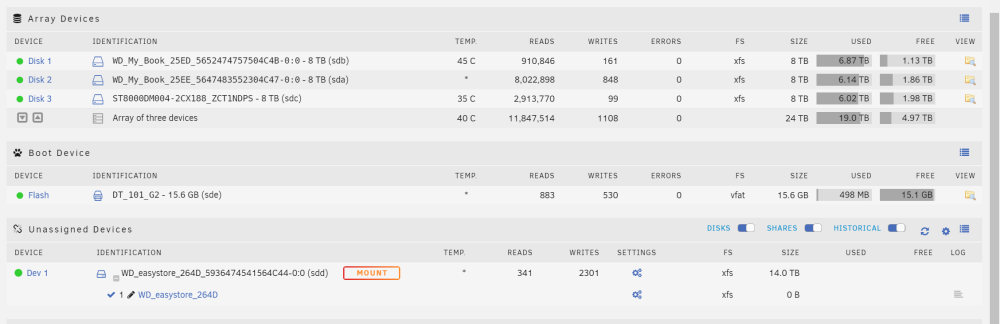
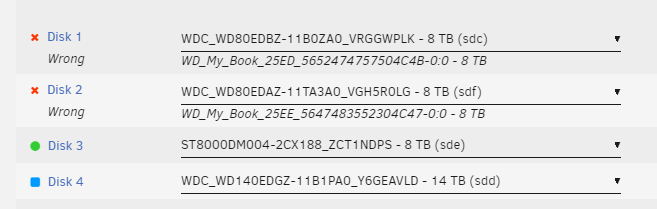
I assume im SOL, but heres my situation. Was running unraid as a VM on esxi7. I had 4 USB drives connected, a 14TB parity drive and 3 8TB drives in the array. I had weird disconnect issues (i think because of my setup) that managed to kill my parity, but not my whole array. i build a new machine, i have an i5-12600k, 32GB RAM and added two 1TB nvme drives for cache and two 16TB drives for parity. that all went smooth, everything is seen by unraid on the new hardware. so tonight i started shucking. didnt seemt to have any issues, all drives powered up, but now two of my drives are seen as different hardware, with different serial numbers so unraid wont let me start the array, as they are "wrong" drives. i dont have anywhere with enough space to have copied all 17ish TB of media as a backup before the build. its all replaceable media, so its not the end of the world, but itll take some time. is there anything i can do to make unraid see the drives how they were, or is that just how it goes when using a USB drive in an array, then shucking it? first pic is what unraid saw before i shut it down. no parity drive is present because i stopped the incredibly slow rebuild and took it out when i was doing something else, but it was there working earlier today. second pic is what i see now. all my drives are seen, but two of my WD my book drives show up with different serial numbers (i think?) so unraid sees them as wrong and wont start the array. any way i can edit something to fix it? Or am i SOL and need to rebuild my media collection? any help would be much apprecaited!
-
thanks! im up and running on the new hardwre, with one minor issue. it wont boot if my storage drives are connected (4 usb drives - i know its less than ideal). if i disconnect the drives it boots fine, then i plug the drives in and i can start the array. any ideas? this seems more of a hardware specific issue than unraid, but i figured i might as well ask. ill dig more into the hardware side of it later.
-
im moving from an old lenovo to a new ryzen 5 mini pc. i cant get the mini PC to boot to unraid. itll boot to a proxmox installer, windows, everything else. eventially i was directed to another thread where it was suggested to edit the name of the EFI folder on the flash drive. i created a new installer to test, removed the character and it booted on the new pc. victory! but now i need to make the edit to the existing flash drive. Can i just shut it down, pop the usb into my desktop, edit the name of the folder, plug it back in and fire it back up? Or do i actually have to set it up as a new install, then copy the config folder over with the edited folder name? I dont want to mess up my array, so i just want to make sure ive got my ducks in a row before i mess something up. for reference, this is where i found that info. is this current and accurate? anything i need to look out for? im worried ill break my array or something. any help would be much appreciated! i just want to get up and running on my new hardware. a

