wangjiahao
Members
-
Joined
-
Last visited
-
可以查看Nvidia-GPU这个插件使用说明
-
非常感谢,已成功解决
-
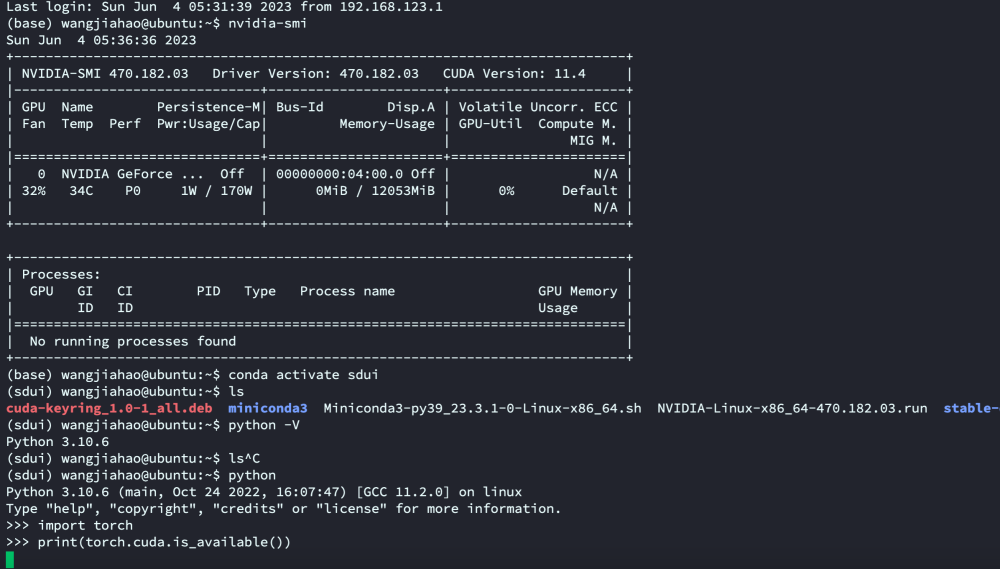
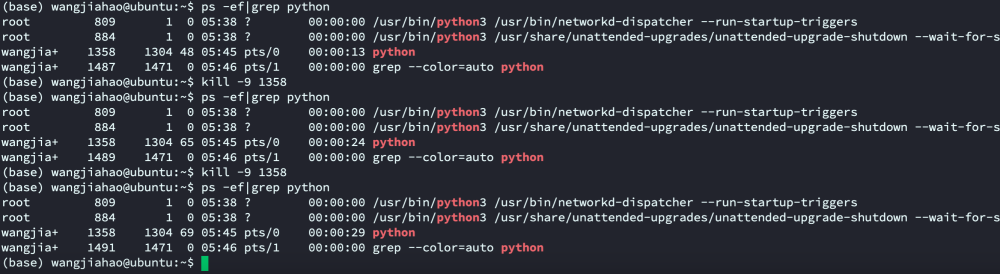
如上图ubuntu 20.04 vm中,GPU RTX 3060 已安装driver 470.x (530.x也尝试过)可以检测出显卡信息,但是执行 torch.cuda.is_available() 会导致系统卡死,而且无法杀死进程 pip list 也已经安装torch (sdui) wangjiahao@ubuntu:~$ pip list Package Version ----------------------- --------------- absl-py 1.4.0 accelerate 0.18.0 addict 2.4.0 aenum 3.1.12 aiofiles 23.1.0 aiohttp 3.8.4 aiosignal 1.3.1 altair 5.0.0 antlr4-python3-runtime 4.9.3 anyio 3.6.2 astunparse 1.6.3 async-timeout 4.0.2 attrs 23.1.0 basicsr 1.4.2 blendmodes 2022 boltons 23.0.0 cachetools 5.3.0 certifi 2023.5.7 charset-normalizer 3.1.0 clean-fid 0.1.35 click 8.1.3 cmake 3.26.3 contourpy 1.0.7 cycler 0.11.0 deprecation 2.1.0 einops 0.4.1 facexlib 0.3.0 fastapi 0.94.0 ffmpy 0.3.0 filelock 3.12.0 filterpy 1.4.5 fonttools 4.39.4 frozenlist 1.3.3 fsspec 2023.5.0 future 0.18.3 gfpgan 1.3.8 gitdb 4.0.10 GitPython 3.1.30 google-auth 2.18.0 google-auth-oauthlib 1.0.0 gradio 3.30.0 gradio_client 0.2.4 grpcio 1.54.0 h11 0.12.0 httpcore 0.15.0 httpx 0.24.0 huggingface-hub 0.14.1 idna 3.4 imageio 2.28.1 inflection 0.5.1 Jinja2 3.1.2 jsonmerge 1.8.0 jsonschema 4.17.3 kiwisolver 1.4.4 kornia 0.6.7 lark 1.1.2 lazy_loader 0.2 lightning-utilities 0.8.0 linkify-it-py 2.0.2 lit 16.0.3 llvmlite 0.40.0 lmdb 1.4.1 Markdown 3.4.3 markdown-it-py 2.2.0 MarkupSafe 2.1.2 matplotlib 3.7.1 mdit-py-plugins 0.3.3 mdurl 0.1.2 mpmath 1.3.0 multidict 6.0.4 networkx 3.1 numba 0.57.0 numpy 1.23.5 oauthlib 3.2.2 omegaconf 2.2.3 opencv-contrib-python 4.7.0.72 opencv-python 4.7.0.72 orjson 3.8.12 packaging 23.1 pandas 2.0.1 piexif 1.1.3 Pillow 9.5.0 pip 23.0.1 protobuf 4.23.0 psutil 5.9.5 pyasn1 0.5.0 pyasn1-modules 0.3.0 pydantic 1.10.7 pyDeprecate 0.3.2 pydub 0.25.1 Pygments 2.15.1 pyparsing 3.0.9 pyrsistent 0.19.3 python-dateutil 2.8.2 python-multipart 0.0.6 pytorch-lightning 1.7.7 pytz 2023.3 PyWavelets 1.4.1 PyYAML 6.0 realesrgan 0.3.0 regex 2023.5.5 requests 2.30.0 requests-oauthlib 1.3.1 resize-right 0.0.2 rich 13.3.5 rsa 4.9 safetensors 0.3.1 scikit-image 0.20.0 scipy 1.10.1 semantic-version 2.10.0 setuptools 67.8.0 six 1.16.0 smmap 5.0.0 sniffio 1.3.0 starlette 0.26.1 sympy 1.12 tb-nightly 2.14.0a20230511 tensorboard 2.13.0 tensorboard-data-server 0.7.0 tifffile 2023.4.12 timm 0.4.12 tokenizers 0.13.3 tomesd 0.1.2 tomli 2.0.1 toolz 0.12.0 torch 2.0.1+cu118 torchdiffeq 0.2.3 torchmetrics 0.11.4 torchsde 0.2.5 torchvision 0.15.2+cu118 tqdm 4.65.0 trampoline 0.1.2 transformers 4.25.1 triton 2.0.0 typing_extensions 4.5.0 tzdata 2023.3 uc-micro-py 1.0.2 urllib3 1.26.15 uvicorn 0.22.0 websockets 11.0.3 Werkzeug 2.3.4 wheel 0.38.4 yapf 0.33.0 yarl 1.9.2
-
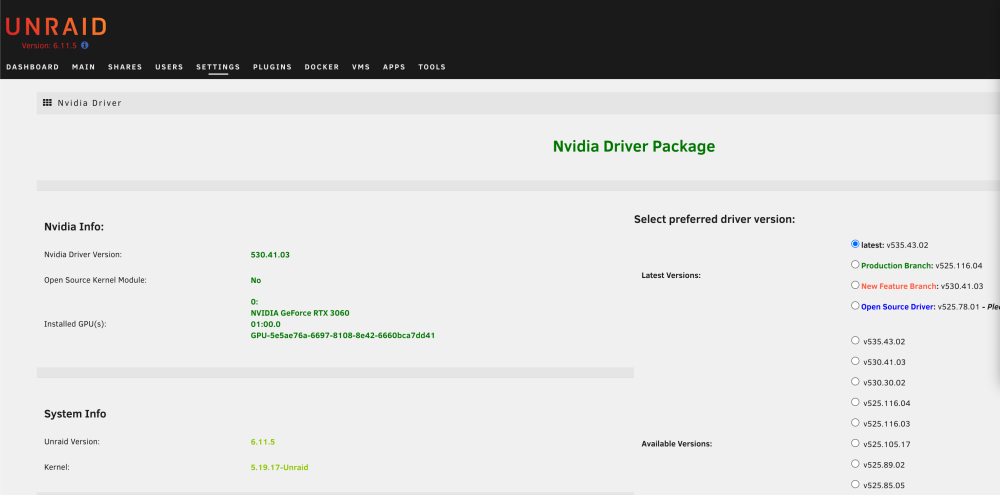
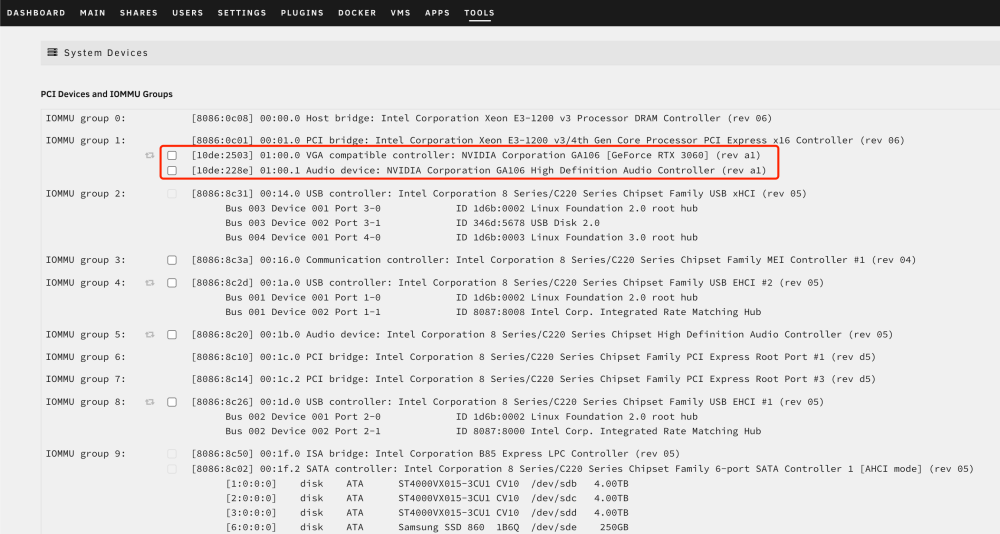
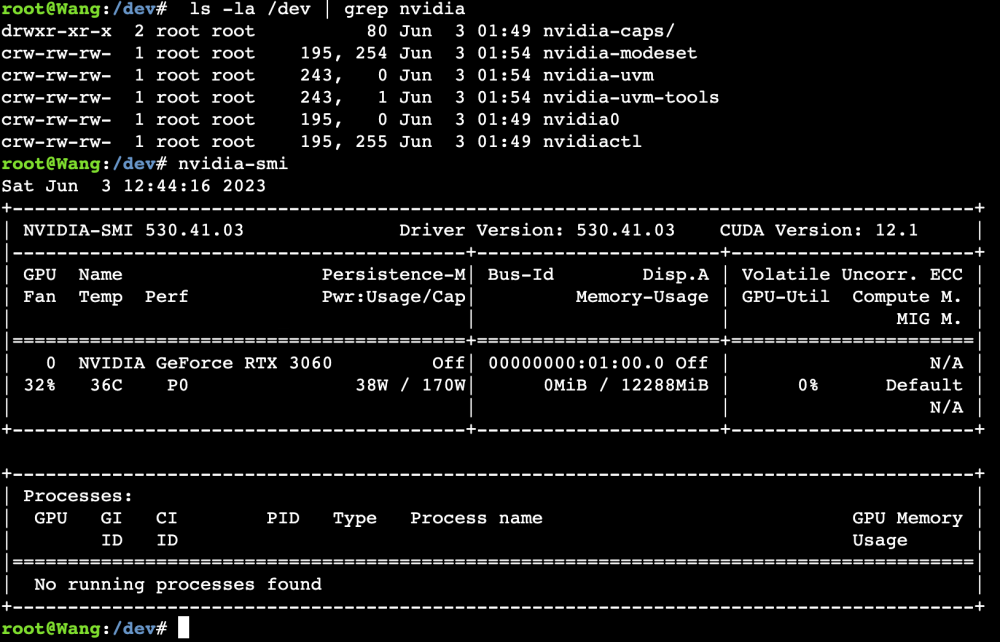
希望在JupyterLab中使用Pytorch(需CUDA),在Jupyter中安装Torch后,检测CUDA是否可用 返回结果为 False 无法正常使用 UNRAID Version 6.11.5 已经安装Nvidia-Driver并且能看到显卡型号 在“TOOLS —— System Devices" 如下图所示 UNRAID Terminal中可以看到Nvidia的相关信息 已经尝试在Docker启动加入 “--runtime=nvidia” 但并不能解决以上问题,请问我该如何开始排查和使用呢?