Skip to content
View in the app

A better way to browse. Learn more.

Unraid

A full-screen app on your home screen with push notifications, badges and more.

To install this app on iOS and iPadOS
  1. Tap the Share icon in Safari
  2. Scroll the menu and tap Add to Home Screen.
  3. Tap Add in the top-right corner.
To install this app on Android
  1. Tap the 3-dot menu (⋮) in the top-right corner of the browser.
  2. Tap Add to Home screen or Install app.
  3. Confirm by tapping Install.

RaidWong

Members
  • Joined

  • Last visited

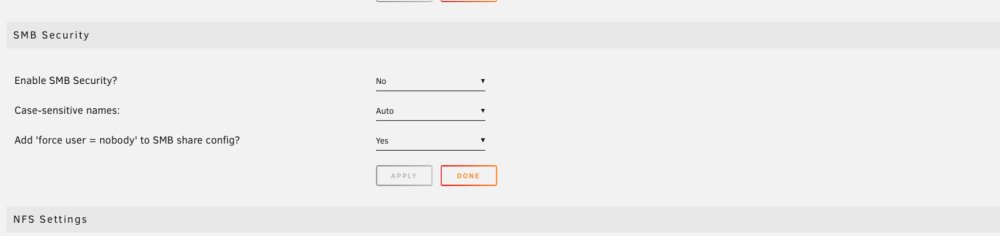
  1. I haven’t changed settings before but flipping SMB security option to ‘Public’ seemed to have solved it ….
  2. Hi im running unraid 6.11.5 with Unassigned plug-in ver 2023.02.20 not sure if it’s since I updated the plug-in but when I turned my server on (I leave it shut down) I can’t see share for my single USB drive (it’s mounted and shared- worked for over a year and plug-in I update regularly) can’t see smb share from windows or my android media player, still see the unraid array folders via smb perfectly though I have tried removing and reinstalling plug-in, also plugged a brand new formatted usb drive to test, but still no smb share appears Any help appreciated !

Account

Navigation

Search

Search

Configure browser push notifications

Chrome (Android)
  1. Tap the lock icon next to the address bar.
  2. Tap Permissions → Notifications.
  3. Adjust your preference.
Chrome (Desktop)
  1. Click the padlock icon in the address bar.
  2. Select Site settings.
  3. Find Notifications and adjust your preference.