




Skip to content
View in the app

A better way to browse. Learn more.

Unraid

A full-screen app on your home screen with push notifications, badges and more.

To install this app on iOS and iPadOS
  1. Tap the Share icon in Safari
  2. Scroll the menu and tap Add to Home Screen.
  3. Tap Add in the top-right corner.
To install this app on Android
  1. Tap the 3-dot menu (⋮) in the top-right corner of the browser.
  2. Tap Add to Home screen or Install app.
  3. Confirm by tapping Install.

Vít Ledvinka

Members
  • Joined

  • Last visited

Everything posted by Vít Ledvinka

  1. Thanks, I didn't think of that, I'll try it!
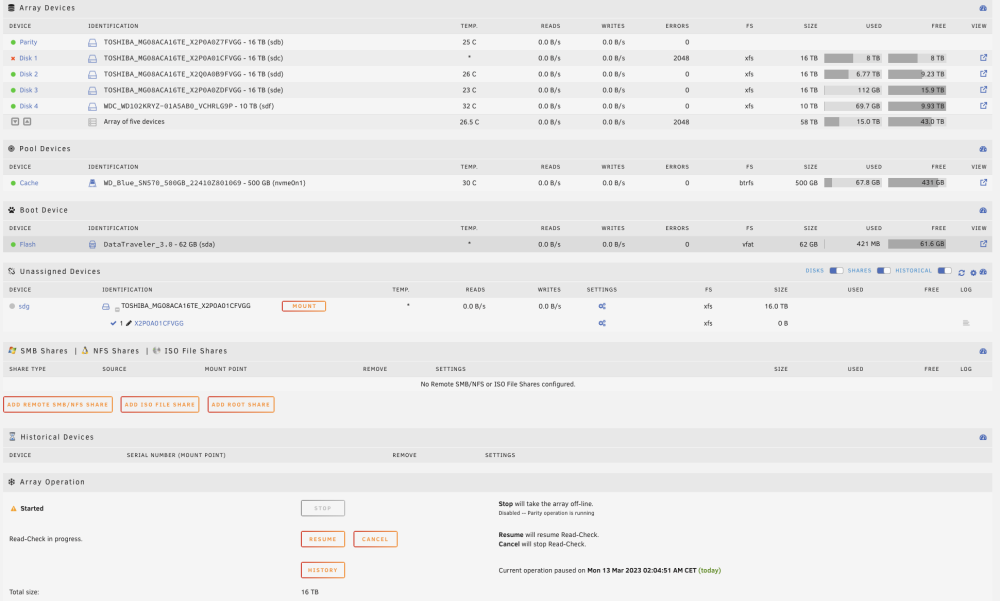
  2. Hello, I`m new in unraid. I`m bought 4 new hdd and built my new NAS before 1 week. I`am copy all my files from external disks to this NAS. Before few day, it shows - "disk 1 disabled" so I check "smart - no errors". I found on this forum "rebuild disk to self", so I make it. It works and looks good for 1 day. It started parity check tonight and 5 minutes after it disabled disk again. Disk is new, so I don`t think so that is problem. It is possible that there si some problem in data? I`m not sure, what can I do different. Thank you for any help. nas-diagnostics-20230313-0954.zip
Account

Navigation

Search

Search

Configure browser push notifications

Chrome (Android)
  1. Tap the lock icon next to the address bar.
  2. Tap Permissions → Notifications.
  3. Adjust your preference.
Chrome (Desktop)
  1. Click the padlock icon in the address bar.
  2. Select Site settings.
  3. Find Notifications and adjust your preference.