




Skip to content
View in the app

A better way to browse. Learn more.

Unraid

A full-screen app on your home screen with push notifications, badges and more.

To install this app on iOS and iPadOS
  1. Tap the Share icon in Safari
  2. Scroll the menu and tap Add to Home Screen.
  3. Tap Add in the top-right corner.
To install this app on Android
  1. Tap the 3-dot menu (⋮) in the top-right corner of the browser.
  2. Tap Add to Home screen or Install app.
  3. Confirm by tapping Install.

MaximumRange

Members
  • Joined

  • Last visited

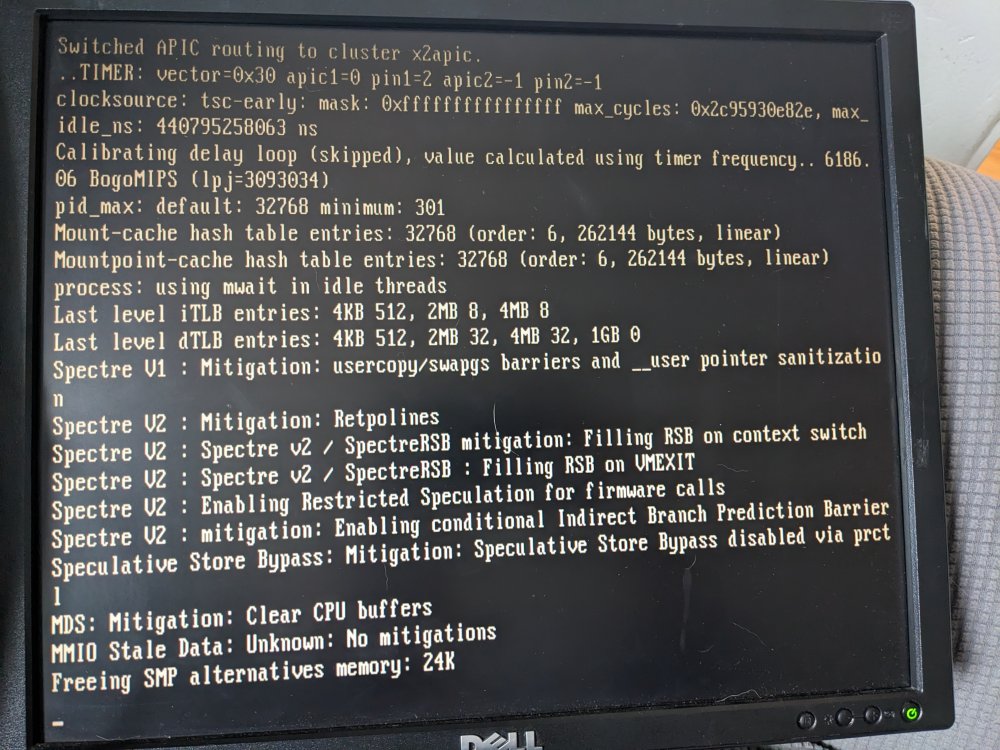
  1. I have a Dell PowerEdge T110 II Xeon E31220 3.10 GHZ 16gb Ram 256gb SSD and 4 4TB Seagate hard drives It keeps getting stuck on Freeing SMP Alternatives Memory: 24k This is my 1st time setting up a NAS using an older PC so any help is greatly appreciated. I did run the memory test with not errors and have tried multiple different USB drives. It's plugged into the a back panel USB port too
Account

Navigation

Search

Search

Configure browser push notifications

Chrome (Android)
  1. Tap the lock icon next to the address bar.
  2. Tap Permissions → Notifications.
  3. Adjust your preference.
Chrome (Desktop)
  1. Click the padlock icon in the address bar.
  2. Select Site settings.
  3. Find Notifications and adjust your preference.