





CkChong
Members
-
Joined
-
Last visited
Everything posted by CkChong
-
Yes, if your system needs the IT87 driver to expose the PWM fans, then you’ll still need it. FanCtrl Plus works with whatever the system provides — it doesn’t replace or load drivers, just controls the available ones. Let me know how it goes once you’re back — curious how it runs on your Ugreen case!
-
Thanks so much! I’m really glad it’s helping your setup. Just in time for the next boss fight — the 7.2 responsive UI.
-
Thanks for the idea! I’ll keep it in mind for future consideration.
-
Thanks for the suggestion about multi-language support — I’ll keep it in mind. At the very least, I’ll only consider it after the 7.2.0 responsive UI adaptation is done. I actually looked into it just now, and it’s not a small job — every visible sentence in the plugin would need to be wrapped for translation and then added to Unraid’s official Chinese language pack. Honestly, using browser’s built-in translation might be the simpler option for now.
-
Thanks for the kind words! 😄 Glad you like it. Yeah, that “engineer-made” look is pretty much the Unraid style — part of the charm for a true server OS, not a prepackaged product. I’m just trying to make it a bit nicer within that style. I’m also waiting for 7.2.0 to drop — once it’s out, I expect the current version will need quite a few adjustments, so give me a little time to work through those when the time comes.
-
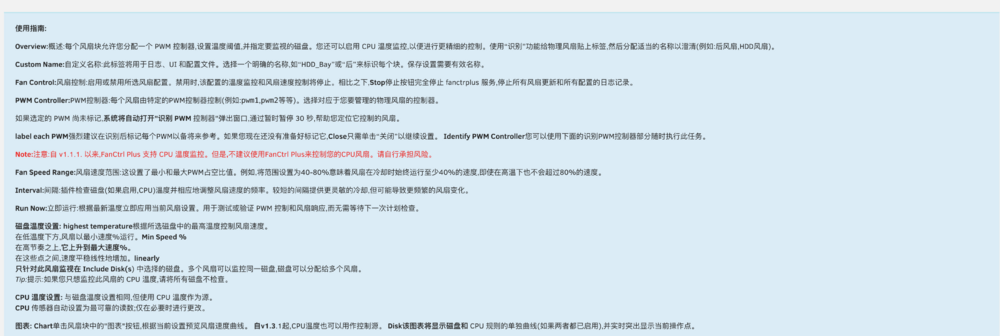
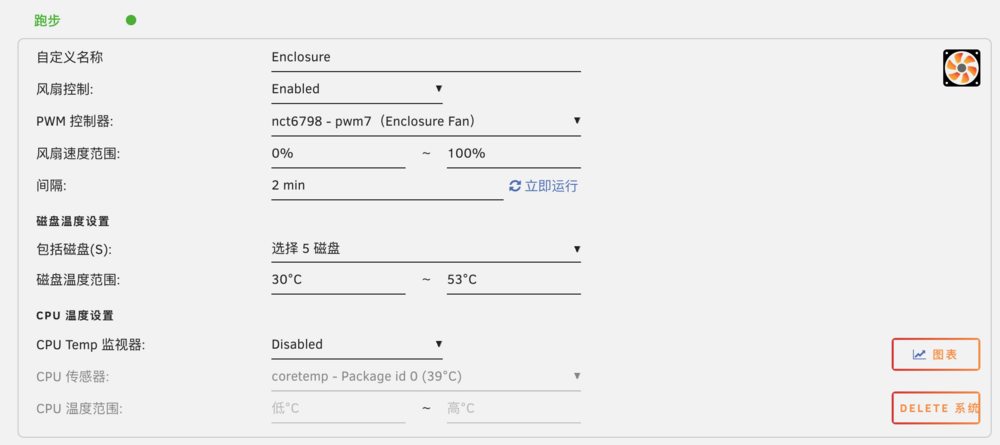
I’m overseas Chinese as well, and my native language is Chinese. Honestly, I don’t think a separate Chinese version is necessary — most browsers now have built-in page translation, which works quite well (see screenshot). So Chinese-speaking users can just use that if needed. Regarding your CPU fan — sounds like your BIOS is locking the control. On some boards (especially budget ones), the OS can’t change CPU fan speed unless the BIOS gives permission. You might want to check if there’s an option in the BIOS to hand over control, or see if a BIOS update adds that feature.
-
Haha, thanks! 😄 And good timing — CPU temp fan control is now live in the new version I just released this morning (v1.3.1). You can turn it on per fan, set your own CPU temp curve, and it’ll kick in whenever the CPU runs hotter than your disks.
-
For HDD monitoring, 2 minutes is totally fine — mechanical drive temps don’t change very quickly. In the next version, when CPU temperature monitoring is supported, if your case fans are linked to CPU temps, you can set it to 1 minute instead. Personally, I just experiment within the 1–2 minute range to find what works best for my setup — you can do the same for yours until it feels stable.
-
I’m aware that Unraid 7.2.0 will bring a major UI overhaul. Because of that, I’ve decided to hold off on any new UI features until after the new design is finalized — otherwise it’s very likely things will break or look wrong. Right now, I’m focusing on finalizing the current update features. If the plugin doesn’t suit your needs in its current form, I understand — FanCtrl Plus might not be the right fit for everyone. I’m developing this plugin in my spare time as a beginner still learning along the way, so I have to prioritize stability and maintainability over adding every request.
-
You can leave it disabled, but if it was enabled before, the BIOS often won’t take back control of the CPU fan until you reboot. If you don’t plan to control the CPU fan anymore, I’d suggest deleting it instead of just disabling — to avoid accidental re-enabling. Just make sure to reboot after that.
-
The footer RPM comes from the System Temp plugin. It depends on which fan you selected in its Array Fan Speed — not from FanCtrl Plus or Auto Fan.
-
Thanks for the suggestion! Right now, you can already see real-time RPM in the Dashboard (or syslog) — just open it in another tab while adjusting your settings. In the next version, the fan configuration will include a chart popup showing a temperature curve, and I’m planning to add real-time temperature and RPM display there too. Stay tuned!
-
The next version will support CPU temperature, and it’s expected to be released in a few days. However, I recommend letting the BIOS handle the CPU fan for safety and reliability. If you choose to control CPU fan using FanCtrl Plus, please make sure to test carefully and take responsibility for the configuration.
-
I wouldn’t recommend running both plugins at the same time — especially if they’re controlling the same PWM fan headers. You can have both FanCtrl Plus and Dynamix Auto Fan Control installed, but you should only run one at a time to avoid conflicts. To be safe, it’s best to disable or uninstall the one you’re not using, just to prevent any accidental settings or interference.
-
Looks like your board’s chip (ITE8613E) isn’t supported by the kernel, so FanCtrl Plus won’t be able to detect or control the fans right now. You can try following that guide, but it’s beyond the scope of what this plugin supports. Sorry I can’t help more on this part! You might want to reach out to your motherboard or system manufacturer to ask if there’s any Linux driver or module available for the ITE8613E chip.
-
Thanks a lot — I’m just happy to hear it’s useful for someone! Appreciate the support.
-
Thanks! CPU support is already in the works — just need a bit more time 🙂
-
Thanks for the update! Just to clarify — you mentioned renaming the label, but it’s possible the issue was actually related to the Custom Name, which is different from the PWM Label. I left a note above about this — feel free to refer back to confirm which one was changed. PWM Labels are just for display and don’t affect functionality, but renaming the Custom Name (especially with only case changes) can currently cause temporary issues in the Dashboard. That bug has been identified and will be fixed in the next version. Since things are working fine now, feel free to keep an eye on it — and if it happens again, any extra details would be super helpful. Thanks again!
-
Hi! Thanks for reporting — if the FanCtrl Plus UI shows “Running” but the Dashboard widget says “Inactive,” it usually means the background update script may not be writing data correctly. Could you try the following steps: Go to the Syslog On/Off section and make sure Syslog is enabled. Wait for 1–2 intervals, or click “Run Now” to force an update. Then go to Tools → System Log, and search for any lines containing fanctrlplus. Please paste any recent log entries here — especially lines like: fanctrlplus: [CASEFAN] Temp=XX → PWM=XXX → RPM=XXXX Also, just to help narrow it down — do you remember if the Dashboard started showing “Inactive” after any recent change, such as editing fan settings, renaming a fan, updating Unraid, etc.? Thanks again — with a bit more info I’ll help you get it sorted. Edit: One more thing to check — did you happen to rename the fan's Custom Name using the same name with different capitalization? (e.g. casefan→ CASEFAN) If so, there’s a known issue where this might cause config mismatches. In that case, you may want to delete the fan block and re-create it using a completely new name. P.S. This only applies to Custom Name. You don’t need to worry about the PWM Label — it’s purely for display purposes and can be freely named. It does not affect functionality or cause this issue. Let me know if that might apply — just to help rule it out.
-
Thanks for sharing your setup — always great to see how others are using the plugin! Hope you’re happy with how it’s working so far!
-
Thanks for the great feedback! I haven’t looked into reading NIC or PCIe device temps yet, so I can’t say for sure how that would work. That said, CPU temp monitoring is already on the roadmap, and will definitely help with case fan control in setups like yours. Just need a bit of time to design and test it properly!
-
Just dropping in to let you know — the new version is out now, with per-fan syslog toggle included. Hope it does the trick — feel free to report back if you hit any issues.
-
Thanks — really glad you’re enjoying the plugin! CPU temp support is already on the roadmap — just need a bit of time to work through the logic. As for showing RPMs for fans not controlled by the plugin, I’ll definitely look into it. In the meantime, I think the Airflow dashboard panel already shows all detected fan RPMs by default.
-
Thanks, no worries — you’ve already provided really helpful info! I’m still learning too, especially when it comes to the different SMART attributes across HDDs, SATA SSDs, and NVMe. I’ll try testing with some older SSDs I have on hand and see how they behave. Hopefully they’re still alive. 😅 Appreciate your input, it helps improve the plugin for everyone!
-
Thanks for the detailed report! I really appreciate it — I don’t have any SATA SSDs in my setup, so I completely missed this issue. I’ll fix it in the next version to better support drives like yours.





