





CkChong
Members
-
Joined
-
Last visited
Everything posted by CkChong
-
Yes — FanCtrl Plus automatically starts with the Unraid array after a reboot. No manual action is needed. If your CPU fan is being controlled by FanCtrl Plus instead of the BIOS, I would recommend not assigning the CPU fan’s PWM controller to FanCtrl Plus. You can use the “Pause 30s” button to help identify which PWM controls your case fan and exclude the CPU fan. Even in future versions that may support CPU temperature input, it’s not advisable to control the CPU fan with FanCtrl Plus. A better approach—just like what theusername mentioned—is to use CPU temperature to help adjust your case fan speed if needed, while still letting the BIOS handle the CPU fan directly. This avoids unintended conflicts unless you’re absolutely sure of what you’re doing. The upcoming version will allow you to label each PWM controller after identifying it, so you’ll avoid confusion going forward. FanCtrl Plus does not wake up spun-down disks. It checks temperatures in a way that keeps sleeping drives untouched. If all monitored disks are asleep, the fan will simply run at the minimum PWM (Fan Speed) you’ve configured.
-
Thanks for the feedback. CPU temperature monitoring is planned for a future version, but not the upcoming release. Just need a bit of time to figure out the logic and test things properly — stay tuned!
-
Thanks for the kind words and support — really appreciate it! At the moment, I don’t have any plans to support OpenFanController. I’m just a hobbyist and beginner — FanCtrl Plus exists mainly because I personally use Unraid, and it helps me solve my own needs. I’m happy to share it with others who might find it useful, but I’m not aiming to cover hardware I don’t personally use. I hadn’t looked into OpenFanController before, so I appreciate you bringing it to my attention. It seems like a solid system, though it also appears to be somewhat commercial in nature. That said — nothing is ever off the table. I just want to be honest that right now, I don’t plan to support it. But I truly appreciate your interest, your encouragement, and your recognition of the work that’s gone into FanCtrl Plus. Hope the next version brings even more improvements you’ll enjoy!
-
External fan controllers vary a lot in hardware and protocols, so they’re unfortunately out of scope for this plugin.
-
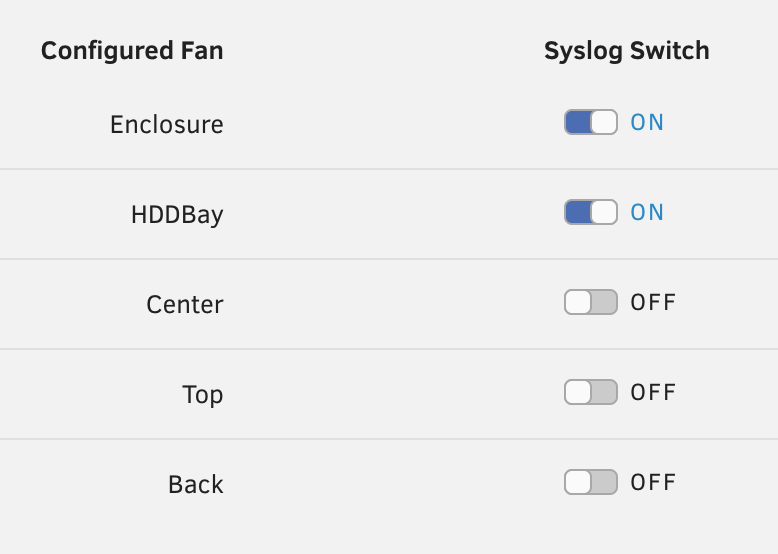
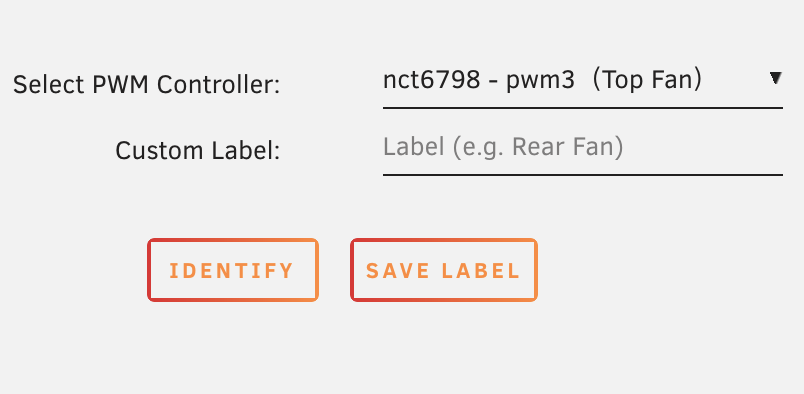
Funny timing — I’m adding log toggle support for the next version, and each fan will have its own on/off switch for syslog logging. I’m also working on a new feature that lets users identify and label each PWM controller more easily, to help with reference and setup. Currently finalizing the UI and testing before release. Here’s a quick preview of the log toggle in action (upcoming version):
-
Just like I replied on GitHub: Support for monitoring CPU temperature will very likely be added in a future update. Since it involves some extra logic — especially when fans are shared between CPU and drives — I’d like to take some time to design it properly and make sure everything is well tested and doesn’t conflict with the current setup. That said, for safety and reliability, I’d still recommend letting the motherboard handle direct CPU fan control. Once CPU temperature support is added, it’ll be best used for adjusting case fans, not the CPU fan itself. Right now I’m mainly working on the next version, focusing on improving the overall UI and user experience — making things more intuitive and easier to understand.
-
Hey! Just checking — do you mean you’re running into trouble detecting PWM controllers, or just curious how the plugin finds them behind the scenes?
-
Hi. Thanks for the kind words, glad it’s working better for your NVMe temps! Regarding the Temp=0°C on [HDD_bay], here are a few things to check: If the HDD is spun down, Unraid will report 0°C — that’s expected. At least one of the monitored drives must be active (spun up) for temperatures to be reported correctly. If the drive is active but still showing 0°C, it could be a SMART polling issue or an unsupported drive model for temp reporting. You can try accessing the drive (read a file) to see if it wakes up and reports a valid temperature. As for [M2_bay_right_side] and [M2_bay_left_side] showing PWM=0 and RPM=0 even with valid temps — it’s likely due to your Low Temp setting being higher than the current temp (e.g. if Low = 35°C but current temp = 28°C), the fan will stay off as intended. Let me know what your Low/High temp and Min PWM values are — happy to help confirm.
-
Thanks again! Appreciate your suggestion. FanCtrl Plus already uses a temperature-to-speed curve — it’s just a linear interpolation between your defined low and high temperature thresholds. For example, if you set: Low Temp = 35°C → Min PWM = 64 (25%) High Temp = 55°C → Max PWM = 192 (75%) Then at 45°C (midpoint), the plugin will automatically set the PWM to 128 (50%). At 40°C it would be around 96 (≈38%), and at 50°C about 160 (≈63%). This gives you a smooth ramp-up across the entire temperature range, not just two hard-coded points. The values in between are fully calculated, so your fan speed transitions naturally without sudden jumps. The advantage is that users can define any custom slope, rather than being limited to fixed values like 30° = 10%, 60° = 100%. So if you want a more aggressive or gentle curve, just set your min/max points accordingly — the plugin fills in the rest automatically. That said, in the upcoming update, we are also planning to show all PWM values as percentages and may offer presets or more visual curve-like configuration to make it more intuitive, especially for users not familiar with PWM ranges.
-
Thanks for the feedback! The current version uses raw PWM values (0–255) because most motherboards expose fan control this way — it directly maps to hardware-level fan speeds. The plugin uses your defined temp points (Low/High) to interpolate a PWM value in that range, based on the highest temperature among the selected drives. That said, you’re absolutely right — percentages would be much more intuitive. Good news: this is already planned for the next update! All PWM values will be shown as 0–100%, and you’ll be able to set Min/Max fan speeds in a clearer way. It’s currently under testing and should be released soon if everything goes well.
-
FanCtrl Plus controls PWM fans directly based on drive temps, while IPMI tools require a server-grade board and control fans via the BMC — so they’re different use cases. I don’t have an IPMI board myself, so the plugin is focused on consumer boards without BMC support. If I misunderstood how IPMI works, feel free to correct me — I haven’t used an IPMI-based system myself.
-
You’re right that the tooltip says the fan will run at max PWM when above the high temp — but I think there might be a small misunderstanding There are actually two temperature thresholds: - Low Temp → when reached, fan will switch from Min PWM to medium speed - High Temp → when reached, fan will switch to max PWM So the fan adjusts in 3 stages: Min PWM → Medium → Max, based on the highest temperature of the selected disks. The “Min Temp” you mentioned might actually be the Min PWM value, which just sets the base fan speed when temps are low or disks are spun down. Hope that clears it up! P.S. In the next version, this will be improved — you’ll be able to set a fan speed range (Min → Max), and all values will be shown as percentages instead of raw PWM numbers. Makes it much easier to configure and understand. If you don't select any disks in the “Include Disk(s)” field, the plugin won't monitor any temperatures for that fan block. In that case: - The fan will simply run at your configured "Minimum PWM" at all times - No temperature-based control will happen - The plugin does not use CPU or motherboard sensors — only the selected disks (HDD/NVMe) are used as temperature sources So essentially, the fan just stays at a fixed speed if no disks are selected.
-
Thanks for the feedback — glad you like the plugin UI! Regarding your concern: the behavior you’re seeing is related to how the “Minimum PWM” setting works for each fan. If you’d like the fan to always keep spinning, even when all drives are idle or spun down, just set a higher Minimum PWM value — for example, 100 (which is approximately 40%). In the next version, this value will be displayed and set as a percentage (0–100%) instead of raw PWM values, to make it more intuitive.
-
Hi @Squid, Sorry to bother, but I submitted my FanCtrl Plus plugin to CA using the official form over a week ago, and it still hasn't appeared in the Repositories list. Just wanted to check if my submission went through or if I missed any steps? If there's anything else I need to provide or do, please let me know! Thanks for your help!
-
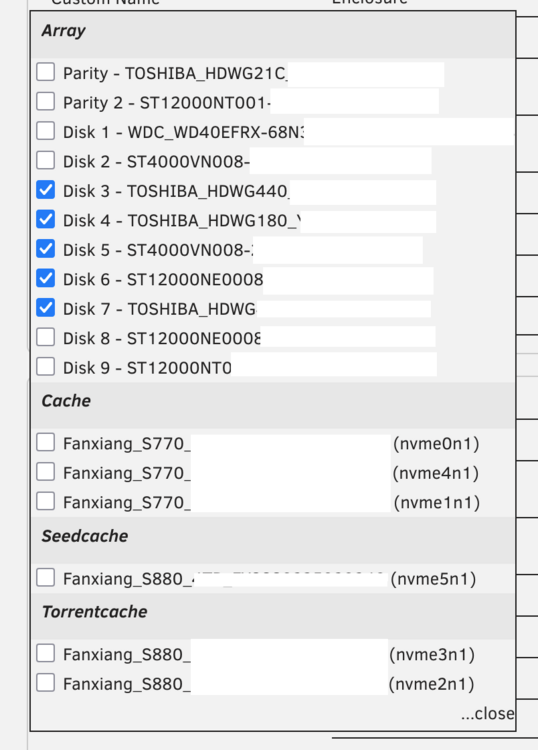
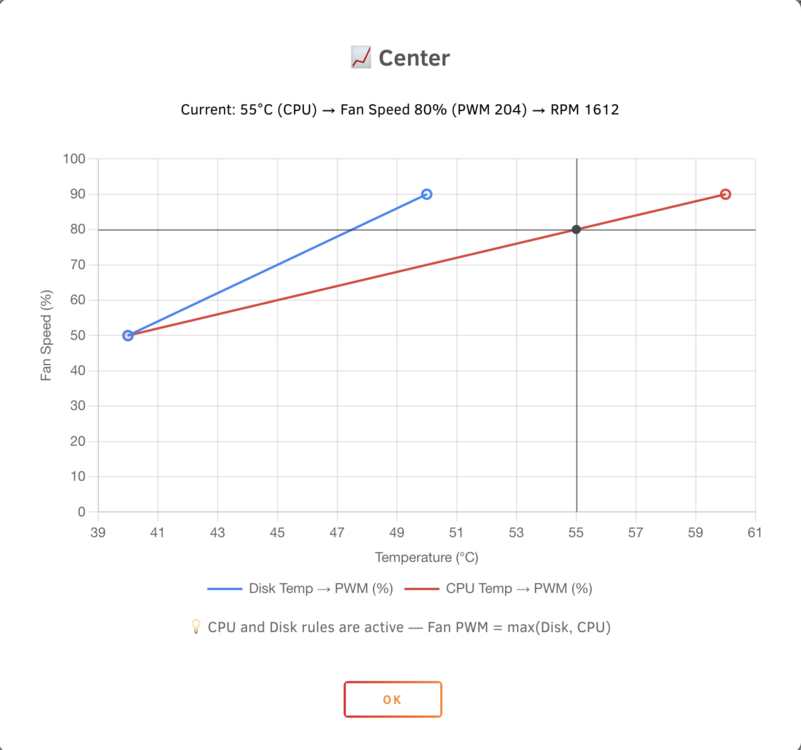
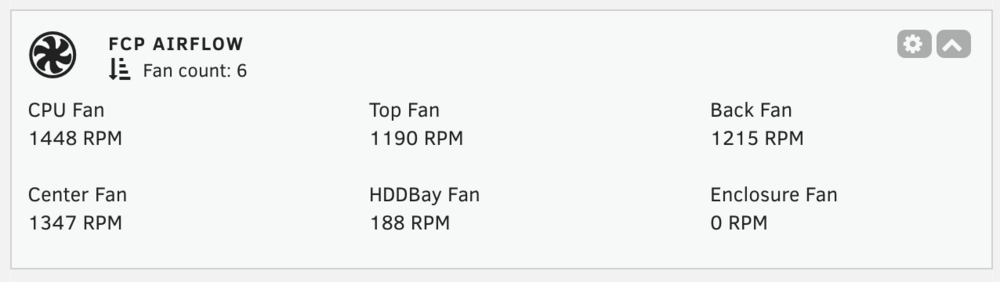
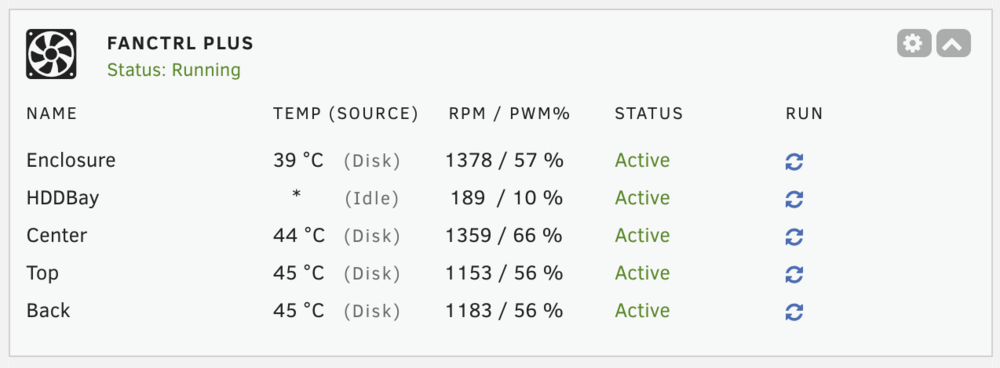
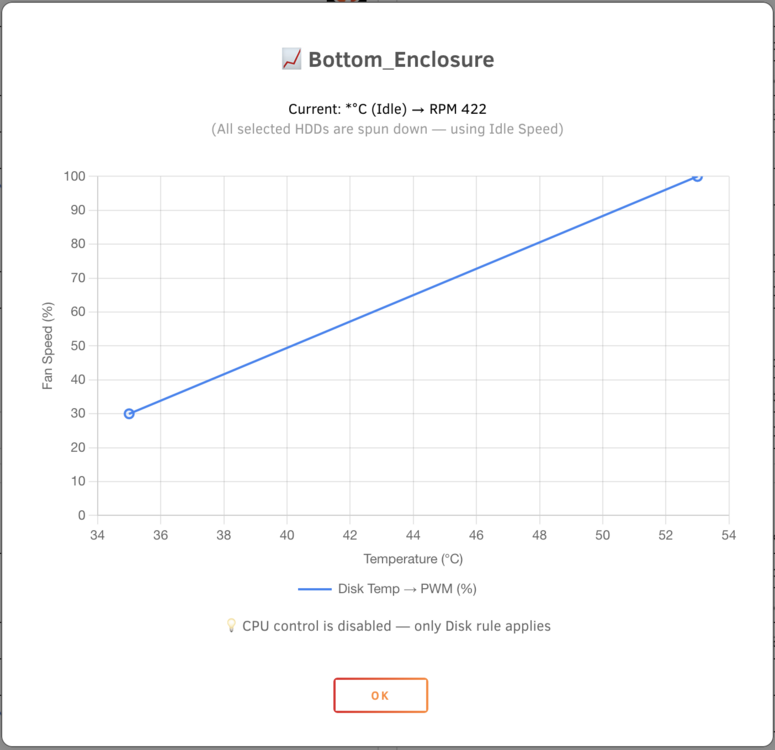
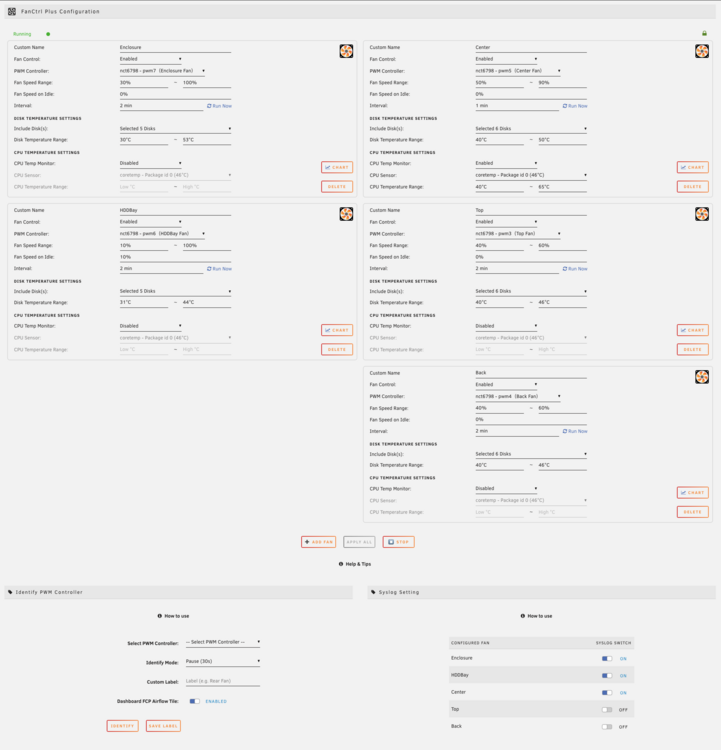
FanCtrl Plus FanCtrl Plus is an Unraid plugin that provides automatic fan control based on the temperatures of HDDs, NVMe drives, Unassigned Devices, and optionally the CPU. Each fan configuration can monitor specific drives, define a temperature range, and scale fan speed automatically using a linear control algorithm. Configuration is done through a user-friendly interface, with custom thresholds, intervals, and labels available per fan. Features - Fully compatible with Unraid 7.2 responsive Web UI - Full-featured Web UI for configuration and monitoring - Supports temporary fan configuration with safe validation and custom naming - Automatically starts with the Unraid array for hands-free operation - Set custom thresholds and intervals per fan - Control multiple PWM fans independently - Monitor temps from array disks, NVMe, unassigned devices, and optionally the CPU - Fan Speed on Idle: define the fan speed to use when all temperature sources are inactive (e.g. all disks spun down, CPU monitoring disabled) – Uses a linear control algorithm to smoothly adjust fan speed (PWM) based on the current temperature (disk or CPU) between your defined low/high values - Identify and label PWM controllers to match physical fans easily - Dashboard tile and system integration - Optional FCP Airflow Dashboard tile, similar to Unraid’s built-in Airflow tile but enhanced with support for custom fan labels - Drag and drop fan configuration boxes to reorder them as you like. The new order is saved and reflected in both the UI and Dashboard. --- Installation: FanCtrl Plus is available in Community Apps (CA). Just search for “FanCtrl Plus” to install. Support / Issues: - Github Support - Or reply to this support thread for questions, suggestions, or bug reports! - View complete changelog on here. If you find this plugin helpful, consider buying me a coffee! Screenshots: Web UI (v1.3.3) Chart (v1.3.1) Chart on idle fan speed (1.3.3) Disks selection Dashboard tile (v1.3.3) Optional FCP Airflow dashboard tile (v1.3.2) Known issue: - ChangeLog: 1.3.3 (2025.10.07) - Added Fan Speed on Idle option for fans without active temperature sources - Dashboard and chart now support display of Idle state - Improved responsive UI touch behavior (less drag interference from sortable blocks) - Refined CPU sensor detection and filtering logic (Tctl fallback, exclude non-CPU sources) - General bug fixes 1.3.2 (2025.09.25) - Adapted for Unraid 7.2.0-beta3 responsive UI and dashboard tile - Added automatic recovery logic for changed hwmon paths - Added new Identify Mode options: Pause (30s), Max Speed (30s), Pulse (40s) - FanCtrl Plus dashboard tile now shows RPM / PWM% - Added new FCP Airflow dashboard tile - Added FCP Airflow toggle in Identify PWM Controller section (default: Disabled) 1.3.1 (2025.08.12) - Added CPU temperature monitoring support. - Automatically selects the most reliable CPU sensor by default (can be overridden manually if needed). - When both Disk and CPU temperature rules are configured for a fan, the fan speed is determined using the higher PWM result from either source. - Dashboard now displays the temperature source Disk / CPU). - Syslog now includes the temperature source Disk / CPU) in its output. - "Run Now" button now supports CPU temperature. - Added chart popup to preview the fan configuration's temperature curves. - Added real-time temperature and RPM display with crosshair overlay in the chart popup. - Chart popup includes temperature source detection and status hints. - Improved Fan Configuration UI for a clearer and more intuitive setup process. (Yes, the blocks are bigger now — but that’s extra space for clarity.) - Fixed an issue where renaming a fan's Custom Name with only a letter case change (e.g. Back → BACK) would not correctly update the .cfg file, potentially causing data loss. - Fixed: Spin-down disks were incorrectly logged and displayed on the Dashboard as Temp=0; now correctly shown as Temp=*. 1.3.0 (2025.07.28) - Replaced “Min PWM” with Fan Speed Range to allow setting both minimum and maximum fan speed - UI now automatically converts PWM values to 0–100%, with tooltips showing both % and raw PWM for reference - Added fallback protection: if input field is left empty, Fan Speed Range will default to 40%–100%. - Combined Low/High Temp fields into a single Temperature Range row for better usability - Added fallback protection: if input field is left empty, Temperature Range will default to 40°C–60°C. - Unit labels (%, °C, min) are now consistently shown in input fields for clarity - New Identify section allows assigning or removing labels for PWM controllers (replaces the old Pause 30s buttons) - If an unlabeled PWM is selected in a fan configuration, the Identify popup will automatically open for labeling - Added Syslog On/Off setting to reduce log noise for fan configurations where logging is not needed (enabled by default) - Syslog list now updates in real time to match the fan configuration order - Introduced a Help & Tips section for inline guidance and explanations - Improved UI layout, tooltips, placeholders, and “How to Use” descriptions - Fixed temperature reading failures on certain SSDs and non-standard drives. - Fixed missing cache pool grouping for XFS/BTRFS drives in Include Disks selector.

-
After reboot Unraid again it back to work. Thank you.
-
Current version not compatible with Unraid latest version 6.12.0? When click on it just hanging on scanning screen without moving.





