wlazarus
Members
-
Joined
-
Last visited
-
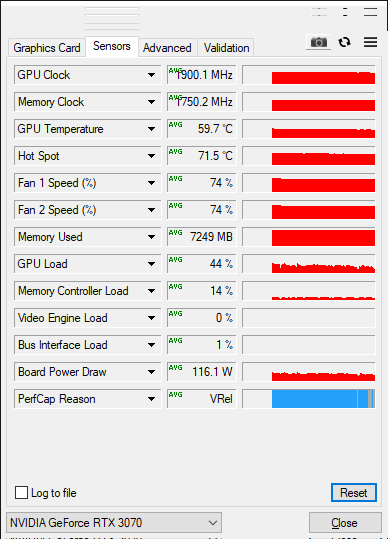
Getting low FPS and low GPU usage on VM1 and VM2. Started with low spec GPUs (GTX660, GT730, GT710) and once upgraded little improvement. Used forms/youtube but no improvement. Updated to Unraid V6.11.5, VM would boot but no display. Didn't want fight with another issue so reverted back to V6.9.2. Any help/direction would be apricated as I am out of ideas. Below is the basic configuration. Attached diagnostics and GPU-Z screenshot of VM1. Hardware CPU = Ryzen 9 5900X, 12-Core MB = ROG Strix X570-E Gaming RAM = 64GB, 3200 MHz VM HD = 1 TB, NVME, WD Black A.HD = 2x, 3.5" 8TB Seagate BarraCuda PCIe 1 = RTX3070, BIOS manual PCIe 4.0 x8 PCIe 2 = RTX3060, BIOS manual PCIe 4.0 x8 PCIe 3 = RX6400, BIOS manual PCIe 4.0 x4 PSU = 750W (not an issue yet) VM1 - Windows10 Would like to focus on VM1 as VM2 has similar issue. Usage Main, Office, 7 Days to Die, Sons of the Forest 44% GPU, 33 FPS, ~80% CPU CPU = Isolated and Pinned 1/13, 2/14, 3/15, 4/16 RAM = 24,576 MB Machine = Q35-5.1 BIOS = SeaBIOS Hyper-V = No Graphics Card = RTX3070, Vid = Od:00.0 Audio = 0d:00.1 VM2 - Windows10 Usage Kids, Minecraft, 7 Days to Die, Sons of the Forest. Low GPU %, Low fps, moderate CPU % CPU = Isolated and Pinned 5/17, 6/18, 7/19, 8/20 RAM = 16,384 MB Machine = Q35-5.1 BIOS = SeaBIOS Hyper-V = No Graphics Card = RTX3060, Vid = Oe:00.0 Audio = 0e:00.1 VM3 - Windows10 Usage Kids, Minecraft, 7 Days to Die. Works expected being GPU limited. CPU = Isolated and Pinned 9/21, 10/22, 11/23 RAM = 16,384 MB Machine = Q35-5.1 BIOS = SeaBIOS Hyper-V = No Graphics Card = RX6400, Vid = O6:00.0 Audio = 06:00.1 server-diagnostics-20230305-0729.zip