embuhrow
Members
-
Joined
-
Last visited
Everything posted by embuhrow
-
That did appear to correct the issue. I was hesitant to just restart, due to the large number of errors. Should I now do a forced parity check, and if so, should I check the "Write corrections to parity" box when doing so? Thanks for the assist! diagnostics-20230507-1346.zip
-
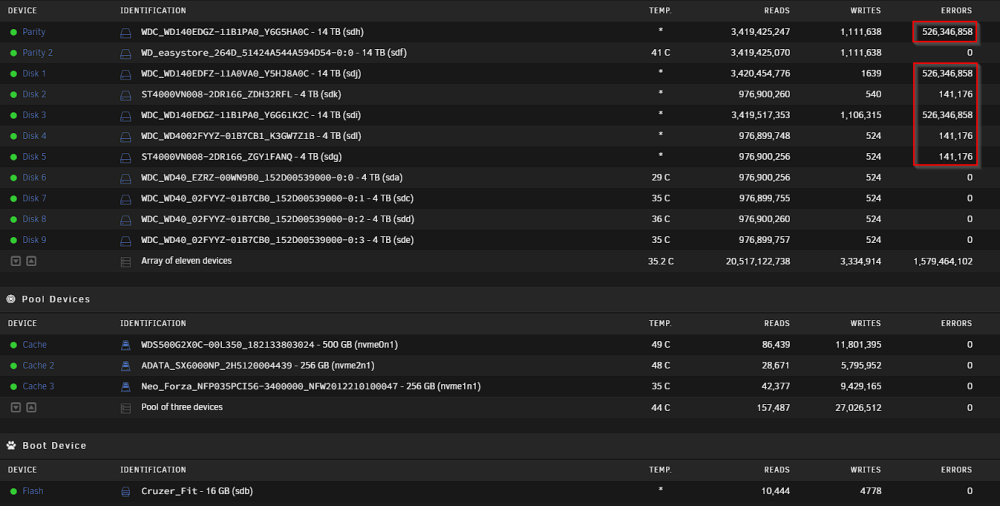
Up until recently I have not had any issues with my Unraid setup, until today, when I went to access files from one of my shares, and noticed that my files were not accessible. I decided to go investigating, and noticed that I have an extremely high amount of errors on several of my drives after my monthly scheduled Parity Check. To my knowledge, I have never had any errors previously, and as of right now all drives are reporting as healthy under the SMART report. The drive marked as Parity 2 was added as a parity drive most recently, though I believe it was about two months ago, and there were some instances where the server was powered off recently to adjust the installed RAM, though to my knowledge all recent shutdowns were done using the system's "Shutdown" command, and I'm not aware of any power failures (plus this is on a battery backup). What I'm looking for assistance with at this point is what the next steps will be in restoring appropriate parity with my drives, so that I can restore my files to their normal state. diagnostics-20230506-2236.zip