retrojonez
Members
-
Joined
-
Last visited
Everything posted by retrojonez
-
That is for the unraid pool. Thanks!
-
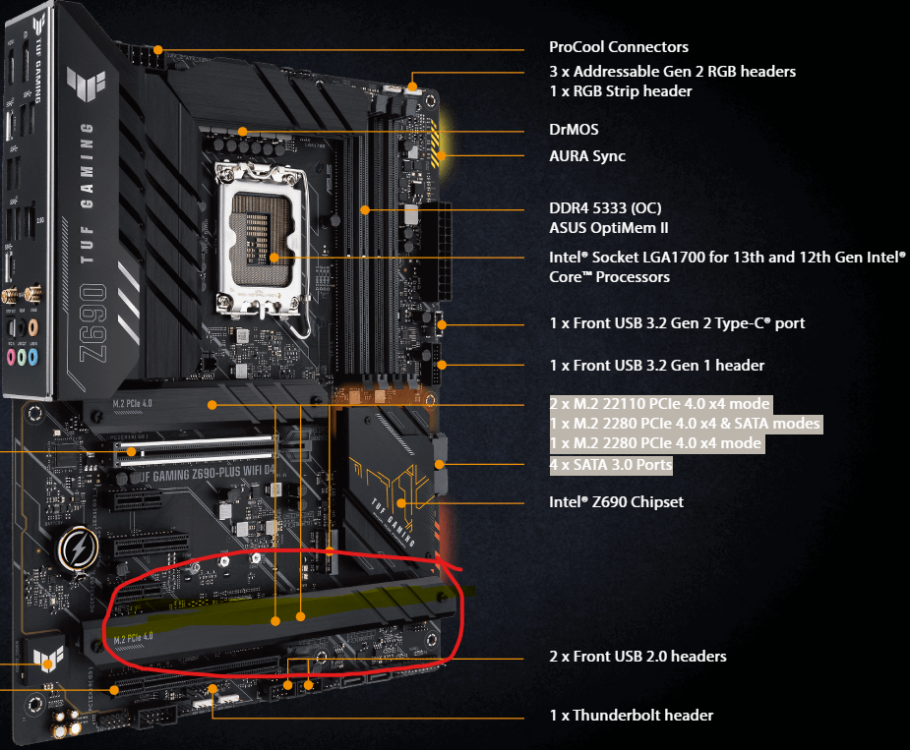
Hey All, Just setup my unraid and everything is working so far. One item I am curious about. I have an Asus Tuf gaming board. It has the following Sata ports and NVME. 2 x M.2 2242 /2260 / 2280 - 22110 PCIe 4.0 x4 mode Chipset 1 x M.2 2280 PCIe 4.0 x4 & SATA modes Chipset 1 x M.2 2280 PCIe 4.0 x4 mode CPU 4 x SATA 3.0 Ports Normally I would have my primary drive on the CPU lane, but since the cache is in raid I used the two 2 x M.2 2280 - PCIe 4.0 x4 on the chipset because I wasn't sure if it would work one on CPU lane, one on chipset. Is this the correct way, or would it be better to move one into the CPU bound lane? I also have an PCIEx4 6 port sata card coming that will take up the x4 lane. Not sure if that matters. Also, it doesn't appear that the SATA ports are disabled with using the NVME, all 4 work. Maybe at lower bandwidth?