





RAISBECK
Members
-
Joined
-
Last visited
-
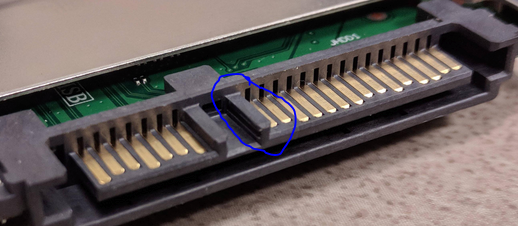
Disk was not Ok. It generated errors on three different attempts to sync parity (bad sectors being reported) - even though SMART said it was fine. When I took the disk out, I noticed the small plastic L part of the SATA power port was broken off (circled below): It came like this - it was brand new. Perhaps this made the power supply to the drive unstable - the contacts might not have been fully in place. I replaced it with a Toshiba N300 (which is a CMR vs the SMR WD Red drives) - which I am now using as the parity drive (due to CMR being superior for the frequent disc writing)... zero issues overnight syncing parity. Just bought my Unraid license - this software saved me 150 bucks by detecting the problems with that new 6 TB disk. I'm very happy. Thanks for your help.
-
Well I ended up returning the problematic drive, and replaced with the more expensive Toshiba N300 (which is also not SMR like the WD Red drives). I'm going to use this one as the parity drive, and try again with a fresh USB key of Unraid.
-
Rebooted, ran extended SMART test. It completed without error... here is the downloaded SMART report as well as another copy of the diagnostics. tower-diagnostics-20230313-1541.zip tower-smart-20230313-1528 (1).zip
-
I just booted up Unraid for the first time (trial) today; I was able to add 3 6TB drives into an array (2 were brand-new, 1 was slightly used) - 2 as storage and 1 as parity. I did not preclear the drives as it was a new array - not adding to an existing array. Unfortunately, I ran into major issues with the parity-sync: First attempt was going well with no errors until 24% or so, and then it quickly racked up many, many errors. The log indicated disk 2 was generating read errors - bad sector. I canceled parity-sync and shut down. Ironically, this was one of the 2 brand-new drives... not the used one. After identifying the drive by serial number, I swapped out the SATA cable, and even plugged it into a different port, and checking all power cables... Turned the server back on, started up the array, and started a new parity-sync. This time, errors began at 1.1%, and again - disc 2. This time, I downloaded the diagnostics data - which I confirmed captures the issue in the log. One last thing to note... around the time these errors started popping up, I could hear whining noises coming from the desktop, as well as what sounded like random beeping coming from the motherboard. No way this was coincidence. Normally, the motherboard never beeps, except maybe on boot once or something. Anyway, please help - really want to get this server going, and hoping that can return "disc 2" if it indeed is faulty... Thank you! tower-diagnostics-20230313-1443.zip
