




Skip to content
View in the app

A better way to browse. Learn more.

Unraid

A full-screen app on your home screen with push notifications, badges and more.

To install this app on iOS and iPadOS
  1. Tap the Share icon in Safari
  2. Scroll the menu and tap Add to Home Screen.
  3. Tap Add in the top-right corner.
To install this app on Android
  1. Tap the 3-dot menu (⋮) in the top-right corner of the browser.
  2. Tap Add to Home screen or Install app.
  3. Confirm by tapping Install.

datman

Members
  • Joined

  • Last visited

Everything posted by datman

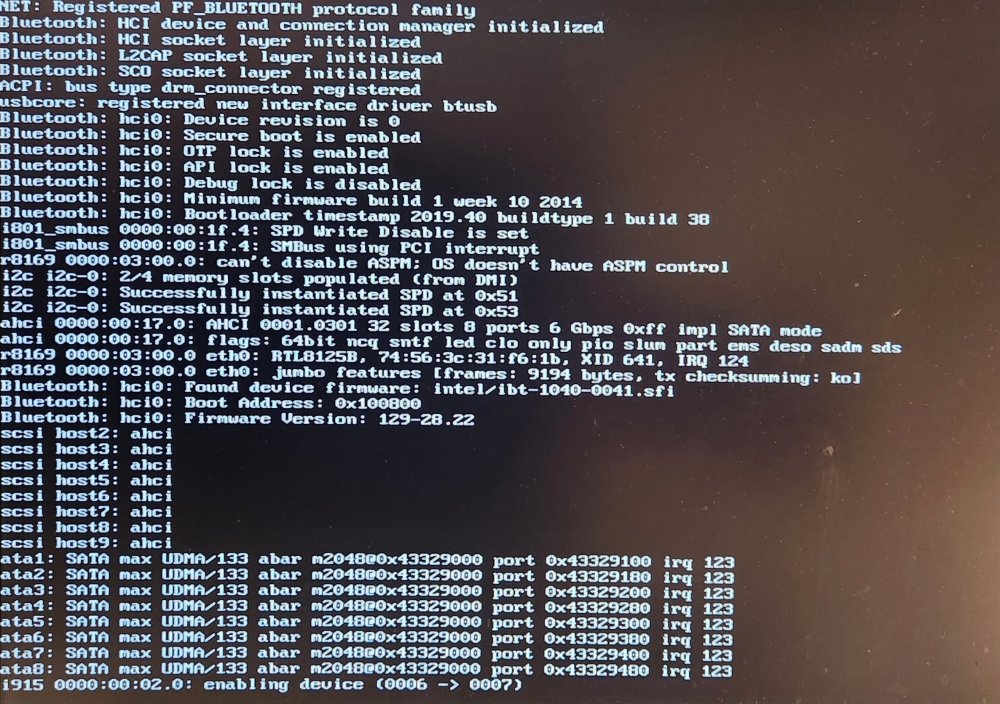
  1. Thanks, that was an easy fix! I was actually trying to run it headless but it was my first boot so I figured attaching a monitor would've been the smart play. Can't believe attaching a monitor was actually what caused it to hang!
  2. Hello, I just built a rig to run unraid off of. I haven't been able to get unraid to boot up. I'm currently stuck on this screen. It runs fine off my main desktop so I suspect it's a bios configuration error, but I'm not sure which setting is causing the hang up? System specs: Intel Core i3-12100 Gigabyte Z690 UD AX motherboard G.SKILL Ripjaws V Series 16GB (2 x 8GB) 288-Pin PC RAM DDR4 3200 EVGA GTX 960 new
Account

Navigation

Search

Search

Configure browser push notifications

Chrome (Android)
  1. Tap the lock icon next to the address bar.
  2. Tap Permissions → Notifications.
  3. Adjust your preference.
Chrome (Desktop)
  1. Click the padlock icon in the address bar.
  2. Select Site settings.
  3. Find Notifications and adjust your preference.