SodOffBaldrick
Members
-
Joined
-
Last visited
Everything posted by SodOffBaldrick
-
This is great, thanks. I started reading through this readme yesterday but didn't make it this far down. I guess I fundamentally misunderstand how dockers work, because I thought they were 100% self contained, so deleting and re-installing would be a clean slate. I'm not used to terminal docker commands, so I'm going to have to research each one fully so I don't end up affecting the others I'm using, but it's exactly what I was looking for, so thanks again.
-
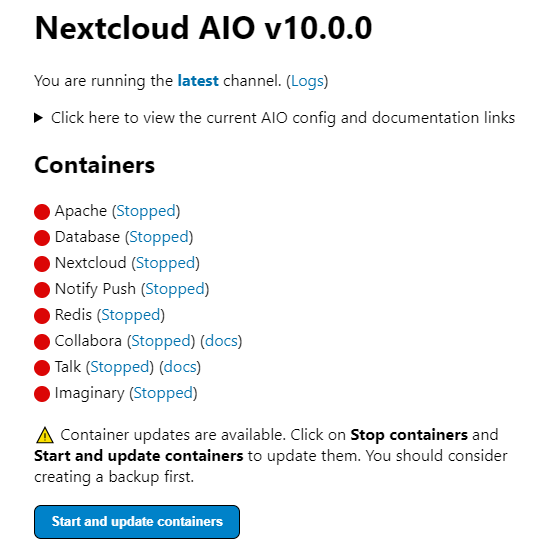
Setup details Unraid version: 6.12.3. I know this isn't the most up to date version, but after upgrading in the past, my server started having stability issues which took ages to resolve, and I don't want those headaches again. If I need to upgrade to address this issue I will, but I'm keen to avoid it if possible. Plugins: Appdata Backup CA Auto Update Applications CA Mover Tuning Community Applications Fix Common Problems Unassigned Devices User Scripts Hardware: Motherboard: ASRock Z77 Pro4 Processor: Intel® Core™ i5-2500K CPU @ 3.30GHz Memory: 16 GiB DDR3 Array: 5 disks - 30TB Parity: Last check completed on Sun 1 Dec 2024 10:42:13 PM GMT (six days ago). Duration: 22 hours, 42 minutes, 12 seconds. Average speed: 122.4 MB/s. Finding 0 errors Cache: 1 SSD - 240GB Background I was following along with spaceinvaderone's tutorial (https://www.youtube.com/watch?v=U47nvwXrAOo) and everything was going well until I accidentally put the wrong subdomain into the 'New AIO instance'. I entered nextcloud.[domain] instead of cloud.[domain] and realised this was wrong as I clicked the Submit domain button (15:50 on the video). I thought this would cause problems so wanted to go back and re-enter the correct domain, but there was no way to do this. There were no errors on the next page, so naively thought maybe it wouldn't be so bad, and clicked Download and start containers. After a little while all the containers were downloaded and started successfully, but when I clicked Open your Nextcloud I got an 'unable to connect' browser error. I can't remember the exact error now, and if I reached out for help at that point I'm sure there would have been a simple fix, but I like to make things difficult for myself so ploughed on. Thinking my initial fear of the wrong domain being entered during setup was the root cause I figured removing all the nextcloud dockers and starting again would be the best approach to take, seeing as it was very straight-forward the first time. Current Problem I have tried re-installing the docker multiple times after deleting everything from the nextcloud share, deleting the share entirely, and recreating deleting the nextcloud template from Docker > 'Add container' using mc to delete the nextcloud-aio-mastercontainer directory from appdata restarting unRaid clearing my browser's cache (I was grasping at straws at this point) Each time I re-install, the nextcloud-aio-domaincheck docker is NOT added, and I get the screen below when clicking on WebUI, even though none of these containers are actually present. Request What can I do to purge all memory of this container so I can start the whole thing from scratch and get the New AIO instance screen where I can specify the correct subdomain this time?