




Skip to content
View in the app

A better way to browse. Learn more.

Unraid

A full-screen app on your home screen with push notifications, badges and more.

To install this app on iOS and iPadOS
  1. Tap the Share icon in Safari
  2. Scroll the menu and tap Add to Home Screen.
  3. Tap Add in the top-right corner.
To install this app on Android
  1. Tap the 3-dot menu (⋮) in the top-right corner of the browser.
  2. Tap Add to Home screen or Install app.
  3. Confirm by tapping Install.

n1kki6

Members
  • Joined

  • Last visited

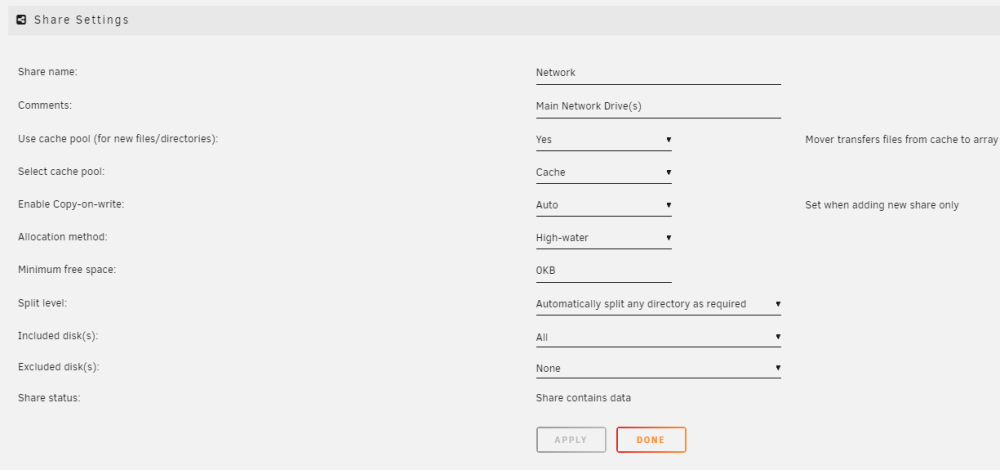
  1. I apologize. I am still not wrapping my head around the high-water split. I have two 14tbs as my parity, and one 14 and four 6tb in my user share. I have written roughly 8 TB to the array and it's still writing to the 14tb. Not sure if that is supposed to fill up until 1tb and then switch, or if it should have switched at 50%. tower-diagnostics-20230403-0813.zip

Account

Navigation

Search

Search

Configure browser push notifications

Chrome (Android)
  1. Tap the lock icon next to the address bar.
  2. Tap Permissions → Notifications.
  3. Adjust your preference.
Chrome (Desktop)
  1. Click the padlock icon in the address bar.
  2. Select Site settings.
  3. Find Notifications and adjust your preference.