




.jpg.deb5184115b52b488d72d2ad7f58cf3b.jpg)
Argusius
Members
-
Joined
-
Last visited
Everything posted by Argusius
-
Alright, after a weeks of frustration I just wiped the USB and reinstalled unraid onto it while loading some key config files I wanted and using Appdata Backup. Case closed. I appreciate everyone's assistance in this matter.
-
I've been able to read/write to it without issue on both my Mint and Windows computers.
-
You suppose the flash drive is corrupted then?
-
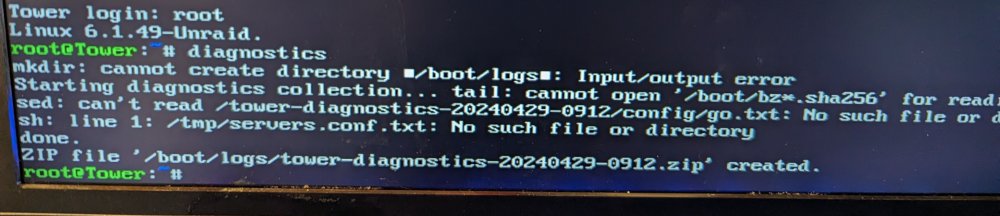
Having issues getting it to actually write a diagnostic fail. See picture. I'll post the last diagnostic and I'll attempt again. tower-diagnostics-20240111-0235.zip
-
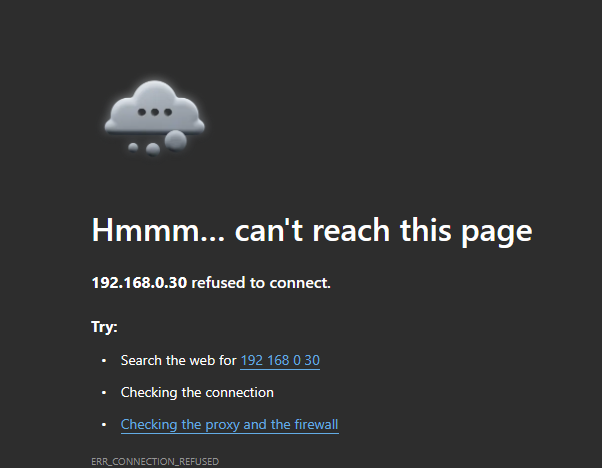
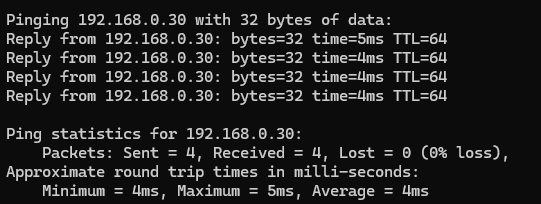
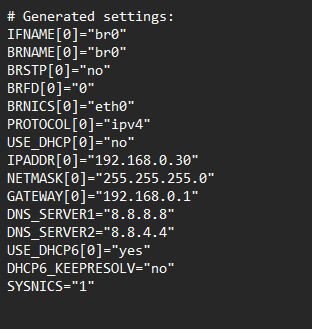
Okay. I'm going to add a few things to this. I last attempted to edit the network.cfg and re-add that to the usb. Still unable to connect.

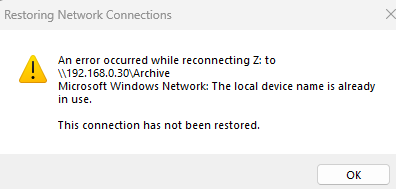
-
I tried that, but when i attempt to do so the screen hangs with a blinking _ in the top left.
-
I've recently moved to a new home and with that I got a new netgear modem/router combo. Recently, after most of the move had shook out, I attempted to setup my ole reliable unraid server. Unfortunately, I was unable to connect to it. I had forgot I had set a static IP for it in the unraid gui. After reading some things online I saw that many people had success with deleting the network config file, so I did this but to no success. I'm curious where to move forward from here. Facts: 1. Router sees the unraid server and assigns it an IP. 2. Attempt to assign static ip via the router doesn't change the fact that I cannot access the gui. 3. Attempting to connect via ip is unsuccessful (https and http) 4. I can ping the unraid server all day.
.thumb.jpg.6c659ec762c4c3ab895857f7a35ab1c0.jpg)

