






-
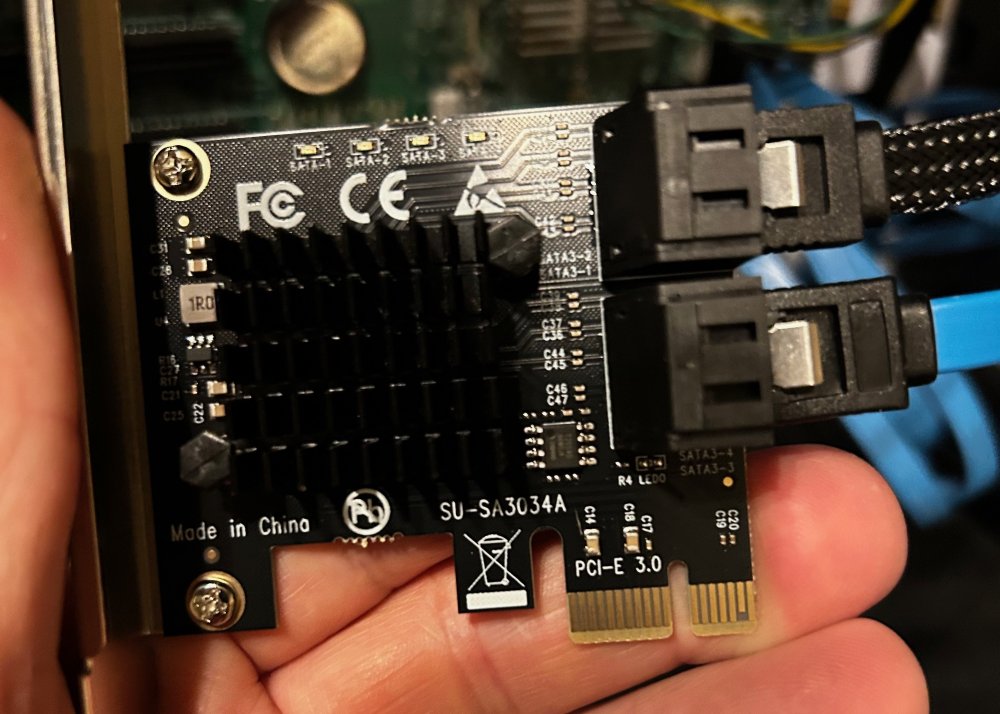
Actually this is the card that is currnetly in the machine with Disk 6 and the second Disk plugged into it.
-
When I went to look at the system after you ran down my issues and told me what to look for, I replaced the cable on disk 5 with a new one. I realized that I had two cards in the system: the one that drive 6 was connected to, and another card with a drive plugged into it (I apologize, I am not sure what drive it was). So, I eliminated the port multiplier that disk 6 was plugged into and plugged six into the other card, hoping it was an HBA. I made sure there were no power splitters on the drives, spun it back up again, and sent the diagnostics to you. I did some reading when the error came up on disk 4, so I reseated all the cables just to be sure and spun the system up again. I have attached the diag for the tower as it sits now. Let me know if the link I shared above will meet the requirements for an HBA. I was having a hard time finding the ASMedia and JMicron boards on Amazon without a long shipping time. If the link I provided won't fit the bill, please let me know. Thanks for taking the time to help resolve this and for your patience. tower-diagnostics-20261110-0945.zip
-
Sorry to bug you, I just want to make sure I do this right. This controller has the ASM1064 and only 4 ports, https://www.amazon.com/10Gtek-Profile-Bracket-Controller-Expansion/dp/B09Y1NRHX3/ref=sr_1_1?crid=1PQ4EG4VDPNIL&dib=eyJ2IjoiMSJ9.2sWWGGvvvc-mX1oQm-rFM1FeN23Sl1zjP5ZTX0hjBVb45zwytoQpNny6SIckaA0vBLKMgiocspqXZSKcx0TsAVmgWfcdWR_1riYU2AFTRoVgj09pG562GgvvVIey0lI_Q_DzwfKtd2YEOo22PhmSm3F5NENxKidRAFZFk5e83zkS2-UNO8Yj-mGLb3GppXqqXXgtAULqkHWRv_pn9gbiALYhIVaf6yeHjI4s44NDz-g.jEOMtl1tZFwmWPrLS2bYfiPaT1JIILcqQ03LWcEUxjg&dib_tag=se&keywords=Asmedia%2BASM1064&qid=1794324336&sprefix=asmedia%2Basm1064%2B%2Caps%2C188&sr=8-1&th=1
-
Looks I am still geting 5% to 100% CPU hits as well. It seems to only be when I reinable the docker. Did reseat the cable on drive 4 that had the error, and it seems to be corrected. I am not sure if I should spin up the dockers again. I also cannot copy any data to the NAS from elsewhere via drag and drop. It gets till it's just about finished and then erros out.
-
Actually I had time this morning. I see now I have read errors on disk 4, I haven't done anything yet, I wanted to see what your fedback was. I replaced the cable on disk 5. As for the controller that disk 6 was on, I realized I had a difffernt controller that had an open port. I am not sure if thats HBA controller or not. Let me know and I can upgrade if needed. I also made the change to the BIOS. tower-diagnostics-20261110-0638.zip
-
Thanks VERY much I will work on the changes you shared. Is there an HBA you recommend, I would like to get one ordered asap. I will work on this when I get back home tonight. Thank you so much.
-
Currently a Parity-Check is running and its only hitting about 381 kbs. I cannot copy or move data on the system. I have disabled all my docker containers and it made no change. My CPU's are flip flopping between them and hitting 100%. From 2% to 100 in a second or two. In my trying to figure out logs, it looks like possibly a controller issue? This is all a bit over my head, any help would be greatly apprciated. Thanks tower-diagnostics-20261110-0443.zip
-
Ok, thank you, Im at where I am at. I appreciate you taking your time with me.
-
No it wasn't formatted in Unraid. I thought it would do it as I triggered the rebuild which it seems I didn't do correctly either. Can I redo the process over? Is there a place to point me to do it correctly?
-
It was a spare drive that was formatted on a PC to clear it and have it as a spare for whatever. I did no formatting when it was put in the array. I was in a bit of a panic when I tried to get things back. I should have taken a breath and... is there anything I can do from this point, or just deal with the consequences?
-
It was an empty drive.
-
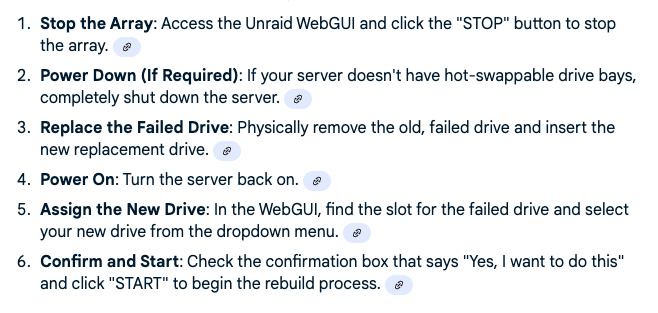
These are the steps I followed to replace the drive. It took about 2 days for it to be all set, but the drive was empty when it said it was finished.
-
I have a 16 TB Parity drive and I lost a drive from the array that was 8TB. I replaced the drive assigned the new disk to the old drive space, but it seems that the drive did not rebuild from the previous drive. Is there anything I can do to get it back? I have attached my diagnostics. tower-diagnostics-20250914-1904.zip
-
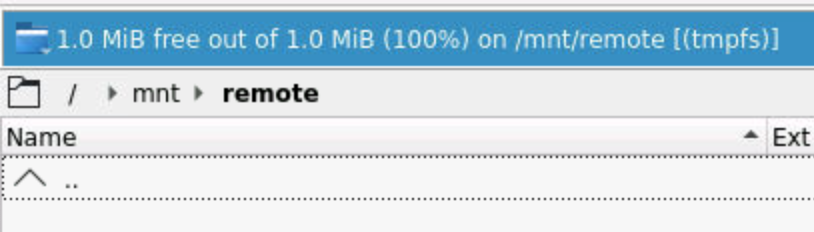
Thank you for your reply. I did not know there was a Krusader thread. I will do a search. When I am in Krusader I cannot see the shares I have set up in Unraid. I set up a SMB share on the main page of Unraid. Example A I then set it up in the Krusader App with a path to it. Example B This will work flawlessly until I have to reboot. Even though the paths remain after a reboot in the respective settings. When I have to reboot the system and I go back to Krusader and go to the same file path there are no folders from the share. Example C. If I delete the settings from Unraid and Krusader several times then for some reason it will start working again until I reboot, then I have to go through all the hassle again to try to get it to work. Please let me know if I am not being clear. I will also find the Krusader thread and post it there if I am making any kind of sense at all.


-
I had to shut my Unraid Server down because of loss of power. It was shut down properly. When I bring it back up, my SMB shares don't work in Krusader. All the paths I had previously set up are there, but it seems the only way to get things back is to continually delete the Unassigned mount on the main menu, and then delete the path I have setup in the Krusader menu multiple times until it works. Any ideas on what I could be doing wrong that I keep loosing this connection to my other SMB? I have the same issue with USB drives I have connected and built out. This has been an ongoing issue for over a year. I asked once before with no replies. Am I not following protocol when asking? Or do I need to add more information? Please let me know, I would really like to get this resolved. Other than getting data on my Unraid server from other places it has worked incredibly well.


