



Skip to content
View in the app

A better way to browse. Learn more.

Unraid

A full-screen app on your home screen with push notifications, badges and more.

To install this app on iOS and iPadOS
  1. Tap the Share icon in Safari
  2. Scroll the menu and tap Add to Home Screen.
  3. Tap Add in the top-right corner.
To install this app on Android
  1. Tap the 3-dot menu (⋮) in the top-right corner of the browser.
  2. Tap Add to Home screen or Install app.
  3. Confirm by tapping Install.

ruelmarc4

Members
  • Joined

  • Last visited

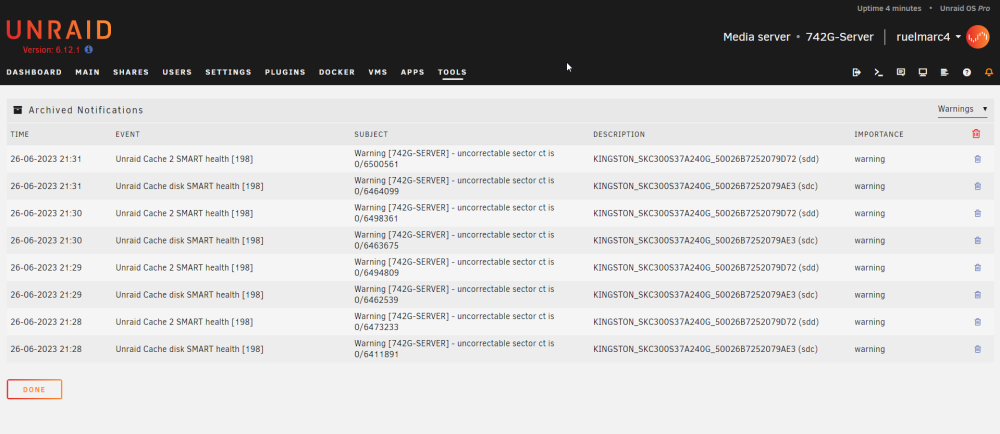
  1. Hey guys, I have been using using for a little over 4 months and everything was going good so far. However, I did an OS Update last week - now at 6.12.1 - and since then, I am getting SMART Errors from both my cache drives every minute. They are both SSDs, same model and make and they both seem to work fine. Error message: Unraid Cache disk SMART health [198] - Warning [SERVER] - uncorrectable sector ct is 0/8235987 I ran an extended SMART test on both drives and they passed. I can't figure out why I still have these errors. See in attachment a printscreen of the errors I've been getting. Note that I cleared the logs for test purposes, but I've been having those since June 23rd. Thank you for your help!
Account

Navigation

Search

Search

Configure browser push notifications

Chrome (Android)
  1. Tap the lock icon next to the address bar.
  2. Tap Permissions → Notifications.
  3. Adjust your preference.
Chrome (Desktop)
  1. Click the padlock icon in the address bar.
  2. Select Site settings.
  3. Find Notifications and adjust your preference.