





oblivion2k
Members
-
Joined
-
Last visited
Everything posted by oblivion2k
-
That worked perfectly, thank you! I don't think I would have ever noticed that the config was capitalized when the share wasn't. No idea how that happened, but I'm not complaining now.
-
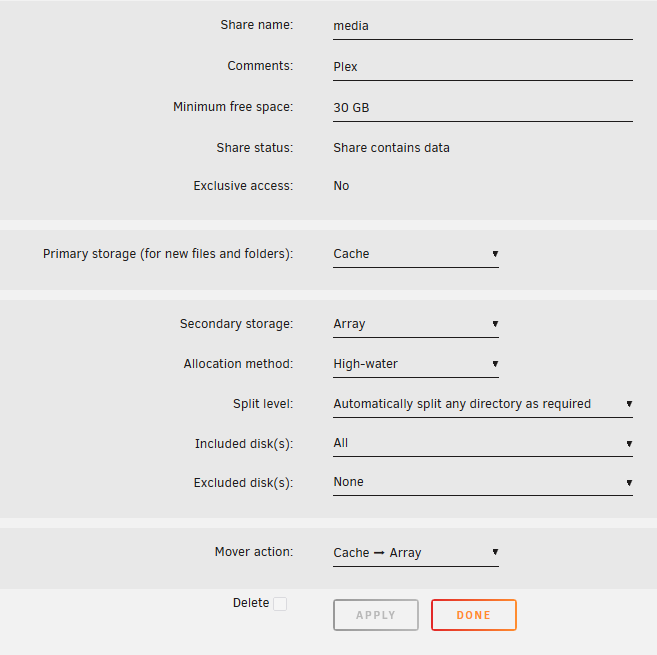
May 6 09:46:37 Tower emhttpd: shcmd (1533): /usr/local/sbin/mover start &> /dev/null & May 6 09:47:03 Tower emhttpd: shcmd (1534): /usr/local/sbin/mover start &> /dev/null & May 6 09:48:19 Tower kernel: process 'opt/chia/bladebit/bladebit_cuda' started with executable stack May 6 10:42:21 Tower kernel: pcieport 0000:00:03.0: AER: Correctable error message received from 0000:04:00.0 May 6 10:42:21 Tower kernel: atlantic 0000:04:00.0: PCIe Bus Error: severity=Correctable, type=Physical Layer, (Receiver ID) May 6 10:42:21 Tower kernel: atlantic 0000:04:00.0: device [1d6a:07b1] error status/mask=00000001/0000a000 May 6 10:42:21 Tower kernel: atlantic 0000:04:00.0: [ 0] RxErr (First) May 6 11:08:23 Tower kernel: pcieport 0000:00:03.0: AER: Correctable error message received from 0000:04:00.0 May 6 11:08:23 Tower kernel: atlantic 0000:04:00.0: PCIe Bus Error: severity=Correctable, type=Physical Layer, (Receiver ID) May 6 11:08:23 Tower kernel: atlantic 0000:04:00.0: device [1d6a:07b1] error status/mask=00000001/0000a000 May 6 11:08:23 Tower kernel: atlantic 0000:04:00.0: [ 0] RxErr (First) May 6 11:33:19 Tower emhttpd: shcmd (1535): /usr/local/sbin/mover start &> /dev/null & Since updating to 7.0.0, the mover does not work, either when scheduled or when invoking manually. I've waited a few updates to see if the issue gets patched, but no luck. I've been using Unbalanced in the meantime, which works fine. tower-diagnostics-20250506-1217.zip
-
Are you working on updating the Chia client to 2.5.1 in the next update?
-
Confirmed 3.3v issue, thanks itimpi
-
I'm starting to think it's a 3.3v issue after all based on what I'm reading online. It's really the only thing that makes sense. I'll tape the pins and report back.
-
All drives are SATA. Some drives are attached to an LSA card in IT mode. Those drives show up. If I unplug them and plug in the new drives, they don't show up. I haven't had the time or resources to check bios on a normally headless system. I'll see what I can find. If they don't show up in BIOS, what should I do about that? I can't think of any reason why a drive of a certain size would show up, but not a slightly larger drive, at least not on a modern system. My understanding is that that's specifically an issue to WD easystore shucked drives, but correct me if I'm wrong, please. Also, the drives show up normally on other systems, Windows and Linux.
-
Bought two exos 18tb drives to replace a single, smaller parity drive. Planned to start the array and let it rebuild, then install the old parity drive as a data drive. However, the new disks do not show up as unassigned devices or with lsscsi Troubleshooting steps so far: Created a new config: Disks predictably lost their assignments, but new disks are not visible. Rebooted server: No change. Installed a drive that was previously part of the array to rule out sudden hardware failure on the sata port where one of the new drives will be installed: drive showed up as predicted. Disk swapped back to the new drive, new drive did not show up. Attached both drives to other computers to rule out double-DOA: Both disks show up on both windows and linux mint PCs. Diagnostics attached. serbur-diagnostics-20230723-1501.zip

