





nate7878
Members
-
Joined
-
Last visited
-
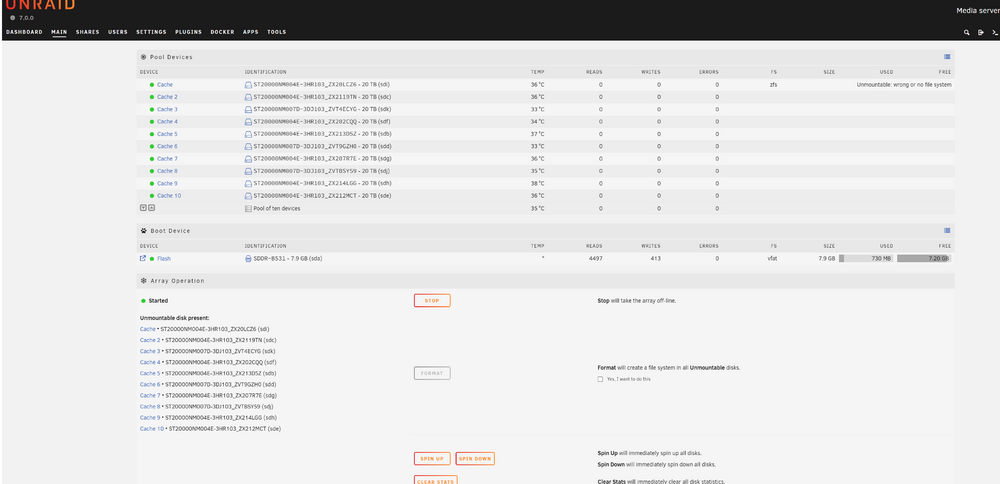
Ok - newbie problem - Had to click the "Yes, I need to do this" under the Format button and then click format - I wish the errors mentioned something about formatting - this wasnt obvious to me especially since the Format button is greyed out.
-
so, I had 4 disks that I was just testing with unraid in a zfs raidz1 and all was fine - then I went and added 6 more disks (10 total). I went and deleted the pool and have tried to create a new pool with all 10 disks - but for some reason it wont - it appears to create fine - but then when I start the array I get all of these weird messages around :"Unmountable disk present:" as well as "unmountable wrong or no file system" - I get that for basically every disk. I have nothing on any of the disks to keep - just want to start from scratch with all 10 disks in a raidz2 with one 10disk vdev - why on earth its not letting me do this - no clue! Attaching diagnostics. Any ideas? Thanks! storage3-diagnostics-20250118-1133.zip
-
I did try that - no dice - but I eventually got this working - I recreated the unraid USB drive and just started over and it appears to be working much better now
-
Other buttons work fine - like shutdown/restart - or many other buttons - it appears that the issue has to do with emhttp timing out. So, once I click that export SMP = yes - and click apply - any other buttons that make calls to emhttp seem to not work. I see the following in the log: Jan 13 11:36:40 storage3 nginx: 2025/01/13 11:36:40 [error] 6723#6723: *1571 upstream timed out (110: Connection timed out) while reading response header from upstream, client: 192.168.1.114, server: , request: "POST /update.htm HTTP/1.1", upstream: "http://unix:/var/run/emhttpd.socket/update.htm", host: "192.168.1.93", referrer: "http://192.168.1.93/Shares/Share?name=storage3"
-
Unfortunately using a different device (I've tried 3 different ones) and different browsers don't help. Even going directly to the command line and typing: emcmd cmdStop=Stop doesn't work - it literally just hangs at that point. Anything else I can try?
-
Unraid 7.0.0 GA (from today) So, this is a brand new system. Gigabyte Z890 UD Wifi6E Motherboard Intel Ultra 265K CPU (1851 socket) 32GB DDR5 PC-6400 RAM Using Integrated graphics in the Intel Ultra 265K CPU (no video card) Attaching diagnostics. So. I'm seeing very weird behaviors with Unraid. I have a pool of 4 disks (zfs). I click start and it starts fine. I've created a new share, but when I go into the bottom SMB section and set export to "Yes" and then click "Apply" nothing happens. Same thing if I go and click "Stop" for the array - it will never stop. Easily reproduceable. I've restarted clean several times - doesnt seem to matter/help. Any other ideas? Thanks in advance. storage3-diagnostics-20250112-1511.zip
